Инструкция для Samsung UE37C5100QW, UE32C5100QW, UE37C5000QW, UE32C5000QW, UE40C6540SW
 1
 2
 3
 4
 5
 6
 7
 8
 9
 10
 11
 12
 13
 14
 15
 16
 17
 18
 19
 20
 21
 22
 23
 24
 25
 26
 27
 28
 29
 30
 31
 32
 33
 34
 35
 36
 37
 38
 39
 40
 41
 42
 43
 44
 45
 46
 47
 48
 49
 50
 51
 52
 53
 54
 55
 56
 57
 58
 59
 60
 61
 62
 63
 64
 65
 66
 67
 68
 69
 70
 71
 72
 73
 74
 75
 76
 77
 78
 79
 80
 81
 82
 83
 84
 85
 86
 87
 88
 89
 90
 91
 92
 93
 94
 95
 96
 97
 98
 99
 100
 101
 102
 103
 104
 105
 106
 107
 108
 109
 110
 111
 112
 113
 114
 115
 116
 117
 118
 119
 120
 121
 122
 123
 124
 125
 126
 127
 128
 129
 130
 131
 132
 133
 134
 135
 136
 137
 138
 139
 140
 141
 142
 143
 144
 145
 146
 147
 148
 149
 150
 151
 152
 153
 154
 155
 156
 157
 158
 159
 160
 161
 162
 163
 164
 165
 166
 167
 168
 169
 170
 171
 172
 173
 174
 175
 176
 177
 178
 179
 180
 181
 182
 183
 184
 185
 186
 187
 188
 189
 190
 191
 192
 193
 194
 195
 196
 197
 198
 199
 200
 201
48
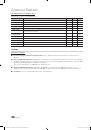
English
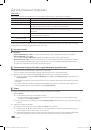
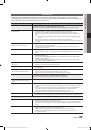
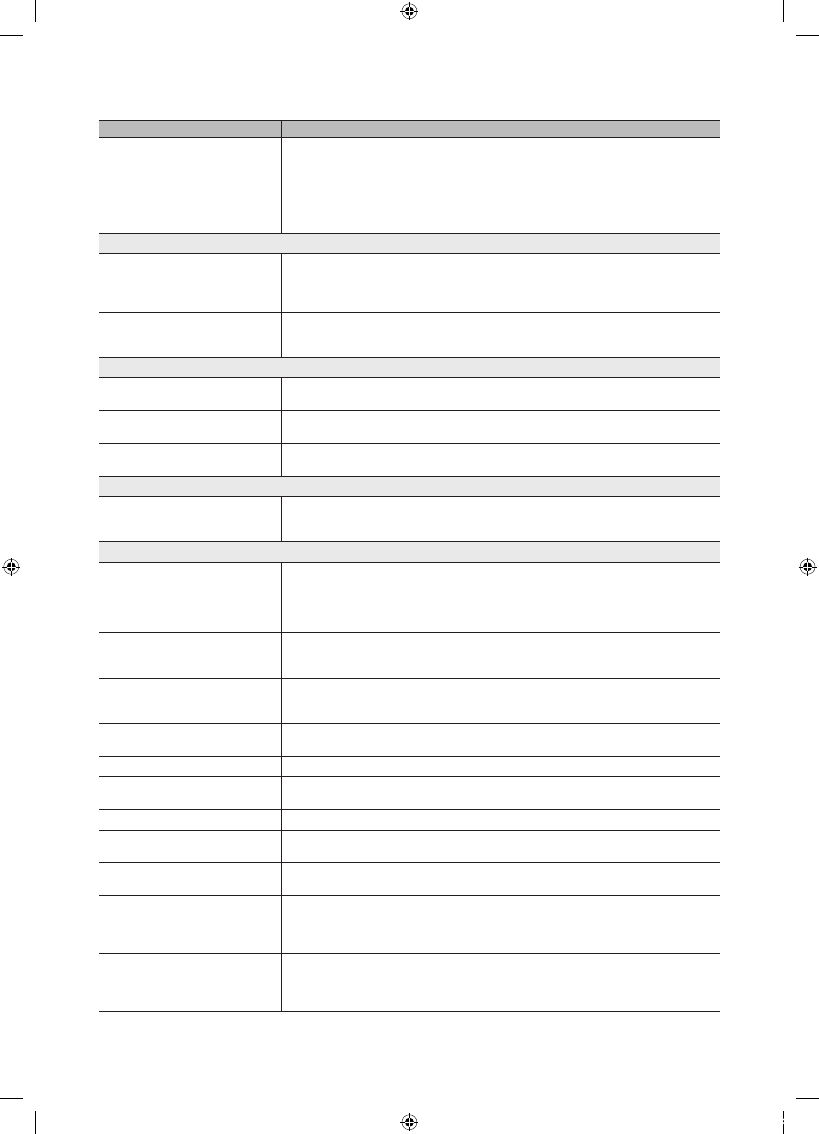
Other Information
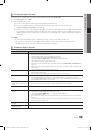
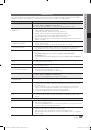
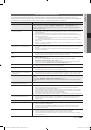
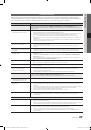
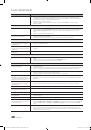
Issues
Solutions and Explanations
There is no picture/Video.
• Check cable connections (remove and reconnect all cables connected to the TV and external
devices).
• Set your external devices’ (Cable/Set top Box, DVD, Blu-ray etc) video outputs to match the
connections to the TV input. For example, if an external device’s output is HDMI, it should be connect
to an HDMI input on the TV.
• Make sure your connected devices are powered on.
• Be sure to select the TV’s correct source by pressing the
SOURCE
button on the TV remote.
RF(Cable/Antenna) Connection
The TV is not receiving all channels.
• Make sure the Antenna cable is connected securely.
• Please try
Plug & Play
(Initial setup) to add available channels to the channel list. Go to
MENU
-
Setup - Plug & Play
(Initial setup) and wait for all available channels to be stored (p. 7).
• Verify the Antenna is positioned correctly.
The picture is distorted: macro block error
small block, dots, pixelization
• Compression of video contents may cause picture distortion, especially with fast moving pictures
such as sports and action movies.
• A low signal can cause picture distortion. This is not a TV issue.
PC Connection
A “Mode Not Supported” message
appears.
• Set your PC’s output resolution and frequency so they match the resolutions supported by the TV
(p. 23).
“PC” is always shown on the source list,
even if a PC is not connected.
• This is normal; “PC” is always shown on the source list, regardless of whether a PC is connected.
The video is OK but there is no audio.
• If you are using a HDMI connection, check the audio output setting on your PC.
Network Connection (Depending on Models)
Wireless network connection failed.
• Samsung Wireless USB dongle is required to use a wireless network.
• Make sure the Network Connection is set to
Wireless
(p. 26).
• Make sure the TV is be connected to a wireless IP sharer (router).
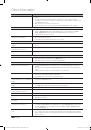
Others
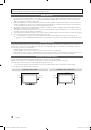
The picture won’t display in full screen.
• HD channels will have black bars on either side of the screen when displaying up scaled SD (4:3)
contents.
• Black bars on the top and bottom will appear during movies that have aspect ratios different from
your TV.
• Adjust the picture size options on your external device or TV to full screen.
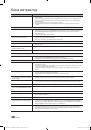
The remote control does not work.
• Replace the remote control batteries with the poles (+/–) in the right direction.
• Clean the sensor’s transmission window on the remote.
• Try pointing the remote directly at the TV from 5~6 feet away.
The cable/set top box remote control
doesn’t turn the TV on or off, or adjust the
volume.
• Programme the Cable/Set top box remote control to operate the TV. Refer to the Cable/Set user
manual for the SAMSUNG TV code.
A “Mode Not Supported” message
appears.
• Check the supported resolution of the TV, and adjust the external device’s output resolution
accordingly. Refer to the resolution settings on page 23 of this manual.
There is a plastic smell from the TV.
• This smell is normal and will dissipate over time.
The TV
Signal Information
is unavailable
in the Self Diagnostic Test menu.
• This function is only available with digital channels from an Antenna / RF/Coax connection (p. 22).
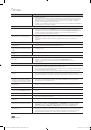
The TV is tilted to the side.
• Remove the base stand from the TV and reassemble it.
There are difficulties assembling the stand
base.
• Make sure the TV is placed on a flat surface. If you can not remove the screws from the TV, use a
magnetized screw driver.
The channel menu is greyed out.
(unavailable)
• The
Channel
menu is only available when the TV source is selected.
Your settings are lost after 30 minutes or
every time the TV is turned off.
• If the TV is in the
Store Demo
mode, it will reset audio and picture settings every 30 minutes. Change
the settings from
Store Demo
mode to
Home Use
mode in the
Plug & Play
(Initial setup) procedure.
Press the
SOURCE
button to select
TV
mode, and go to
MENU
→
Setup
→
Plug & Play
(Initial
setup)
→
ENTER
E
(p. 7).
You have intermittent loss of audio or
video.
• Check the cable connections and reconnect them.
• Loss of audio or video can be caused by using overly rigid or thick cables. Make sure the cables are
flexible enough for long term use. If mounting the TV to the wall, we recommend using cables with 90
degree connectors.
[UC5100_Rus]BN68-02656H-00L04.indb 48
2010-03-24 오전 10:37:22