Инструкция для Samsung LE40A454C1, LE40A451C1, LE40A450C2, LE37A451C1, LE37A450C2
 1
 2
 3
 4
 5
 6
 7
 8
 9
 10
 11
 12
 13
 14
 15
 16
 17
 18
 19
 20
 21
 22
 23
 24
 25
 26
 27
 28
 29
 30
 31
 32
 33
 34
 35
 36
 37
 38
 39
 40
 41
 42
 43
 44
 45
 46
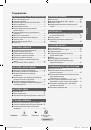 47
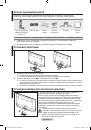 48
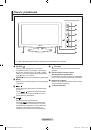 49
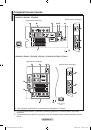 50
 51
 52
 53
 54
 55
 56
 57
 58
 59
 60
 61
 62
 63
 64
 65
 66
 67
 68
 69
 70
 71
 72
 73
 74
 75
 76
 77
 78
 79
 80
 81
 82
 83
 84
 85
 86
 87
 88
 89
 90
 91
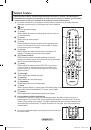
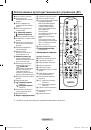
English - 7
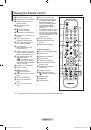
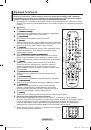
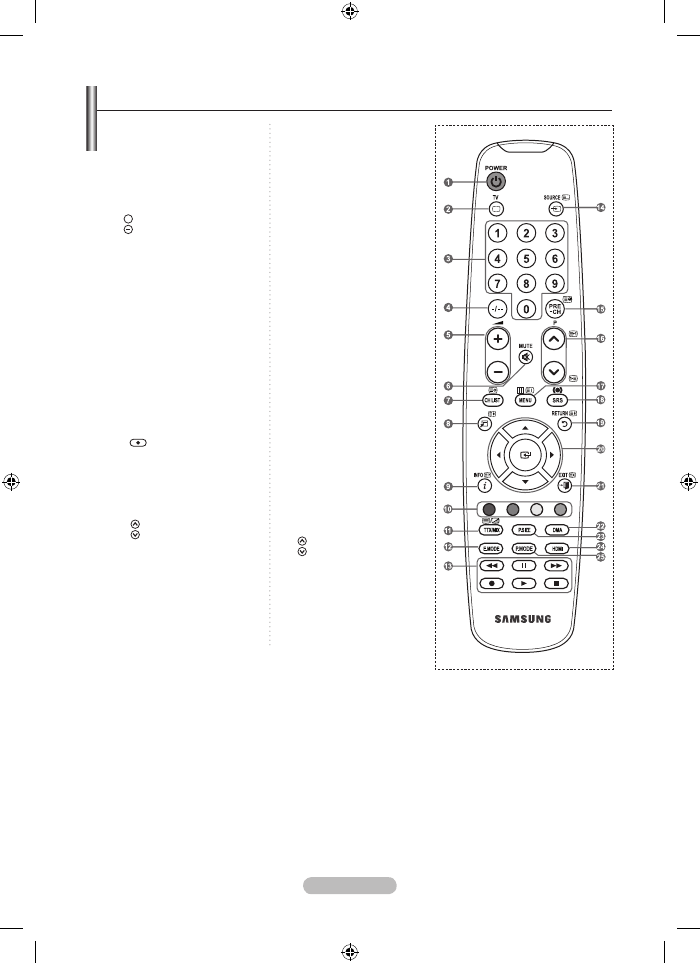
TOOLS
1
Television Standby button
2
Selects the TV mode directly
3
Number buttons for direct
channel access
4
One/Two-digit channel
selection
5
+
: Volume increase
: Volume decrease
6
Temporary sound switch-off
7
Displays the Channel List on
screen
8
Use to quickly select
frequently used functions.
9
Use to see information on
the current broadcast
0
Colour buttons :
Use these buttons in the
Channel list, etc.
@
Press to select the optional
display and sound modes for
sports, cinema and games.
#
Use these buttons in the
DMA, and Anynet+.
(
TOOLS
: This remote can be
used to control recording on
Samsung recorders with the
Anynet+ feature)
$
Available source selection
%
Previous channel
^
P
: Next channel
P
: Previous channel
&
Displays the main on-screen
menu
*
SRS TS XT selection
(
Returns to the previous
menu
)
Control the cursor in the
menu
a
Exit the on-screen menu
b
Use this when connecting
a SAMSUNG DMA (Digital
Media Adapter) device
through an HDMI interface
and switching to DMA
mode.(The DMA button is
optional.)
For more information on the
operating procedures, refer to
the user manual of the DMA.
This button is available when
“Anynet
+
(HDMI-CEC)" is “On”
(see page 31)
c
Picture size selection
d
Selects the HDMI mode
directly.
e
Picture effect selection
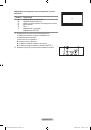
teletext Functions
2
Exit from the teletext display
7
Teletext store
8
Teletext size selection
9
Teletext reveal
0
Fastext topic selection
!
Alternately select Teletext,
Double, or Mix.
$
Teletext mode selection
(LIST/FLOF)
%
Teletext sub page
^
P
: Teletext next page
P
: Teletext previous page
&
Teletext index
(
Teletext hold
a
Teletext cancel
The performance of the remote control may be affected by bright light.
➣
Viewing the Remote Control
BN68-01425D-Eng-0227.indd 7
2008-03-18 ¿ÀÈÄ 7:42:07
Оглавление инструкции
- Cover
- Eng
- Connecting and Preparing Your TV
- List of Parts
- Installing the Stand
- Installing the Wall Mount Kit
- Viewing the Control Panel
- Viewing the Connection Panel
- Viewing the Remote Control
- Installing Batteries in the Remote Control
- Switching On and Off
- Placing Your Television in Standby Mode
- Viewing the Menus
- Using the TOOLS Button
- Plug & Play
- Setting the Channels
- Setting the Picture
- Setting the Sound
- Setting the Time
- Function Description
- Setting the PC
- About Anynet+
- Recommendations For Use
- Connecting and Preparing Your TV
- Rus