Инструкция для Samsung LE40A454C1, LE40A451C1, LE40A450C2, LE37A451C1, LE37A450C2
 1
 2
 3
 4
 5
 6
 7
 8
 9
 10
 11
 12
 13
 14
 15
 16
 17
 18
 19
 20
 21
 22
 23
 24
 25
 26
 27
 28
 29
 30
 31
 32
 33
 34
 35
 36
 37
 38
 39
 40
 41
 42
 43
 44
 45
 46
 47
 48
 49
 50
 51
 52
 53
 54
 55
 56
 57
 58
 59
 60
 61
 62
 63
 64
 65
 66
 67
 68
 69
 70
 71
 72
 73
 74
 75
 76
 77
 78
 79
 80
 81
 82
 83
 84
 85
 86
 87
 88
 89
 90
 91
English - 7
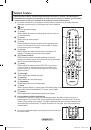
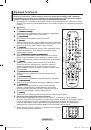
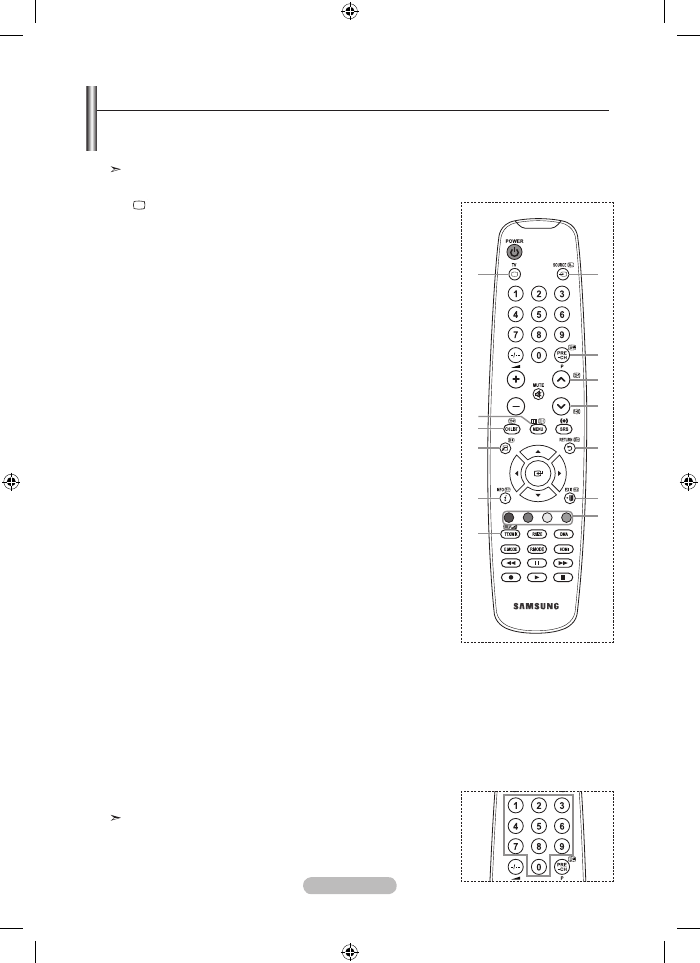
Most television stations provide written information services via teletext. the index page of
the teletext service gives you information on how to use the service. In addition, you can select
various options to suit your requirements by using the remote control buttons.
For teletext information to be displayed correctly, channel reception must be stable. Otherwise,
information may be missing or some pages may not be displayed.
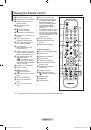
1.
TOOLS
(exit)
Exit from the teletext display
2
6
(index)
Used to display the index (contents) page at any time while you
are viewing teletext.
3
8
(store)
Used to store the teletext pages.
4
4
(size)
Press to display the double-size letters in the upper half of the
screen. For lower half of the screen, press it again. To display
normal screen, press it once again.
5
5
(reveal)
Used to display the hidden text (answers to quiz games, for
example). To display normal screen, press it again.
6
/
(teletext on/mix)
Press to activate teletext mode after selecting the channel
providing the teletext service. Press it twice to overlap the teletext
with the current broadcasting screen.
7
0
(mode)
Press to select the teletext mode (LIST/FLOF). If you press it
in the LIST mode, it switches into the List save mode. In the
List save mode, you can save teletext page into list using the
8
(store) button.
8
1
(sub-page)
Used to display the available sub-page.
9
2
(page up)
Used to display the next teletext page.
0
3
(page down)
Used to display the previous teletext page.
!
9
(hold)
Used to hold the display on a given page if the selected page is linked with several secondary
pages which follow on automatically. To resume, press it again.
@
7
(cancel)
Used to display the broadcast when searching for a page.
#
Coloure buttons (red/green/yellow/blue)
If the FASTEXT system is used by a broadcasting company, the different topics covered on a
teletext page are colour-coded and can be selected by pressing the coloured buttons. Press one
of them corresponding to the required. The page is displayed with other coloured information that
can be selected in the same way. To display the previous or next page, press the corresponding
coloured button.
You can change teletext pages by pressing the numeric buttons on
the remote control.
teletext Feature
TOOLS
TOOLS
1
3
4
5
6
7
8
9
0
!
@
#
2
BN68-01425D-Eng-0227.indd 37
2008-03-18 ¿ÀÈÄ 7:42:23
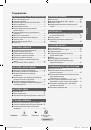
Оглавление инструкции
- Cover
- Eng
- Connecting and Preparing Your TV
- List of Parts
- Installing the Stand
- Installing the Wall Mount Kit
- Viewing the Control Panel
- Viewing the Connection Panel
- Viewing the Remote Control
- Installing Batteries in the Remote Control
- Switching On and Off
- Placing Your Television in Standby Mode
- Viewing the Menus
- Using the TOOLS Button
- Plug & Play
- Setting the Channels
- Setting the Picture
- Setting the Sound
- Setting the Time
- Function Description
- Setting the PC
- About Anynet+
- Recommendations For Use
- Connecting and Preparing Your TV
- Rus