Инструкция для Clavia NORD Lead 2X
 1
 2
 3
 4
 5
 6
 7
 8
 9
 10
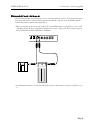 11
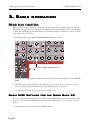 12
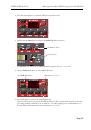 13
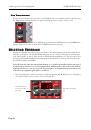 14
 15
 16
 17
 18
 19
 20
 21
 22
 23
 24
 25
 26
 27
 28
 29
 30
 31
 32
 33
 34
 35
 36
 37
 38
 39
 40
 41
 42
 43
 44
 45
 46
 47
 48
 49
 50
 51
 52
 53
 54
 55
 56
 57
 58
 59
 60
 61
 62
 63
 64
 65
 66
 67
 68
 69
 70
 71
 72
 73
 74
 75
 76
 77
 78
 79
 80
 81
 82
 83
 84
 85
 86
 87
 88
 89
 90
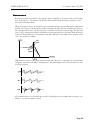 91
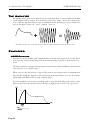 92
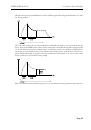 93
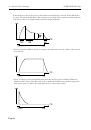 94
 95
 96
 97
 98
 99
 100
 101
 102
 103
 104
 105
 106
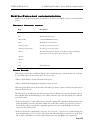 107
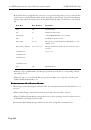 108
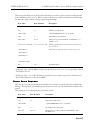 109
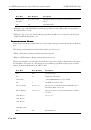 110
 111
 112
 113
 114
 115
 116
 117
 118
 119

10. MIDI: Using Nord Lead 2X with a sequencer
NORD LEAD 2X V1.0x
Page 76
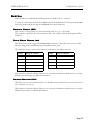
• When you select a new Performance, a Bank Select (see below) and Program Change message is trans-
mitted on the
Global
MIDI Channel. For information on how to set the Global MIDI Channel, see
.
• When a Program Change message is received on the Global MIDI Channel, a new Performance is
selected.
If the Global MIDI Channel happens to be set to the same number as one of the Program slots, the
Performance takes precedence. That is, Program Change messages on this MIDI Channel will select
Performances, not Programs.
B
B
B
B
A
A
A
AN
N
N
NK
K
K
K
S
S
S
S
E
E
E
EL
L
L
LE
E
E
EC
C
C
CT
T
T
T
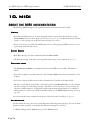
Bank Select messages are transmitted and received as MIDI Controller 32.
Bank Select messages are used to determine which Program/Performance Bank is currently used. Every
Program Change sent from the Nord Lead 2X is preceded by a Bank Select message. The lowest Bank
Select number ‘0’ selects the first Bank, Bank select number ‘1’ selects the second Bank and so on. Bank
Select must always be used in combination with Program Change, or no Bank change will take place.
S
S
S
S
Y
Y
Y
YS
S
S
ST
T
T
TE
E
E
EM
M
M
M
E
E
E
E
X
X
X
XC
C
C
CL
L
L
LU
U
U
US
S
S
SIIIIV
V
V
VE
E
E
E
Program settings can be transmitted as a System Exclusive “bulk dump”. See
.
U
U
U
U
S
S
S
SIIIIN
N
N
NG
G
G
G
N
N
N
N
O
O
O
OR
R
R
RD
D
D
D
L
L
L
L
E
E
E
EA
A
A
AD
D
D
D
2X
2X
2X
2X
W
W
W
WIIIIT
T
T
TH
H
H
H
A
A
A
A
S
S
S
SE
E
E
EQ
Q
Q
QU
U
U
UE
E
E
EN
N
N
NC
C
C
CE
E
E
ER
R
R
R
C
C
C
C
O
O
O
ON
N
N
NN
N
N
NE
E
E
EC
C
C
CT
T
T
TIIIIO
O
O
ON
N
N
NS
S
S
S
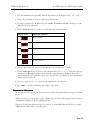
1. Connect
MIDI O
UT
on the Nord Lead 2X to a MIDI In on your sequencer.
2. Connect a MIDI Out from your sequencer to the
MIDI I
N
on the Nord Lead 2X.
L
L
L
L
O
O
O
OC
C
C
CA
A
A
AL
L
L
L
O
O
O
O
N
N
N
N
/O
/O
/O
/O
F
F
F
FF
F
F
F
If your sequencer “echoes” all received MIDI signals via its MIDI Output(s) (which it probably does, look
for a function called “MIDI Thru”, “MIDI Echo”, “MIDI Merge”, “Soft Thru” or similar), the Nord
Lead 2X should be set to MIDI Local Off. See
.
MIDI C
MIDI C
MIDI C
MIDI C
H
H
H
HA
A
A
AN
N
N
NN
N
N
NE
E
E
EL
L
L
LS
S
S
S
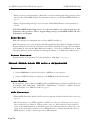
• Which MIDI Channel the Nord Lead 2X
transmit
s on depends on which of the four Slots is active (see
).
• All four Slots always
receive
MIDI, regardless of which one is selected, or if layering of one or more
Slots is activated or not. However, all Slots used in a Layer (i.e. all Slots that are activated) will
also
receive on the MIDI channel set for the leftmost active Slot! This means that if you have a layer con-
sisting of Slots A, B and D, and Slot A is set to MIDI channel 1, both Slots B and D will receive on
MIDI channel 1, as well as on their respective set MIDI channels.
Оглавление инструкции
- 1. Introduction
- 2. Connections
- 3. Basic operation
- Demo play function
- Basic MIDI Settings for the Nord Rack 2X
- Selecting Programs
- Selecting Percussion Kits
- Using the Slots to switch Programs
- Layering
- Splitting the Keyboard
- Performances
- Monophonic and polyphonic operation
- Stereo/Mono
- Pitch Stick and Modulation Wheel
- Master Tune
- Using a sustain pedal
- Using a control (expression) pedal
- The “Panic” button
- 4. Editing Programs
- 5. Programming Velocity Sensitivity
- 6. Percussion Kits
- 7. Performances
- 8. Panel Reference
- 9. Shift functions
- Accessing the Shift functions
- Shift function list
- Tune (Master Tune)
- Out Mode
- Local
- Prog/Ctrl
- MIDI Channel
- Special
- Accessing the Special functions
- Function “1” – Synchronizing LFO 1 to MIDI Clock
- Function “2” – Synchronizing LFO2/Arpeggio to MIDI Clock
- Function “F” – External triggering of Filter envelope
- Function “A” – External triggering of Amplifier Envelope
- Function “S” – External Velocity Morph
- Aftertouch and Expression Pedal Settings
- System
- 10. MIDI
- 11. Synthesis basics
- 12. Factory presets
- 13. MIDI implementation
- Index