Инструкция для Clavia NORD Lead 2X
 1
 2
 3
 4
 5
 6
 7
 8
 9
 10
 11
 12
 13
 14
 15
 16
 17
 18
 19
 20
 21
 22
 23
 24
 25
 26
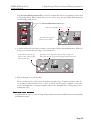 27
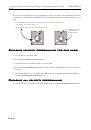 28
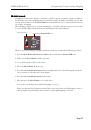 29
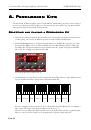 30
 31
 32
 33
 34
 35
 36
 37
 38
 39
 40
 41
 42
 43
 44
 45
 46
 47
 48
 49
 50
 51
 52
 53
 54
 55
 56
 57
 58
 59
 60
 61
 62
 63
 64
 65
 66
 67
 68
 69
 70
 71
 72
 73
 74
 75
 76
 77
 78
 79
 80
 81
 82
 83
 84
 85
 86
 87
 88
 89
 90
 91
 92
 93
 94
 95
 96
 97
 98
 99
 100
 101
 102
 103
 104
 105
 106
 107
 108
 109
 110
 111
 112
 113
 114
 115
 116
 117
 118
 119

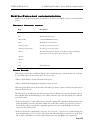
9. Shift functions: Tune (Master Tune)
NORD LEAD 2X V1.0x
Page 64
A
A
A
A
B
B
B
BO
O
O
OU
U
U
UT
T
T
T
G
G
G
G
L
L
L
LO
O
O
OB
B
B
BA
A
A
AL
L
L
L
A
A
A
AN
N
N
ND
D
D
D
S
S
S
S
L
L
L
LO
O
O
OT
T
T
T
F
F
F
F
U
U
U
UN
N
N
NC
C
C
CT
T
T
TIIIIO
O
O
ON
N
N
NS
S
S
S
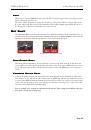
• If the function you select can be set independently for each Slot (A to D), the selected Slot
LED
flashes. To make settings for a specific Slot, select it by pressing the
S
LOT
button.
• If the selected function is global for all Slots, the selected
S
LOT
button is steadily lit. Which Slot is
selected is then of no relevance for the setting.
S
S
S
S
E
E
E
ET
T
T
TT
T
T
TIIIIN
N
N
NG
G
G
G
T
T
T
TH
H
H
HE
E
E
E
V
V
V
VA
A
A
AL
L
L
LU
U
U
UE
E
E
E
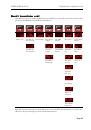
Once a function is selected, the value is set using the
U
P
/D
OWN
buttons.
E
E
E
E
X
X
X
XIIIIT
T
T
TIIIIN
N
N
NG
G
G
G
T
T
T
TH
H
H
HE
E
E
E
S
S
S
S
H
H
H
HIIIIF
F
F
FT
T
T
T
F
F
F
FU
U
U
UN
N
N
NC
C
C
CT
T
T
TIIIIO
O
O
ON
N
N
NS
S
S
S
M
M
M
MO
O
O
OD
D
D
DE
E
E
E
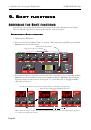
To go back to the regular “play mode”, press the
S
HIFT
button once again.
There is no need to store the Shift function settings. The settings will be stored automatically to the mem-
ory. However, some functions are always reset to default values when you turn off power (see the descrip-
tion of each Shift function for details).
T
T
T
T
U
U
U
UN
N
N
NE
E
E
E
(M
(M
(M
(M
A
A
A
AS
S
S
ST
T
T
TE
E
E
ER
R
R
R
T
T
T
T
U
U
U
UN
N
N
NE
E
E
E
))))
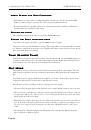
This function is used to tune the Nord Lead 2X to other instruments. ‘00’ is normal 440Hz tuning. Low-
er pitches are indicated by a dot to the right of the number and values higher than normal pitch are in-
dicated without a dot. The values are in cents (hundreds of a semitone).
O
O
O
O
U
U
U
UT
T
T
T
M
M
M
M
O
O
O
OD
D
D
DE
E
E
E
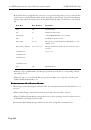
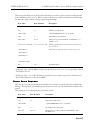
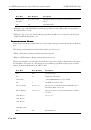
This function is used to set how the sound should be routed from the Slots to the Outputs. The Out
Mode settings are global for the entire instrument, which means all Programs share the settings made
here.
Nord Lead 2 has four outputs, labelled A-D. It might be a good idea to think of these outputs as two
output pairs (A-B and C-D), because that is often how they are used.
Basically there are three possibilities for how a sound appears in the outputs:
• The first is that a Program appears with equal level at two outputs, which is what we refer to as
mono
.
• The second option is that the voices (the keys you play) appear alternating between the two outputs in
an output pair (A-B or C-D). This we refer to as
stereo
. If you play chords in stereo mode, the sound
will be spread out in the stereo image.
• When Unison is activated, more than one voice will be used each time you press a key, as described on
. If a Unison Program is played in stereo mode, each time you play a key you will get at least
one voice at one output in a pair and at least one at the other, which will result in a “wide” stereo
sound.
• The third option is that when playing several Programs at the same time, the different Programs
appear separated on different outputs.
Оглавление инструкции
- 1. Introduction
- 2. Connections
- 3. Basic operation
- Demo play function
- Basic MIDI Settings for the Nord Rack 2X
- Selecting Programs
- Selecting Percussion Kits
- Using the Slots to switch Programs
- Layering
- Splitting the Keyboard
- Performances
- Monophonic and polyphonic operation
- Stereo/Mono
- Pitch Stick and Modulation Wheel
- Master Tune
- Using a sustain pedal
- Using a control (expression) pedal
- The “Panic” button
- 4. Editing Programs
- 5. Programming Velocity Sensitivity
- 6. Percussion Kits
- 7. Performances
- 8. Panel Reference
- 9. Shift functions
- Accessing the Shift functions
- Shift function list
- Tune (Master Tune)
- Out Mode
- Local
- Prog/Ctrl
- MIDI Channel
- Special
- Accessing the Special functions
- Function “1” – Synchronizing LFO 1 to MIDI Clock
- Function “2” – Synchronizing LFO2/Arpeggio to MIDI Clock
- Function “F” – External triggering of Filter envelope
- Function “A” – External triggering of Amplifier Envelope
- Function “S” – External Velocity Morph
- Aftertouch and Expression Pedal Settings
- System
- 10. MIDI
- 11. Synthesis basics
- 12. Factory presets
- 13. MIDI implementation
- Index