Инструкция для Clavia NORD Lead 2X
 1
 2
 3
 4
 5
 6
 7
 8
 9
 10
 11
 12
 13
 14
 15
 16
 17
 18
 19
 20
 21
 22
 23
 24
 25
 26
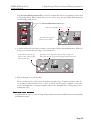 27
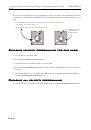 28
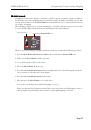 29
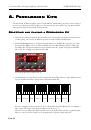 30
 31
 32
 33
 34
 35
 36
 37
 38
 39
 40
 41
 42
 43
 44
 45
 46
 47
 48
 49
 50
 51
 52
 53
 54
 55
 56
 57
 58
 59
 60
 61
 62
 63
 64
 65
 66
 67
 68
 69
 70
 71
 72
 73
 74
 75
 76
 77
 78
 79
 80
 81
 82
 83
 84
 85
 86
 87
 88
 89
 90
 91
 92
 93
 94
 95
 96
 97
 98
 99
 100
 101
 102
 103
 104
 105
 106
 107
 108
 109
 110
 111
 112
 113
 114
 115
 116
 117
 118
 119

9. Shift functions: Special
NORD LEAD 2X V1.0x
Page 70
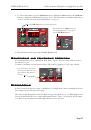
2. Select ‘F.on’ with the
U
P
/D
OWN
buttons.
3. Press
S
TORE
. The
D
ISPLAY
shows the MIDI Channel currently used. Set the MIDI Channel with
the
U
P
/D
OWN
buttons.
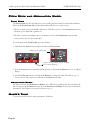
4. Press
S
TORE
again. The
D
ISPLAY
shows which MIDI Note number is currently used. The numbers
start at C0 (MIDI note number 24), and sharp notes (#) are indicated by the symbol . “Middle C”
is displayed as ‘C3’. Select MIDI Note number, either by pressing a key on the keyboard, or by
selecting one with the
U
P
/D
OWN
buttons. The value ‘– – –’ means that note number is ignored and
that all notes on the set MIDI Channel will be used for triggering. This value is found below all the
“note number values”.
G
G
G
G
U
U
U
UIIIID
D
D
DE
E
E
EL
L
L
LIIIIN
N
N
NE
E
E
ES
S
S
S
F
F
F
FO
O
O
OR
R
R
R
U
U
U
U
S
S
S
SIIIIN
N
N
NG
G
G
G
F
F
F
F
IIIIL
L
L
LT
T
T
TE
E
E
ER
R
R
R
E
E
E
E
N
N
N
NV
V
V
VE
E
E
EL
L
L
LO
O
O
OP
P
P
PE
E
E
E
T
T
T
T
R
R
R
RIIIIG
G
G
GG
G
G
GE
E
E
ER
R
R
RIIIIN
N
N
NG
G
G
G
• If you have notes transmitted from your sequencer that you want to use
only
for triggering the enve-
lope, make sure the MIDI Channel you use for this function is not used by any of the Slots.
• Please note that if the Velocity function in the Filter section is activated, the velocities of the incoming
MIDI notes are routed to Filter Envelope amount. This allows you to adjust the timbre of the sound
with the velocity of the incoming MIDI notes.
A
A
A
A
N
N
N
N
E
E
E
E
X
X
X
XA
A
A
AM
M
M
MP
P
P
PL
L
L
LE
E
E
E
O
O
O
OF
F
F
F
F
F
F
F
IIIIL
L
L
LT
T
T
TE
E
E
ER
R
R
R
E
E
E
E
N
N
N
NV
V
V
VE
E
E
EL
L
L
LO
O
O
OP
P
P
PE
E
E
E
T
T
T
T
R
R
R
RIIIIG
G
G
GG
G
G
GE
E
E
ER
R
R
RIIIIN
N
N
NG
G
G
G
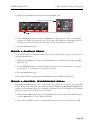
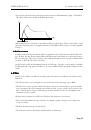
1. Select a Program for Slot A, that plays a stable sound with high sustain, for example a “string” or
“pad” sound.
2. Lower the Filter Cutoff
F
REQUENCY
to 0.
3. Raise the Filter
E
NVELOPE
A
MOUNT
and adjust the Filter envelope so that the sound has a short,
snappy character.
4. Hold down
S
HIFT
and press
MIDI C
H
. Set the MIDI Channel for Slot A to ‘1’.
5. Press each of the other
S
LOT
buttons and set them to MIDI Channel ‘16’. This is just to make sure
they do not get used in this example.
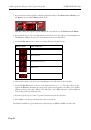
6. Hold down
S
HIFT
and press
S
PECIAL
.
7. Press the
S
PECIAL
button until the left digit in the
D
ISPLAY
reads ‘F’.
8. Make sure Slot A is selected. Otherwise press the
S
LOT
A
button.
9. Use the
U
P
/D
OWN
buttons to set the value to ‘F.on’.
10.Press
S
TORE
. Use the
U
P
/D
OWN
buttons to select MIDI Channel ‘2’.
11.Press
S
TORE
again and then the
D
OWN
button to select ‘– – –’ (any MIDI note number).
12.Press
S
TORE
again.
Оглавление инструкции
- 1. Introduction
- 2. Connections
- 3. Basic operation
- Demo play function
- Basic MIDI Settings for the Nord Rack 2X
- Selecting Programs
- Selecting Percussion Kits
- Using the Slots to switch Programs
- Layering
- Splitting the Keyboard
- Performances
- Monophonic and polyphonic operation
- Stereo/Mono
- Pitch Stick and Modulation Wheel
- Master Tune
- Using a sustain pedal
- Using a control (expression) pedal
- The “Panic” button
- 4. Editing Programs
- 5. Programming Velocity Sensitivity
- 6. Percussion Kits
- 7. Performances
- 8. Panel Reference
- 9. Shift functions
- Accessing the Shift functions
- Shift function list
- Tune (Master Tune)
- Out Mode
- Local
- Prog/Ctrl
- MIDI Channel
- Special
- Accessing the Special functions
- Function “1” – Synchronizing LFO 1 to MIDI Clock
- Function “2” – Synchronizing LFO2/Arpeggio to MIDI Clock
- Function “F” – External triggering of Filter envelope
- Function “A” – External triggering of Amplifier Envelope
- Function “S” – External Velocity Morph
- Aftertouch and Expression Pedal Settings
- System
- 10. MIDI
- 11. Synthesis basics
- 12. Factory presets
- 13. MIDI implementation
- Index