Инструкция для Clavia NORD Lead 2X
 1
 2
 3
 4
 5
 6
 7
 8
 9
 10
 11
 12
 13
 14
 15
 16
 17
 18
 19
 20
 21
 22
 23
 24
 25
 26
 27
 28
 29
 30
 31
 32
 33
 34
 35
 36
 37
 38
 39
 40
 41
 42
 43
 44
 45
 46
 47
 48
 49
 50
 51
 52
 53
 54
 55
 56
 57
 58
 59
 60
 61
 62
 63
 64
 65
 66
 67
 68
 69
 70
 71
 72
 73
 74
 75
 76
 77
 78
 79
 80
 81
 82
 83
 84
 85
 86
 87
 88
 89
 90
 91
 92
 93
 94
 95
 96
 97
 98
 99
 100
 101
 102
 103
 104
 105
 106
 107
 108
 109
 110
 111
 112
 113
 114
 115
 116
 117
 118
 119

NORD LEAD 2X V1.0x
7. Performances: Extracting single sounds from a Performance
Page 35
The above point means that there is no need to store the
Programs
separately. As soon as you save the
Performance, all Programs that it uses are also saved, inside the Performance. This also means that if you
later change any of your Programs, from Program mode, the Programs in the Performances are not af-
fected in any way.
On the other hand,
Percussion Kits
need to be saved separately, as described on
.
E
E
E
E
X
X
X
XT
T
T
TR
R
R
RA
A
A
AC
C
C
CT
T
T
TIIIIN
N
N
NG
G
G
G
S
S
S
SIIIIN
N
N
NG
G
G
GL
L
L
LE
E
E
E
S
S
S
SO
O
O
OU
U
U
UN
N
N
ND
D
D
DS
S
S
S
F
F
F
FR
R
R
RO
O
O
OM
M
M
M
A
A
A
A
P
P
P
P
E
E
E
ER
R
R
RF
F
F
FO
O
O
OR
R
R
RM
M
M
MA
A
A
AN
N
N
NC
C
C
CE
E
E
E
The text below does not apply to Percussion Kits in Performances.
As stated earlier, the sounds used in the Slots of a Performance are
not
references to regular, existing Pro-
grams, but complete Program patches “in their own right”. You will find several unique sounds in the
factory Performances, sounds that you will not find in any of the internal Program locations. You may
want to extract such a sound, for use as a single Program, or to make it part of another Performance. Pro-
ceed as follows:
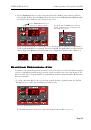
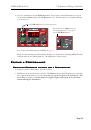
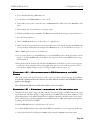
1. Select the Performance containing the sound you want to extract.
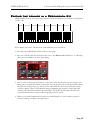
2. Make sure the Slot with the desired sound is selected (
LED
is flashing).
3. Press
S
TORE
.
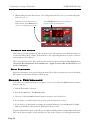
4. Press the
P
ERF
. M
ODE
button, to exit Performance mode.
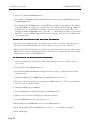
5. Scroll to a suitable Program location (1- 3.99) in the internal memory and press
S
TORE
again. The
sound is stored as a regular Program. This can now be played as usual, or included in another Per-
formance as described on the previous page.
E
E
E
E
X
X
X
XIIIIT
T
T
TIIIIN
N
N
NG
G
G
G
P
P
P
P
E
E
E
ER
R
R
RF
F
F
FO
O
O
OR
R
R
RM
M
M
MA
A
A
AN
N
N
NC
C
C
CE
E
E
E
M
M
M
MO
O
O
OD
D
D
DE
E
E
E
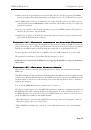
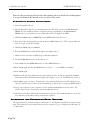
To exit Performance mode, press the
P
ERF
. M
ODE
button. Now, you return to the regular Program
mode. You will note that the four slots now play the four Programs that were selected
before
you entered
Performance mode. Likewise, Layering and Shift functions are restored to the way they were set before
you entered Performance mode.
Оглавление инструкции
- 1. Introduction
- 2. Connections
- 3. Basic operation
- Demo play function
- Basic MIDI Settings for the Nord Rack 2X
- Selecting Programs
- Selecting Percussion Kits
- Using the Slots to switch Programs
- Layering
- Splitting the Keyboard
- Performances
- Monophonic and polyphonic operation
- Stereo/Mono
- Pitch Stick and Modulation Wheel
- Master Tune
- Using a sustain pedal
- Using a control (expression) pedal
- The “Panic” button
- 4. Editing Programs
- 5. Programming Velocity Sensitivity
- 6. Percussion Kits
- 7. Performances
- 8. Panel Reference
- 9. Shift functions
- Accessing the Shift functions
- Shift function list
- Tune (Master Tune)
- Out Mode
- Local
- Prog/Ctrl
- MIDI Channel
- Special
- Accessing the Special functions
- Function “1” – Synchronizing LFO 1 to MIDI Clock
- Function “2” – Synchronizing LFO2/Arpeggio to MIDI Clock
- Function “F” – External triggering of Filter envelope
- Function “A” – External triggering of Amplifier Envelope
- Function “S” – External Velocity Morph
- Aftertouch and Expression Pedal Settings
- System
- 10. MIDI
- 11. Synthesis basics
- 12. Factory presets
- 13. MIDI implementation
- Index