Инструкция для Clavia NORD Lead 2X
 1
 2
 3
 4
 5
 6
 7
 8
 9
 10
 11
 12
 13
 14
 15
 16
 17
 18
 19
 20
 21
 22
 23
 24
 25
 26
 27
 28
 29
 30
 31
 32
 33
 34
 35
 36
 37
 38
 39
 40
 41
 42
 43
 44
 45
 46
 47
 48
 49
 50
 51
 52
 53
 54
 55
 56
 57
 58
 59
 60
 61
 62
 63
 64
 65
 66
 67
 68
 69
 70
 71
 72
 73
 74
 75
 76
 77
 78
 79
 80
 81
 82
 83
 84
 85
 86
 87
 88
 89
 90
 91
 92
 93
 94
 95
 96
 97
 98
 99
 100
 101
 102
 103
 104
 105
 106
 107
 108
 109
 110
 111
 112
 113
 114
 115
 116
 117
 118
 119

NORD LEAD 2X V1.0x
4. Editing Programs: Customizing Manual mode
Page 23
C
C
C
C
U
U
U
US
S
S
ST
T
T
TO
O
O
OM
M
M
MIIIIZ
Z
Z
ZIIIIN
N
N
NG
G
G
G
M
M
M
M
A
A
A
AN
N
N
NU
U
U
UA
A
A
AL
L
L
L
M
M
M
MO
O
O
OD
D
D
DE
E
E
E
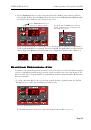
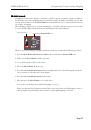
When you enter Manual mode, the button functions (waveform select, modulation destinations etc.) will
be set to some default values, for a basic sound. However, if you would like Manual mode to be different
the next time you turn on power, proceed as follows:
1. Enter Manual mode by holding down
S
HIFT
and pressing the Manual (
P
ERF
.
MODE
) button.
2. Set all button functions as you want them.
3. Press
S
TORE
twice.
S
S
S
S
T
T
T
TO
O
O
OR
R
R
RIIIIN
N
N
NG
G
G
G
P
P
P
P
R
R
R
RO
O
O
OG
G
G
GR
R
R
RA
A
A
AM
M
M
MS
S
S
S
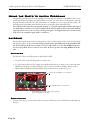
Storing is done identically regardless if you are saving an edited Program or if you are saving from Manual
mode.
Saving a Program will permanently overwrite an existing Program. Be careful so that you don’t acciden-
tally erase a Program you’d like to keep! However, if you want to restore any of the original RAM factory
programs later on, they can be fetched as standard MIDI files at http://www.clavia.se and downloaded to
the Nord Lead 2X from a MIDI sequencer
1. Press the
S
TORE
button. The
D
ISPLAY
flashes.
2. Use the
U
P
/D
OWN
buttons to select a Program number. As you scroll through the memory loca-
tions, you can play and hear the Program currently shown in the
D
ISPLAY
. This prevents you from
overwriting a sound that you want to keep.
Only Program numbers from 1-3.99 in internal mem-
ory can be overwritten. If you try to save in higher Program numbers, nothing will happen.
3. If you change your mind at this point, press the Slot you want to return to or hold down
S
HIFT
and
press the Manual (
P
ERF
. M
ODE
) button to return to Manual Mode.
4. If you decide to go ahead with overwriting the existing Program, press
S
TORE
again. The
D
ISPLAY
stops flashing to indicate the Program has been saved.
C
C
C
C
O
O
O
OP
P
P
PY
Y
Y
YIIIIN
N
N
NG
G
G
G
P
P
P
P
R
R
R
RO
O
O
OG
G
G
GR
R
R
RA
A
A
AM
M
M
MS
S
S
S
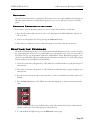
Copying Programs from one memory location to another is just a variation on Storing:
1. Select the Program you want to copy.
2. Press
S
TORE
.
3. Use the
U
P
/D
OWN
buttons to select a new Program number. As you scroll through the memory
locations, you can play and hear the Program currently shown in the
D
ISPLAY
. This prevents you
from overwriting a sound that you want to keep.
Only Program numbers from 1-3.99 in internal
memory can be overwritten. If you try to save in higher Program numbers, nothing will happen.
4. Press
S
TORE
again.
Оглавление инструкции
- 1. Introduction
- 2. Connections
- 3. Basic operation
- Demo play function
- Basic MIDI Settings for the Nord Rack 2X
- Selecting Programs
- Selecting Percussion Kits
- Using the Slots to switch Programs
- Layering
- Splitting the Keyboard
- Performances
- Monophonic and polyphonic operation
- Stereo/Mono
- Pitch Stick and Modulation Wheel
- Master Tune
- Using a sustain pedal
- Using a control (expression) pedal
- The “Panic” button
- 4. Editing Programs
- 5. Programming Velocity Sensitivity
- 6. Percussion Kits
- 7. Performances
- 8. Panel Reference
- 9. Shift functions
- Accessing the Shift functions
- Shift function list
- Tune (Master Tune)
- Out Mode
- Local
- Prog/Ctrl
- MIDI Channel
- Special
- Accessing the Special functions
- Function “1” – Synchronizing LFO 1 to MIDI Clock
- Function “2” – Synchronizing LFO2/Arpeggio to MIDI Clock
- Function “F” – External triggering of Filter envelope
- Function “A” – External triggering of Amplifier Envelope
- Function “S” – External Velocity Morph
- Aftertouch and Expression Pedal Settings
- System
- 10. MIDI
- 11. Synthesis basics
- 12. Factory presets
- 13. MIDI implementation
- Index