Инструкция для Clavia NORD Lead 2X
 1
 2
 3
 4
 5
 6
 7
 8
 9
 10
 11
 12
 13
 14
 15
 16
 17
 18
 19
 20
 21
 22
 23
 24
 25
 26
 27
 28
 29
 30
 31
 32
 33
 34
 35
 36
 37
 38
 39
 40
 41
 42
 43
 44
 45
 46
 47
 48
 49
 50
 51
 52
 53
 54
 55
 56
 57
 58
 59
 60
 61
 62
 63
 64
 65
 66
 67
 68
 69
 70
 71
 72
 73
 74
 75
 76
 77
 78
 79
 80
 81
 82
 83
 84
 85
 86
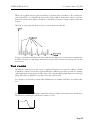 87
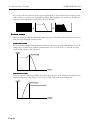 88
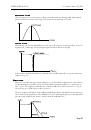 89
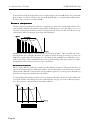 90
 91
 92
 93
 94
 95
 96
 97
 98
 99
 100
 101
 102
 103
 104
 105
 106
 107
 108
 109
 110
 111
 112
 113
 114
 115
 116
 117
 118
 119

7. Performances: What is a Performance?
NORD LEAD 2X V1.0x
Page 32
7. P
7. P
7. P
7. P
E
E
E
ER
R
R
RF
F
F
FO
O
O
OR
R
R
RM
M
M
MA
A
A
AN
N
N
NC
C
C
CE
E
E
ES
S
S
S
W
W
W
W
H
H
H
HA
A
A
AT
T
T
T
IIIIS
S
S
S
A
A
A
A
P
P
P
P
E
E
E
ER
R
R
RF
F
F
FO
O
O
OR
R
R
RM
M
M
MA
A
A
AN
N
N
NC
C
C
CE
E
E
E
?
?
?
?
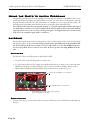
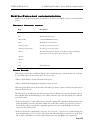
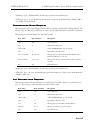
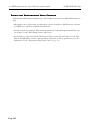
Performances allow you to call up four Programs at a time in a live situation, or to recall complete setups
when sequencing via MIDI. The Nord Lead 2X comes with 100 rewritable Performances and another
3x100 Performances in ROM. Some of these make use of two, three or four Slots, while some are single-
Slot Performances, effectively serving as extra “Programs”. Please note:
• You can edit selected ROM Performance as desired, but you can only save your changes in the first
Performance bank (A.0-L.9).
• You can transmit edited Performance data via MIDI SysEx, for storage in an external sequencer, etc.
• If the Performance contains a Percussion Kit, only the
reference
to the Kit Location will be saved with
the SysEx dump! To include the parameters for the Percussion Kit, you need to make a separate SysEx
dump of the Percussion Kit, from Program mode (not from Performance mode).
• You can receive SysEx data for one Performance at a time into the edit buffer. If you for example use
Nord Lead 2X multitimbrally together with a sequencer, it is often practical to place a SysEx Perform-
ance data dump in the beginning of your song, to select sounds, initialize global settings, etc.
The Factory Performances include several life-like drawbar organ simulations, created using a special
“pseudo-additive” synthesis method. Some of the sounds include famous sound artifacts such as “hum”
and “click” as well as rotating speaker effects, accomplished with the Nord Lead2X’s Morph function.
Among the Performances you can also find recreations of over 40 original factory patches from the classic
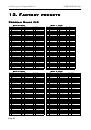
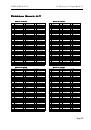
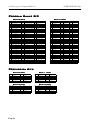
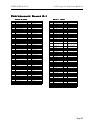
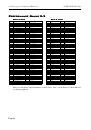
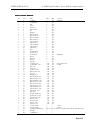
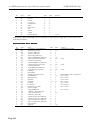
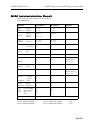
vintage synthesizer Prophet 5. All Performances are listed on
.
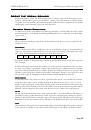
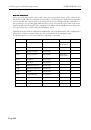
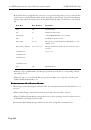
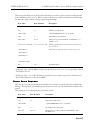
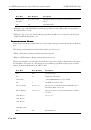
Later in this text follows a detailed list of what settings are contained in a Performance.
R
R
R
R
E
E
E
EC
C
C
CA
A
A
AL
L
L
LL
L
L
LIIIIN
N
N
NG
G
G
G
A
A
A
A
P
P
P
P
E
E
E
ER
R
R
RF
F
F
FO
O
O
OR
R
R
RM
M
M
MA
A
A
AN
N
N
NC
C
C
CE
E
E
E
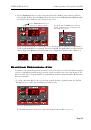
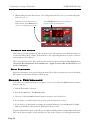
When you recall a Performance, you replace the four current sounds in the slots A to D with the sounds
in the recalled Performance. You also recall other settings as listed in the table later in this chapter.
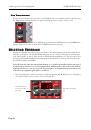
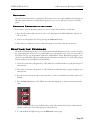
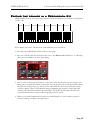
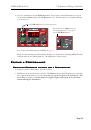
1. Enter Performance mode by pressing the
P
ERF
. M
ODE
button. The
D
ISPLAY
shows the latest
selected Performance.
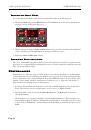
The Performances are organised in 4 Banks, each holding100 Performances. The Performances are
named alphabetically from A0-L9 in each Bank (the letters I and K are excluded because they’re hard
to show clearly in the
D
ISPLAY
). The Performances in the first Bank there are rewritable and the rest
are in ROM.
Оглавление инструкции
- 1. Introduction
- 2. Connections
- 3. Basic operation
- Demo play function
- Basic MIDI Settings for the Nord Rack 2X
- Selecting Programs
- Selecting Percussion Kits
- Using the Slots to switch Programs
- Layering
- Splitting the Keyboard
- Performances
- Monophonic and polyphonic operation
- Stereo/Mono
- Pitch Stick and Modulation Wheel
- Master Tune
- Using a sustain pedal
- Using a control (expression) pedal
- The “Panic” button
- 4. Editing Programs
- 5. Programming Velocity Sensitivity
- 6. Percussion Kits
- 7. Performances
- 8. Panel Reference
- 9. Shift functions
- Accessing the Shift functions
- Shift function list
- Tune (Master Tune)
- Out Mode
- Local
- Prog/Ctrl
- MIDI Channel
- Special
- Accessing the Special functions
- Function “1” – Synchronizing LFO 1 to MIDI Clock
- Function “2” – Synchronizing LFO2/Arpeggio to MIDI Clock
- Function “F” – External triggering of Filter envelope
- Function “A” – External triggering of Amplifier Envelope
- Function “S” – External Velocity Morph
- Aftertouch and Expression Pedal Settings
- System
- 10. MIDI
- 11. Synthesis basics
- 12. Factory presets
- 13. MIDI implementation
- Index