Инструкция для Clavia NORD Lead 2X
 1
 2
 3
 4
 5
 6
 7
 8
 9
 10
 11
 12
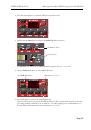 13
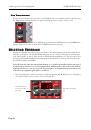 14
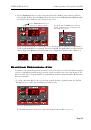 15
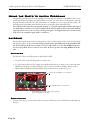 16
 17
 18
 19
 20
 21
 22
 23
 24
 25
 26
 27
 28
 29
 30
 31
 32
 33
 34
 35
 36
 37
 38
 39
 40
 41
 42
 43
 44
 45
 46
 47
 48
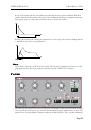 49
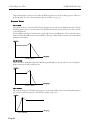 50
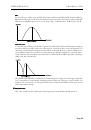 51
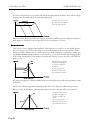 52
 53
 54
 55
 56
 57
 58
 59
 60
 61
 62
 63
 64
 65
 66
 67
 68
 69
 70
 71
 72
 73
 74
 75
 76
 77
 78
 79
 80
 81
 82
 83
 84
 85
 86
 87
 88
 89
 90
 91
 92
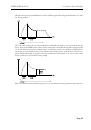 93
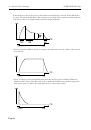 94
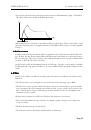 95
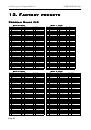 96
 97
 98
 99
 100
 101
 102
 103
 104
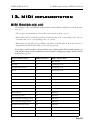 105
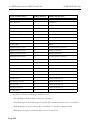 106
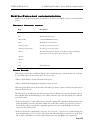 107
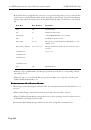 108
 109
 110
 111
 112
 113
 114
 115
 116
 117
 118
 119

Table of content
NORD LEAD 2X V1.0x
II
4. Editing Programs ...............................................
...............................................
...............................................
............................................... 22
Changing an existing Program .................................................
.................................................
.................................................
.................................................22
Changing one Program in a layer
Changing one Program in a layer
Changing one Program in a layer
Changing one Program in a layer............................................
............................................
............................................
............................................22
Reverting to the original Program
Reverting to the original Program
Reverting to the original Program
Reverting to the original Program .........................................
.........................................
.........................................
.........................................22
Using Manual mode ...................................................................
...................................................................
...................................................................
...................................................................22
Customizing Manual mode.........................................................
.........................................................
.........................................................
.........................................................23
Storing Programs .....................................................................
.....................................................................
.....................................................................
.....................................................................23
Copying Programs .....................................................................
.....................................................................
.....................................................................
.....................................................................23
5. Programming Velocity Sensitivity
Programming Velocity Sensitivity
Programming Velocity Sensitivity
Programming Velocity Sensitivity ....................
The Filter Velocity function ....................................................
....................................................
....................................................
....................................................24
Making any parameter velocity dependent
Making any parameter velocity dependent
Making any parameter velocity dependent
Making any parameter velocity dependent .............................
.............................24
Setting the parameter ranges .................................................................................................. 24
Moving the range................................................................................................................... 25
Clearing velocity programming for one knob
Clearing velocity programming for one knob
Clearing velocity programming for one knob
Clearing velocity programming for one knob ........................
Clearing all velocity programming
Clearing all velocity programming
Clearing all velocity programming
Clearing all velocity programming .........................................
.........................................
.........................................
.........................................26
Morphing ....................................................................................
....................................................................................
....................................................................................
....................................................................................27
Percussion Kits..................................................
..................................................
..................................................
.................................................. 28
Selecting and playing a Percussion Kit
Selecting and playing a Percussion Kit
Selecting and playing a Percussion Kit
Selecting and playing a Percussion Kit .................................
.................................
.................................
.................................28
Editing the sounds in a Percussion Kit
Editing the sounds in a Percussion Kit
Editing the sounds in a Percussion Kit
Editing the sounds in a Percussion Kit..................................
..................................
..................................
..................................29
Saving Percussion Kits ............................................................
............................................................
............................................................
............................................................30
Copying, extracting and importing individual percussion sounds
Copying, extracting and importing individual percussion sounds
Copying, extracting and importing individual percussion sounds
Copying, extracting and importing individual percussion sounds
30
30
SysEx dumps of Percussion Kits
SysEx dumps of Percussion Kits
SysEx dumps of Percussion Kits
SysEx dumps of Percussion Kits .............................................
.............................................
.............................................
.............................................30
Using Percussion Kits in Performance mode
Using Percussion Kits in Performance mode
Using Percussion Kits in Performance mode
Using Percussion Kits in Performance mode .........................
Performances .....................................................
.....................................................
.....................................................
..................................................... 32
What is a Performance? ...........................................................
...........................................................
...........................................................
...........................................................32
Recalling a Performance..........................................................
..........................................................
..........................................................
..........................................................32
Editing a Performance ..............................................................
..............................................................
..............................................................
..............................................................33
Selecting Programs as base for a Performance......................................................................... 33
Layering and editing .............................................................................................................. 34
Shift Functions ...................................................................................................................... 34
Saving a Performance ...............................................................
...............................................................
...............................................................
...............................................................34
Extracting single sounds from a Performance
Extracting single sounds from a Performance
Extracting single sounds from a Performance
Extracting single sounds from a Performance.....................
Exiting Performance mode........................................................
........................................................
........................................................
........................................................35
What a Performance contains .................................................
.................................................
.................................................
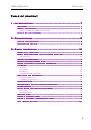
Оглавление инструкции
- 1. Introduction
- 2. Connections
- 3. Basic operation
- Demo play function
- Basic MIDI Settings for the Nord Rack 2X
- Selecting Programs
- Selecting Percussion Kits
- Using the Slots to switch Programs
- Layering
- Splitting the Keyboard
- Performances
- Monophonic and polyphonic operation
- Stereo/Mono
- Pitch Stick and Modulation Wheel
- Master Tune
- Using a sustain pedal
- Using a control (expression) pedal
- The “Panic” button
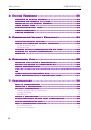
- 4. Editing Programs
- 5. Programming Velocity Sensitivity
- 6. Percussion Kits
- 7. Performances
- 8. Panel Reference
- 9. Shift functions
- Accessing the Shift functions
- Shift function list
- Tune (Master Tune)
- Out Mode
- Local
- Prog/Ctrl
- MIDI Channel
- Special
- Accessing the Special functions
- Function “1” – Synchronizing LFO 1 to MIDI Clock
- Function “2” – Synchronizing LFO2/Arpeggio to MIDI Clock
- Function “F” – External triggering of Filter envelope
- Function “A” – External triggering of Amplifier Envelope
- Function “S” – External Velocity Morph
- Aftertouch and Expression Pedal Settings
- System
- 10. MIDI
- 11. Synthesis basics
- 12. Factory presets
- 13. MIDI implementation
- Index