Инструкция для Clavia NORD Lead 2X
 1
 2
 3
 4
 5
 6
 7
 8
 9
 10
 11
 12
 13
 14
 15
 16
 17
 18
 19
 20
 21
 22
 23
 24
 25
 26
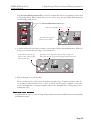 27
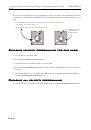 28
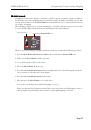 29
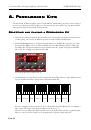 30
 31
 32
 33
 34
 35
 36
 37
 38
 39
 40
 41
 42
 43
 44
 45
 46
 47
 48
 49
 50
 51
 52
 53
 54
 55
 56
 57
 58
 59
 60
 61
 62
 63
 64
 65
 66
 67
 68
 69
 70
 71
 72
 73
 74
 75
 76
 77
 78
 79
 80
 81
 82
 83
 84
 85
 86
 87
 88
 89
 90
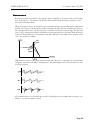 91
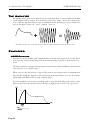 92
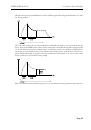 93
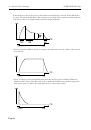 94
 95
 96
 97
 98
 99
 100
 101
 102
 103
 104
 105
 106
 107
 108
 109
 110
 111
 112
 113
 114
 115
 116
 117
 118
 119

NORD LEAD 2X V1.0x
9. Shift functions: Special
Page 69
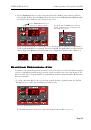
2. Lower the Filter Envelope
A
MOUNT
to 0.
3. Set the Filter Cutoff
F
REQUENCY
to “nine o’clock”.
4. In the LFO section, select a sawtooth wave, set
D
ESTINATION
to Filter and set the
A
MOUNT
to full
value.
5. Play the keyboard. You should hear a repeating sound.
6. Hold down
S
HIFT
and press
S
PECIAL
. The
D
ISPLAY
should show the setting for Special function 1.
7. Press the
S
LOT
A
button.
8. Use the
U
P
/D
OWN
buttons to set the value to ‘5’ (eighth notes).
9. Make sure all other Special functions are turned off for Slot A. Do this by pressing the
S
PECIAL
but-
ton repeatedly and check that the left digit in the
D
ISPLAY
is set to ‘oF’ for all Functions except “1”.
10.Press
S
HIFT
again to return to “normal mode”.
11.Set up your sequencer (or other MIDI device) to transmit MIDI clock to the Nord Lead 2X. Set the
tempo to around 120 BPM and activate Play in the sequencer/device so that MIDI clocks are actu-
ally transmitted.
12.Play the Nord Lead 2X keyboard and adjust the
R
ATE
knob in the LFO 1 section. Start at approxi-
mately 12 o’clock and adjust until you get eighth notes that are in sync with the sequencer. If you
raise the Rate slightly from this position you’ll get a shuffle 16th note repeat, etc.
F
F
F
F
U
U
U
UN
N
N
NC
C
C
CT
T
T
TIIIIO
O
O
ON
N
N
N
“2” – S
“2” – S
“2” – S
“2” – S
Y
Y
Y
YN
N
N
NC
C
C
CH
H
H
HR
R
R
RO
O
O
ON
N
N
NIIIIZ
Z
Z
ZIIIIN
N
N
NG
G
G
G
LFO2/A
LFO2/A
LFO2/A
LFO2/A
R
R
R
RP
P
P
PE
E
E
EG
G
G
GG
G
G
GIIIIO
O
O
O
T
T
T
TO
O
O
O
MIDI
MIDI
MIDI
MIDI
C
C
C
C
L
L
L
LO
O
O
OC
C
C
CK
K
K
K
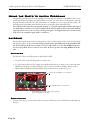
This works exactly as the Special 1 function, only it operates on LFO 2 and the Arpeggio instead.
Please
note that the explanation about the relation between the LFO rate and the restart via MIDI Clock also
applies to the Arpeggio.
Note: this function will not be enabled when Echo is selected on LFO2.
F
F
F
F
U
U
U
UN
N
N
NC
C
C
CT
T
T
TIIIIO
O
O
ON
N
N
N
“F” – E
“F” – E
“F” – E
“F” – E
X
X
X
XT
T
T
TE
E
E
ER
R
R
RN
N
N
NA
A
A
AL
L
L
L
T
T
T
TR
R
R
RIIIIG
G
G
GG
G
G
GE
E
E
ER
R
R
RIIIIN
N
N
NG
G
G
G
O
O
O
OF
F
F
F
F
F
F
F
IIIIL
L
L
LT
T
T
TE
E
E
ER
R
R
R
E
E
E
EN
N
N
NV
V
V
VE
E
E
EL
L
L
LO
O
O
OP
P
P
PE
E
E
E
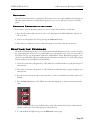
This function can be used to trigger the Filter envelope via notes coming in via MIDI, instead of by play-
ing the keyboard. The Filter envelope is triggered from its own MIDI Channel and note number(s), com-
pletely independent of the MIDI Channel used for defining which keys should be played. This can be
used to play back preprogrammed rhythms in your MIDI sequencer while inputting the actual pitch(es)
by playing the keyboard or via MIDI.
Use the
U
P
/D
OWN
buttons to switch between ‘oF’ and ‘on’.
To set which MIDI Channel and possibly which MIDI note number to use for triggering, do like this:
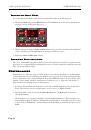
1. Activate the function by holding down
S
HIFT
and pressing the
S
PECIAL
button three times.
Оглавление инструкции
- 1. Introduction
- 2. Connections
- 3. Basic operation
- Demo play function
- Basic MIDI Settings for the Nord Rack 2X
- Selecting Programs
- Selecting Percussion Kits
- Using the Slots to switch Programs
- Layering
- Splitting the Keyboard
- Performances
- Monophonic and polyphonic operation
- Stereo/Mono
- Pitch Stick and Modulation Wheel
- Master Tune
- Using a sustain pedal
- Using a control (expression) pedal
- The “Panic” button
- 4. Editing Programs
- 5. Programming Velocity Sensitivity
- 6. Percussion Kits
- 7. Performances
- 8. Panel Reference
- 9. Shift functions
- Accessing the Shift functions
- Shift function list
- Tune (Master Tune)
- Out Mode
- Local
- Prog/Ctrl
- MIDI Channel
- Special
- Accessing the Special functions
- Function “1” – Synchronizing LFO 1 to MIDI Clock
- Function “2” – Synchronizing LFO2/Arpeggio to MIDI Clock
- Function “F” – External triggering of Filter envelope
- Function “A” – External triggering of Amplifier Envelope
- Function “S” – External Velocity Morph
- Aftertouch and Expression Pedal Settings
- System
- 10. MIDI
- 11. Synthesis basics
- 12. Factory presets
- 13. MIDI implementation
- Index