Инструкция для Clavia NORD Lead 2X
 1
 2
 3
 4
 5
 6
 7
 8
 9
 10
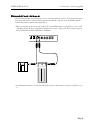 11
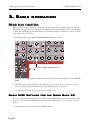 12
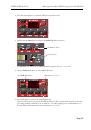 13
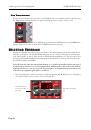 14
 15
 16
 17
 18
 19
 20
 21
 22
 23
 24
 25
 26
 27
 28
 29
 30
 31
 32
 33
 34
 35
 36
 37
 38
 39
 40
 41
 42
 43
 44
 45
 46
 47
 48
 49
 50
 51
 52
 53
 54
 55
 56
 57
 58
 59
 60
 61
 62
 63
 64
 65
 66
 67
 68
 69
 70
 71
 72
 73
 74
 75
 76
 77
 78
 79
 80
 81
 82
 83
 84
 85
 86
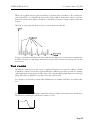 87
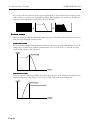 88
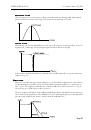 89
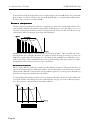 90
 91
 92
 93
 94
 95
 96
 97
 98
 99
 100
 101
 102
 103
 104
 105
 106
 107
 108
 109
 110
 111
 112
 113
 114
 115
 116
 117
 118
 119

8. Panel Reference: LFO 2: LFO Mode
NORD LEAD 2X V1.0x
Page 56
• The echo function may give unexpected results if you use another Play mode than Poly. For example,
in Mono mode, each sustaining note will be cut off by the next echo repeat and in Legato mode, you
may end up with no sound at all, since new notes will not retrig the envelopes.
LFO 2: LFO M
LFO 2: LFO M
LFO 2: LFO M
LFO 2: LFO M
O
O
O
OD
D
D
DE
E
E
E
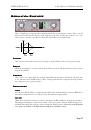
When “LFO Mode” is selected for LFO 2 (the Arp indicator is dark), LFO 2 works as a regular LFO,
producing vibrato, wah-wah or tremolo effects. The parameters have the following functions:
R
R
R
R
A
A
A
AT
T
T
TE
E
E
E
This determines the rate (speed) of the modulation.
D
D
D
D
E
E
E
ES
S
S
ST
T
T
TIIIIN
N
N
NA
A
A
AT
T
T
TIIIIO
O
O
ON
N
N
N
OSC 1+2
OSC 1+2
OSC 1+2
OSC 1+2
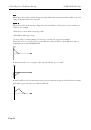
When this is selected, LFO 2 produces a triangle wave routed to the pitch of Oscillator 1 and 2 in equal
amounts – in other words, a regular vibrato.
A
A
A
A
M
M
M
MP
P
P
P
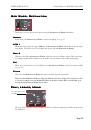
When this is selected, LFO2 produces a triangle wave routed to the volume, for tremolo effects.
F
F
F
F
IIIIL
L
L
LT
T
T
TE
E
E
ER
R
R
R
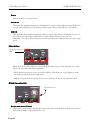
When this is selected, LFO2 produces a triangle wave routed to the Filter Frequency, for wah-wah effects.
A
A
A
A
M
M
M
MT
T
T
T
This determines the amount of modulation. Turn the knob to the right for more pronounced vibrato/
tremolo/wah-wah.
Оглавление инструкции
- 1. Introduction
- 2. Connections
- 3. Basic operation
- Demo play function
- Basic MIDI Settings for the Nord Rack 2X
- Selecting Programs
- Selecting Percussion Kits
- Using the Slots to switch Programs
- Layering
- Splitting the Keyboard
- Performances
- Monophonic and polyphonic operation
- Stereo/Mono
- Pitch Stick and Modulation Wheel
- Master Tune
- Using a sustain pedal
- Using a control (expression) pedal
- The “Panic” button
- 4. Editing Programs
- 5. Programming Velocity Sensitivity
- 6. Percussion Kits
- 7. Performances
- 8. Panel Reference
- 9. Shift functions
- Accessing the Shift functions
- Shift function list
- Tune (Master Tune)
- Out Mode
- Local
- Prog/Ctrl
- MIDI Channel
- Special
- Accessing the Special functions
- Function “1” – Synchronizing LFO 1 to MIDI Clock
- Function “2” – Synchronizing LFO2/Arpeggio to MIDI Clock
- Function “F” – External triggering of Filter envelope
- Function “A” – External triggering of Amplifier Envelope
- Function “S” – External Velocity Morph
- Aftertouch and Expression Pedal Settings
- System
- 10. MIDI
- 11. Synthesis basics
- 12. Factory presets
- 13. MIDI implementation
- Index