Инструкция для Yamaha RX-V365
 1
 2
 3
 4
 5
 6
 7
 8
 9
 10
 11
 12
 13
 14
 15
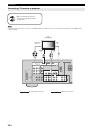 16
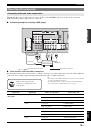 17
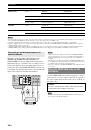 18
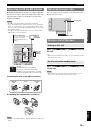 19
 20
 21
 22
 23
 24
 25
 26
 27
 28
 29
 30
 31
 32
 33
 34
 35
 36
 37
 38
 39
 40
 41
 42
 43
 44
 45
 46
 47
 48
 49
 50
 51
 52
 53
 54
 55
 56
 57
 58
 59
 60
 61
 62
 63
 64
 65
 66
 67
 68
 69
 70
 71
 72
 73
 74
 75
 76
 77
 78
 79
 80
 81
 82
 83
 84
 85
 86
 87
 88
 89
 90
 91
 92
 93
 94
 95
 96
 97
 98
 99
 100

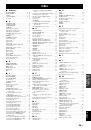
Index
46
En
■
N
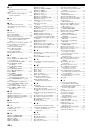
NEWS, Radio Data System program type .... 29
NIGHT indicator ............................................. 4
Night listening mode ..................................... 20
NIGHT, front panel ......................................... 3
NIGHT, remote control ................................... 5
NO FRONT L SP, Auto setup error
message .................................................... 41
NO FRONT R SP, Auto setup error
message .................................................... 41
■
O
OPTIMIZER MIC jack, Auto setup .............. 16
OPTIMIZER MIC jack, front panel ................ 3
Optimizer microphone ................................... 16
Optimizer microphone, Auto setup ............... 16
Optimizing speaker setting ............................ 16
Option menu .................................................. 31
OTHER M, Radio Data System
program type ............................................. 29
■
P
PANORAMA ................................................ 26
Panorama ....................................................... 26
Parameter initialization ................................. 36
PCM indicator ................................................. 4
PHASE REVERSED, Auto setup error
message .................................................... 42
PHONES jack, front panel .............................. 3
Placing speakers .............................................. 9
Playing video sources in the background ...... 21
POP M, Radio Data System program type .... 29
Pop/Rock ....................................................... 25
PORTABLE (VIDEO AUX) jack,
front panel ................................................... 3
Power cable ..................................................... 6
POWER, remote control ................................. 5
PRESET ........................................................ 37
Preset SCENE templates ............................... 23
PRESET/TUNING, front panel ....................... 3
PROG, remote control ..................................... 5
Program service, Radio Data System
information ............................................... 29
Program type, Radio Data System
information ............................................... 29
PROGRAM, front panel .................................. 3
PS, PTY, RT and CT ....................................... 4
PTY HOLD PTY SEEK mode, Radio Data
System tuning ........................................... 29
PTY, Radio Data System information ........... 29
■
R
Radio Data System indicators ......................... 4
Radio Data System tuning ............................. 29
Radio Listening ............................................. 23
Radio text, Radio Data System
information ............................................... 29
Rear panel ........................................................ 6
Remote control ................................................ 5
Resetting the system ...................................... 37
RETURN, remote control ............................... 5
ROCK M, Radio Data System
program type ............................................. 29
RT, Radio Data System information ............. 29
■
S
SCENE .......................................................... 22
SCENE 1/2/3/4, front panel ............................ 3
SCENE 1/2/3/4, remote control ...................... 5
SCIENCE, Radio Data System
program type ............................................. 29
Selecting audio input jacks ............................ 19
Selecting preset stations ................................ 28
component as the input source .................. 19
Selecting the night listening mode ................. 20
Selecting the SCENE templates ..................... 22
Selection, Radio Data System
program type ............................................. 29
Set menu ........................................................ 31
Set this unit to the standby mode ................... 15
SIGNAL INFO .............................................. 21
Signal information ......................................... 31
SILENT CINEMA ......................................... 26
SILENT CINEMA indicator ............................ 4
SLEEP indicator .............................................. 4
Sleep timer ..................................................... 21
SLEEP, remote control .................................... 5
Sound field programs ..................................... 25
Sound menu ................................................... 31
SP A B indicators ............................................. 4
SP D.R ........................................................... 34
SP LFE ........................................................... 34
Speaker distance ............................................ 33
Speaker distances ........................................... 33
Speaker dynamic range .................................. 34
Speaker level .................................................. 33
Speaker LFE .................................................. 34
Speaker settings ............................................. 32
SPEAKERS terminals ...................................... 6
SPEAKERS, front panel .................................. 3
Specifications ................................................. 44
SPORT, Radio Data System program type .... 29
STANDBY, remote control ............................. 5
STANDBY/ON, front panel ............................ 3
Straight decoding mode ................................. 26
STRAIGHT, front panel .................................. 3
STRAIGHT, remote control ............................ 5
SUBWOOFER OUTPUT jack ........................ 6
Subwoofer phase ............................................ 33
Supplied accessories ........................................ 2
SUR. LR ......................................................... 32
SUR.DECODE, remote control ....................... 5
Surround left/right speakers ........................... 32
SWFR PHASE ............................................... 33
■
T
TEST .............................................................. 34
Test tone ......................................................... 34
TONE CONTROL, front panel ....................... 3
Troubleshooting ............................................. 38
Tuner indicators ............................................... 4
TUNING AUTO/MAN’L, front panel ............ 3
Turning off the power .................................... 15
Turning on the power ..................................... 15
TV Sports ....................................................... 25
TV Sports Viewing ........................................ 23
TV Viewing ................................................... 23
■
U
UNIT .............................................................. 33
Unit ................................................................ 33
Unplug HP!, Auto setup error message ......... 41
USER CANCEL, Auto setup error
message ..................................................... 41
Using the remote control .................................. 8
Using the VIDEO AUX jacks ........................ 14
Using your headphones .................................. 20
■
V
program type ............................................. 29
VIDEO (VIDEO AUX) jack, front panel ........ 3
Video cable plugs ........................................... 11
VIDEO jacks .............................................. 6, 11
Video jacks .................................................... 11
Virtual CINEMA DSP ................................... 26
VIRTUAL indicator ......................................... 4
VOLUME +/-, remote control ......................... 5
VOLUME control, front panel ......................... 3
VOLUME level indicator ................................ 4
Volume Trim .................................................. 35
■
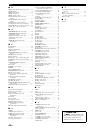
Y
Yamaha Parametric Room Acoustic
Optimizer .................................................. 16
YPAO ............................................................ 16
YPAO (Yamaha Parametric Room
Acoustic Optimizer) ................................. 16
YPAO indicator ............................................... 4
■
Z
Zone B ........................................................... 19
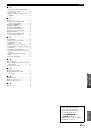
“
A
STANDBY/ON
” or
“
e
DVD
” (example) indicates the
name of the parts on the front panel
or the remote control. Refer to
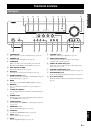
“Functional overview” on page 3.
Оглавление инструкции
- English
- INTRODUCTION
- PREPARATION
- BASIC OPERATION
- ADVANCED OPERATION
- ADDITIONAL INFORMATION
- Русский
- ВВЕДЕНИЕ
- ПОДГОТОВКА
- ОСНОВНЫЕ ОПЕРАЦИИ
- ДОПОЛНИТЕЛЬНЫЕ ОПЕРАЦИИ
- ДОПОЛНИТЕЛЬНАЯ ИНФОРМАЦИЯ