Инструкция для Yamaha RX-V365
 1
 2
 3
 4
 5
 6
 7
 8
 9
 10
 11
 12
 13
 14
 15
 16
 17
 18
 19
 20
 21
 22
 23
 24
 25
 26
 27
 28
 29
 30
 31
 32
 33
 34
 35
 36
 37
 38
 39
 40
 41
 42
 43
 44
 45
 46
 47
 48
 49
 50
 51
 52
 53
 54
 55
 56
 57
 58
 59
 60
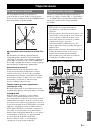 61
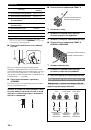 62
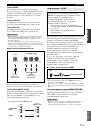 63
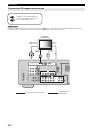 64
 65
 66
 67
 68
 69
 70
 71
 72
 73
 74
 75
 76
 77
 78
 79
 80
 81
 82
 83
 84
 85
 86
 87
 88
 89
 90
 91
 92
 93
 94
 95
 96
 97
 98
 99
 100
39
En
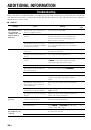
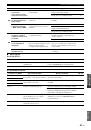
Troubleshooting
English
INTR
ODUCTION
AD
DITIONAL
INFORMA
T
ION
APPENDIX
PRE
P
ARA
T
ION
BA
S
IC
OPERA
T
ION
AD
V
ANCED
OPERA
T
ION
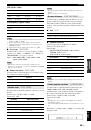
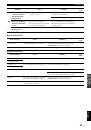
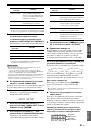
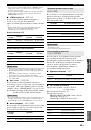
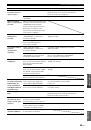
Only the center
speaker outputs
substantial sound.
When playing a monaural source with a
CINEMA DSP program, the source signal
is directed to the center channel, and the
front and surround speakers output effect
sounds.
No sound is heard
from the center
speaker.
“CENTER” in “SPEAKER SET” is set to
“NONE.”
Set “CENTER” to “SML” or “LRG.”
Some sound field programs do not output
sounds from the center speaker.
Try another sound field program.
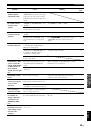
No sound is heard
from the surround
speakers.
“SUR. LR” in “SPEAKER SET” is set to
“NONE.”
Set “SUR. LR” to “SML” or “LRG.”
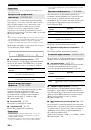
This unit is in the “STRAIGHT” mode
and a monaural source is being played
back.
Press
M
STRAIGHT
on the front panel so that
“STRAIGHT” disappears from the front panel
display.
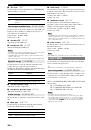
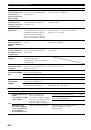
No sound is heard
from the subwoofer.
“BASS OUT” in “SPEAKER SET” is set
to “FRONT” when a Dolby Digital or
DTS signal is being played.
Set “BASS OUT” to “SWFR” or “BOTH.”
“BASS OUT” in “SPEAKER SET” is set
to “SWFR” or “FRONT” when a 2-
channel source is being played.
Set “BASS OUT” to “BOTH.”
The source does not contain low-
frequency bass signals.
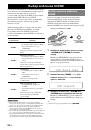
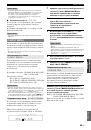
Dolby Digital or DTS
sources cannot be
played. (Dolby Digital
or DTS indicator on
the front panel
display does not light
up.)
The connected component is not set to
output Dolby Digital or DTS digital
signals.
Make an appropriate setting following the operating
instructions for your component.
—
Audio input jack select is set to
“ANALOG.”
Set Audio input jack select to “AUTO.”
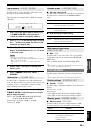
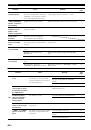
A humming sound is
heard.
Incorrect cable connections.
Connect the audio cables firmly. If the problem
persists, the cables may be defective.
—
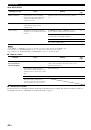
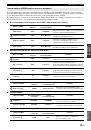
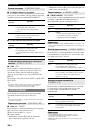
The volume level
cannot be increased,
or the sound is
distorted.
You are attempting to set the volume level
higher than the maximum volume level.
Adjust “MAX VOL.” setting.
The component connected to the AUDIO
OUT (REC) jack on this unit is turned off.
Turn on the power of the component.
—
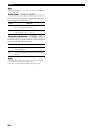
The sound effect
cannot be recorded.
It is not possible to record the sound effect
with a recording component.
A source cannot be
recorded by an
analog component
connected to the
AUDIO OUT (REC)
jack.
The source component is not connected to
the analog AUDIO IN jacks on this unit.
Connect the source component to the analog AUDIO
IN jacks.
The sound field
parameters and some
other settings of this
unit cannot be
changed.
“MEM.GUARD” in “OPTION MENU” is
set to “ON.”
Set “MEM.GUARD” to “OFF.”
Problem
Cause
Remedy
See
page
Оглавление инструкции
- English
- INTRODUCTION
- PREPARATION
- BASIC OPERATION
- ADVANCED OPERATION
- ADDITIONAL INFORMATION
- Русский
- ВВЕДЕНИЕ
- ПОДГОТОВКА
- ОСНОВНЫЕ ОПЕРАЦИИ
- ДОПОЛНИТЕЛЬНЫЕ ОПЕРАЦИИ
- ДОПОЛНИТЕЛЬНАЯ ИНФОРМАЦИЯ