Инструкция для Yamaha RX-V365
 1
 2
 3
 4
 5
 6
 7
 8
 9
 10
 11
 12
 13
 14
 15
 16
 17
 18
 19
 20
 21
 22
 23
 24
 25
 26
 27
 28
 29
 30
 31
 32
 33
 34
 35
 36
 37
 38
 39
 40
 41
 42
 43
 44
 45
 46
 47
 48
 49
 50
 51
 52
 53
 54
 55
 56
 57
 58
 59
 60
 61
 62
 63
 64
 65
 66
 67
 68
 69
 70
 71
 72
 73
 74
 75
 76
 77
 78
 79
 80
 81
 82
 83
 84
 85
 86
 87
 88
 89
 90
 91
 92
 93
 94
 95
 96
 97
 98
 99
 100

34
En
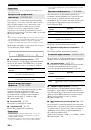
Set menu
■
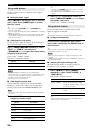
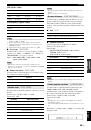
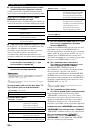
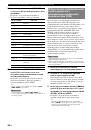
Test tone
TEST
Use this feature to make adjustments for “CENTER GEQ”
while listening to a test tone.
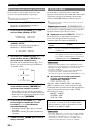
Use this feature to adjust the output level of the LFE (low-
frequency effect) channel according to the capacity of
your subwoofer or headphones.
Control range: –20 dB to 0 dB*
Control step: 1 dB
■
Speaker LFE
SP LFE
Adjusts the speaker LFE level.
■
Headphone LFE
HP LFE
Adjusts the headphone LFE level.
Notes
•
Depending on the settings of “BASS OUT” (see page 32), some signals
may not be output at the SUBWOOFER OUTPUT jack.
•
The LFE channel carries low-frequency special effects which are only
added to certain scenes.
•
This setting is effective when the input signal contains the LFE channel.
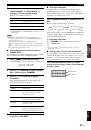
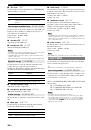
Use this feature to select the amount of dynamic range
compression to be applied to your speakers or
headphones. This setting is effective only when this unit is
decoding Dolby Digital and DTS signals.
■
Speaker dynamic range
SP D.R
Adjusts the speaker compression.
■
Headphone dynamic range
HP D.R
Adjusts the headphone compression.
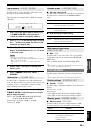
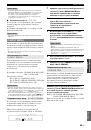
Use this feature to adjust the overall audio settings of this
unit.
■
Mute type
MUTE TYP.
Use this feature to adjust how much the mute function
reduces the output volume (see page 20).
■
Audio delay
A.DELAY
Use this feature to delay the sound output and synchronize
it with the video image. This may be necessary for certain
LCD monitors or projectors.
Control range: 0 ms* to 160 ms
Control step: 1 ms
■
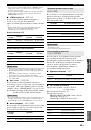
Maximum volume
MAX VOL.
Use this feature to set the maximum volume level
regardless of the original volume range. This feature is
useful to avoid the unexpected loud sound.
Control range: +16 dB*, +10 dB to –30 dB
Control step: 5 dB
Note
•
The “MAX VOL.” setting takes priority over the “INI.VOL.” setting. For
example, if “INI.VOL.” is set to –20 dB and “MAX VOL.” is set to –30
dB, the volume level is automatically set to –30 dB when you turn on the
power of this unit next time.
■
Initial volume
INI.VOL.
Use this feature to set the volume level when the power of
this unit is turned on.
Choices: Off*, –80 dB to +16 dB
Control step: 1 dB
Note
•
The “MAX VOL.” setting takes priority over the “INI.VOL.” setting.
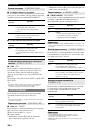
Use this menu to reassign the input jacks, select the input
mode or rename the input source.
y
•
Initial settings are indicated by (*) in this following each parameter.
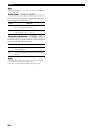
Use this feature to assign the input jacks according to the
component to be used if the initial settings of this unit do
not correspond to your needs.
Choices: CD, MD/CD-R, DVD, DTV/CBL, V-AUX, DVR
Initial setting:
IN (1) (COAXIAL jack): DVD
IN (2) (OPTICAL (DTV/CBL) jack): DTV/CBL
IN (3) (OPTICAL (CD) jack): CD
Notes
•
You cannot select a specific item more than once.
•
You cannot assign the same input source to both “IN (2)” and “IN (3).”
For example, you assign “CD” to “IN (2),” “–––” appears in “IN (3).”
•
Once the input jacks are reassigned, you can select the corresponding
component by using
N
INPUT
l
/
h
(or the input selector buttons
(
e
) on the remote control).
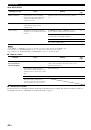
Choice
Function
OFF
*
Stops test tones and output the currently.
ON
Outputs test tones from the center and from left
speakers.
Low-frequency effect level
E)LFE LEVEL
Dynamic range
F)D.RANGE
Choice
Function
MIN
Adjusts the dynamic range to narrow.
STD
Adjusts the dynamic range to medium.
MAX
*
Preserves the greatest amount of dynamic range.
Audio settings
G)AUDIO SET
Choice
Function
FULL
*
Completely mutes all the audio output.
-20dB
Reduces the current volume by 20 dB.
2 INPUT MENU
Input assignment
A)INPUT ASSIGN
Оглавление инструкции
- English
- INTRODUCTION
- PREPARATION
- BASIC OPERATION
- ADVANCED OPERATION
- ADDITIONAL INFORMATION
- Русский
- ВВЕДЕНИЕ
- ПОДГОТОВКА
- ОСНОВНЫЕ ОПЕРАЦИИ
- ДОПОЛНИТЕЛЬНЫЕ ОПЕРАЦИИ
- ДОПОЛНИТЕЛЬНАЯ ИНФОРМАЦИЯ