Инструкция для Yamaha RX-V365
 1
 2
 3
 4
 5
 6
 7
 8
 9
 10
 11
 12
 13
 14
 15
 16
 17
 18
 19
 20
 21
 22
 23
 24
 25
 26
 27
 28
 29
 30
 31
 32
 33
 34
 35
 36
 37
 38
 39
 40
 41
 42
 43
 44
 45
 46
 47
 48
 49
 50
 51
 52
 53
 54
 55
 56
 57
 58
 59
 60
 61
 62
 63
 64
 65
 66
 67
 68
 69
 70
 71
 72
 73
 74
 75
 76
 77
 78
 79
 80
 81
 82
 83
 84
 85
 86
 87
 88
 89
 90
 91
 92
 93
 94
 95
 96
 97
 98
 99
 100
1
En
English
INTR
ODUCTION
AD
DITIONAL
INFORMA
T
ION
APPENDIX
PRE
P
ARA
T
ION
BA
S
IC
OPERA
T
ION
AD
V
ANCED
OPERA
T
ION
Features.................................................................... 2
Supplied accessories .................................................. 2
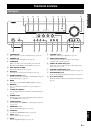
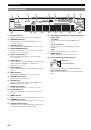
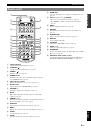
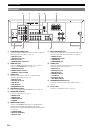
Functional overview................................................ 3
Front panel ................................................................. 3
Front panel display..................................................... 4
Remote control........................................................... 5
Rear panel .................................................................. 6
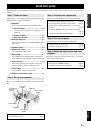
Quick start guide..................................................... 7
L
Preparation of remote control ............................... 8
Connections ............................................................. 9
Placing speakers......................................................... 9
Connecting speakers .................................................. 9
Connecting video components................................. 11
Connecting other components ................................. 13
Using the VIDEO AUX jacks on the front panel .... 14
Connecting the FM and AM antennas ..................... 15
Connecting the power cable..................................... 15
Turning on and off the power .................................. 15
Optimizing the speaker setting for your listening
room (YPAO) .................................................... 16
Using AUTO SETUP............................................... 16
Playback................................................................. 18
Basic procedure........................................................ 18
Additional operations............................................... 19
Selecting the SCENE templates ........................... 22
Selecting the desired SCENE template.................... 22
Creating your original SCENE templates ................ 24
Sound field programs ........................................... 25
Selecting sound field programs................................ 25
FM/AM tuning ...................................................... 27
Radio Data System tuning (Europe and Russia
models only)....................................................... 29
SEEK mode) ........................................................ 29
Using the enhanced other networks (EON) data
service.................................................................. 30
Set menu ................................................................ 31
Using set menu......................................................... 32
1 SOUND MENU .................................................... 32
2 INPUT MENU ...................................................... 34
3 OPTION MENU ................................................... 35
Advanced setup..................................................... 37
Troubleshooting .................................................... 38
Glossary ................................................................. 43
Specifications......................................................... 44
Index ...................................................................... 45
Contents
INTRODUCTION
PREPARATION
BASIC OPERATION
ADVANCED OPERATION
ADDITIONAL INFORMATION
About this manual
•
y
indicates a tip for your operation.
•
Some operations can be performed by using either the buttons on the
front panel or the ones on the remote control. In case the button
names differ between the front panel and the remote control, the
button name on the remote control is given in parentheses.
•
This manual is printed prior to production. Design and specifications
are subject to change in part as a result of improvements, etc. In case
of differences between the manual and product, the product has
priority.
•
“
A
STANDBY/ON
” or “
e
DVD
” (example) indicates the name of
the parts on the front panel or the remote control. Refer to the
“Functional overview” on page 3.
Оглавление инструкции
- English
- INTRODUCTION
- PREPARATION
- BASIC OPERATION
- ADVANCED OPERATION
- ADDITIONAL INFORMATION
- Русский
- ВВЕДЕНИЕ
- ПОДГОТОВКА
- ОСНОВНЫЕ ОПЕРАЦИИ
- ДОПОЛНИТЕЛЬНЫЕ ОПЕРАЦИИ
- ДОПОЛНИТЕЛЬНАЯ ИНФОРМАЦИЯ