Инструкция для Sony BRAVIA KDL-40X3000
 1
 2
 3
 4
 5
 6
 7
 8
 9
 10
 11
 12
 13
 14
 15
 16
 17
 18
 19
 20
 21
 22
 23
 24
 25
 26
 27
 28
 29
 30
 31
 32
 33
 34
 35
 36
 37
 38
 39
 40
 41
 42
 43
 44
 45
 46
 47
 48
 49
 50
 51
 52
 53
 54
 55
 56
 57
 58
 59
 60
 61
 62
 63
 64
 65
 66
 67
 68
 69
 70
 71
 72
 73
 74
 75
 76
 77
 78
 79
 80
 81
 82
 83
 84
 85
 86
 87
 88
 89
 90
 91
 92
 93
 94
 95
 96
 97
 98
 99
 100
 101
 102
 103
 104
 105
 106
 107
 108
 109
 110
 111
 112
 113
 114
 115
 116
 117
 118
 119
 120
 121
 122
 123
 124
 125
 126
 127
 128
 129
 130
 131
 132
 133
 134
 135
 136
 137
 138
 139
 140
 141
 142
 143
 144
 145
 146
 147
 148
 149
 150
 151
 152
 153
 154
 155
 156
 157
 158
 159
 160
 161
 162
 163
 164
23
GB
Usi
ng Opt
io
nal
Equi
pment
To view two pictures simultaneously
– PIP (Picture in Picture)
You can view two pictures (PC input and TV
programme) on the screen simultaneously.
Connect a PC (page 20), and make sure that images
from a PC appear on the screen.
1
Press TOOLS to display the Tools menu.
2
Press
F
/
f
to select “PIP”, then press .
The picture from the connected PC is displayed with
full size and the TV programme is displayed on the
right corner.
You can use
F
/
f
/
G
/
g
to move the TV programme
screen position.
3
Press number buttons or PROG +/– to
select the TV channel.
To return to single picture mode
Press RETURN.
z
You can switch the audible picture by selecting “TV Sound /
PC Sound” from the Tools menu.
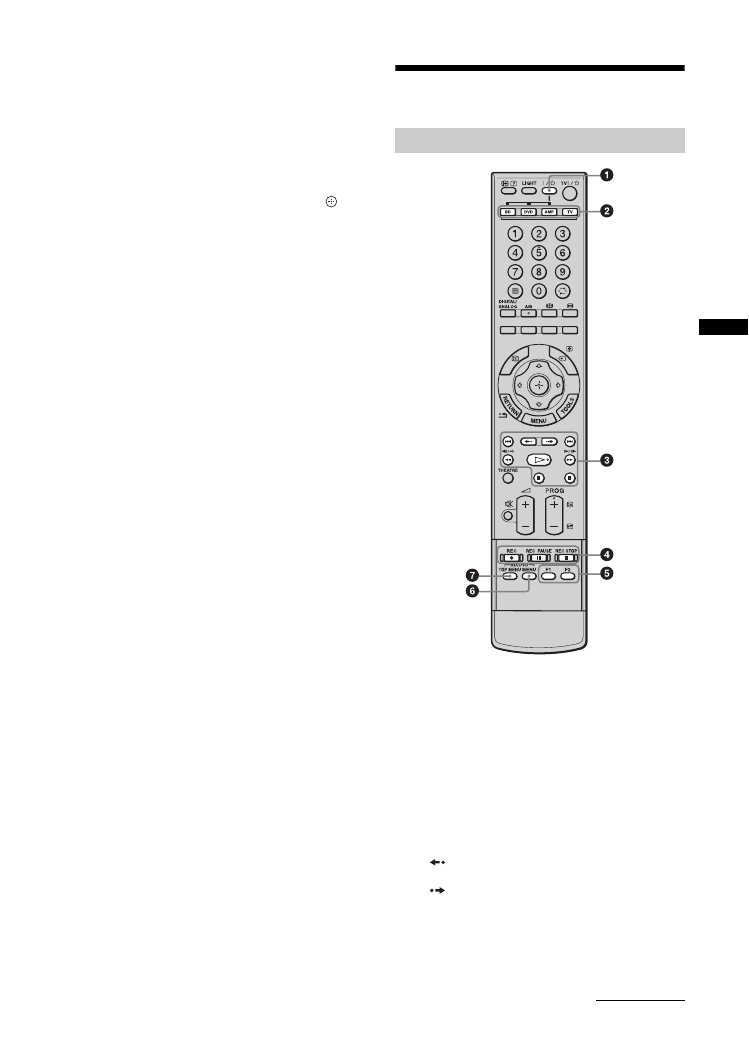
Using the remote
1
"/1
Turns on or off the optional equipment selected from
the function buttons.
2
Function buttons
Enables you to operate the corresponding equipment.
For details, see “Programming the remote” on
page 24.
3
BD/DVD operating buttons
•
.
: Replays the current programme from the
previous chapter mark (if any).
•
>
: Advances forward to the next chapter mark
(if any).
•
: Replays the current programme for a set
period of time.
•
: Advances forward a set period of time.
•
m
: Plays a programme in fast reverse mode.
•
M
: Plays a programme in fast forward mode.
•
H
: Plays a programme at a normal speed.
•
X
: Pauses playback.
•
x
: Stops the playback.
Buttons for using optional equipment
Continued
Оглавление инструкции
- GB
- PL
- RU