Инструкция для Sony BRAVIA KDL-40X3000
 1
 2
 3
 4
 5
 6
 7
 8
 9
 10
 11
 12
 13
 14
 15
 16
 17
 18
 19
 20
 21
 22
 23
 24
 25
 26
 27
 28
 29
 30
 31
 32
 33
 34
 35
 36
 37
 38
 39
 40
 41
 42
 43
 44
 45
 46
 47
 48
 49
 50
 51
 52
 53
 54
 55
 56
 57
 58
 59
 60
 61
 62
 63
 64
 65
 66
 67
 68
 69
 70
 71
 72
 73
 74
 75
 76
 77
 78
 79
 80
 81
 82
 83
 84
 85
 86
 87
 88
 89
 90
 91
 92
 93
 94
 95
 96
 97
 98
 99
 100
 101
 102
 103
 104
 105
 106
 107
 108
 109
 110
 111
 112
 113
 114
 115
 116
 117
 118
 119
 120
 121
 122
 123
 124
 125
 126
 127
 128
 129
 130
 131
 132
 133
 134
 135
 136
 137
 138
 139
 140
 141
 142
 143
 144
 145
 146
 147
 148
 149
 150
 151
 152
 153
 154
 155
 156
 157
 158
 159
 160
 161
 162
 163
 164
12
GB
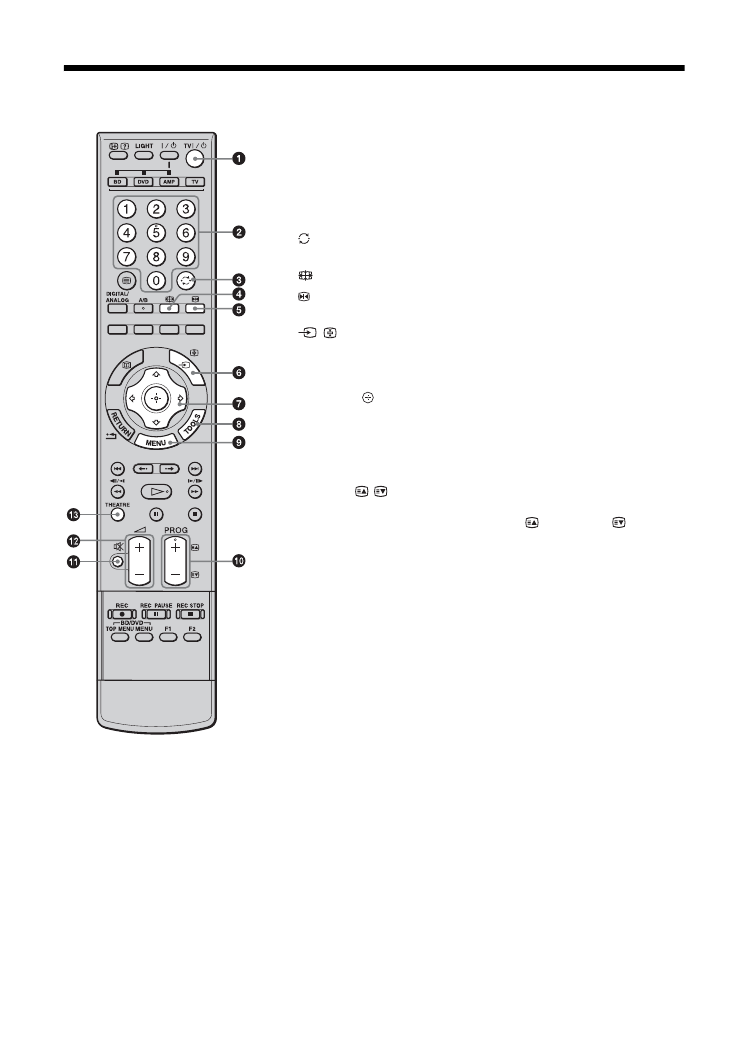
Overview of the remote
1
TV
"/1
— TV standby
Turns the TV on and off from standby mode.
2
Number buttons
• In TV mode: Selects channels. For channel numbers 10 and above, enter
the second and third digit quickly.
• In Text mode: Enters the page number to select the page.
3
— Previous channel
Returns to the previous channel watched (for more than five seconds).
4
— Screen mode (page 16)
5
— Picture freeze (page 15)
Freezes the TV picture.
6
/
— Input select / Text hold
• In TV mode (page 22): Selects the input source from equipment connected
to the TV sockets.
• In Text mode (page 16): Holds the current page.
7
F
/
f
/
G
/
g
/
8
Enables you to access various viewing options and change/make adjustments
according to the source and screen format.
9
0
PROG +/–/
/
• In TV mode (page 15): Selects the next (+) or previous (–) channel.
• In Text mode (page 16): Selects the next (
) or previous (
) page.
qa
%
qs
2
+/– — Volume (page 22)
qd
THEATRE
You can set Theatre Mode on or off. When Theatre Mode is set to on, the
optimum audio output (if the TV is connected with an audio system using an
HDMI cable) and picture quality for film-based contents are automatically
set.
z
If you turn the TV off, Theatre Mode is also turned off.
Оглавление инструкции
- GB
- PL
- RU