Инструкция для Sony BRAVIA KDL-40X3000
 1
 2
 3
 4
 5
 6
 7
 8
 9
 10
 11
 12
 13
 14
 15
 16
 17
 18
 19
 20
 21
 22
 23
 24
 25
 26
 27
 28
 29
 30
 31
 32
 33
 34
 35
 36
 37
 38
 39
 40
 41
 42
 43
 44
 45
 46
 47
 48
 49
 50
 51
 52
 53
 54
 55
 56
 57
 58
 59
 60
 61
 62
 63
 64
 65
 66
 67
 68
 69
 70
 71
 72
 73
 74
 75
 76
 77
 78
 79
 80
 81
 82
 83
 84
 85
 86
 87
 88
 89
 90
 91
 92
 93
 94
 95
 96
 97
 98
 99
 100
 101
 102
 103
 104
 105
 106
 107
 108
 109
 110
 111
 112
 113
 114
 115
 116
 117
 118
 119
 120
 121
 122
 123
 124
 125
 126
 127
 128
 129
 130
 131
 132
 133
 134
 135
 136
 137
 138
 139
 140
 141
 142
 143
 144
 145
 146
 147
 148
 149
 150
 151
 152
 153
 154
 155
 156
 157
 158
 159
 160
 161
 162
 163
 164
24
GB
4
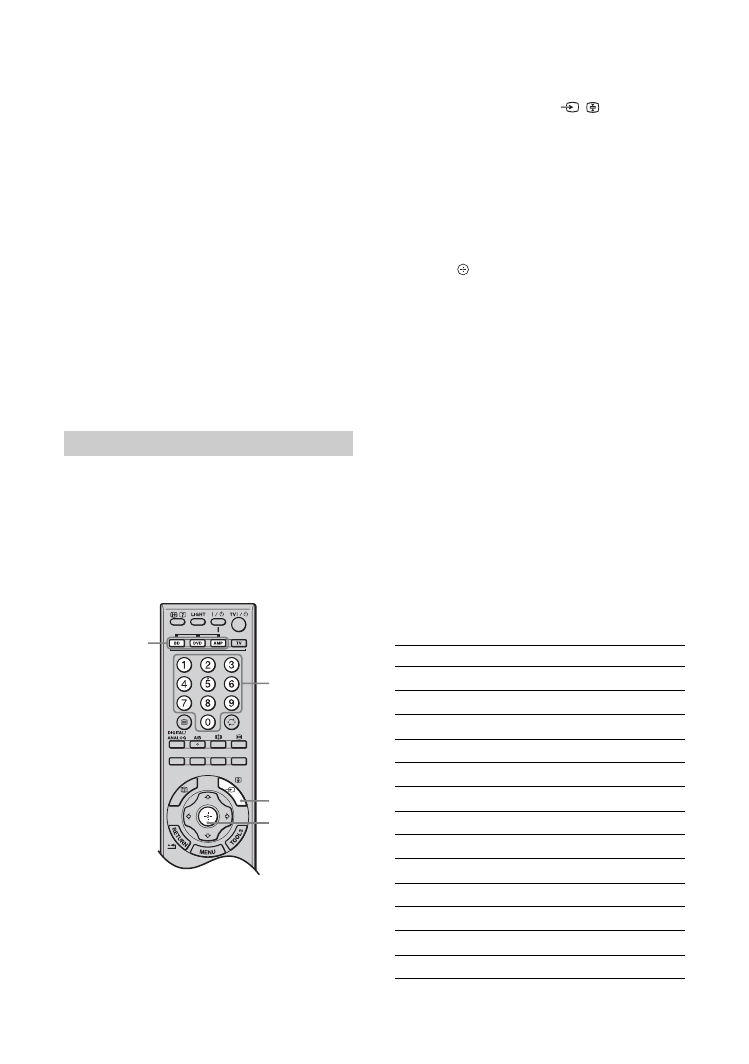
DVD record buttons
•
z
REC: Starts recording.
•
X
REC PAUSE: Pauses the recording.
•
x
REC STOP: Stops the recording.
5
F1/F2
• Selects a disc when using a DVD changer.
• Selects a function when using a combination unit
(e.g. a BD/DVD).
For details, see the operating instructions supplied
with the DVD changer or combination unit.
6
BD/DVD MENU
Displays the DVD disc menu. For details, see the
operating instructions supplied with the connected
equipment.
7
BD/DVD TOP MENU
Displays the top menu of the DVD disc. For details,
see the operating instructions supplied with the
connected equipment.
z
The
H
button has a tactile dot. Use the tactile dot as a
reference when operating other equipment.
This remote is preset to operate Sony TVs, most Sony
BDs, DVDs and AMPs (Home Theatre, etc.).
To control BDs and DVDs of other manufacturers
(and some other Sony BD, DVD and AMP models),
do the following procedure to programme the remote.
~
Before you start, look up the three-digit code for your brand
of BD, DVD or AMP from the “Manufacturer’s codes” on
page 24.
1
Press and hold the BD, DVD or AMP
function button you want to programme on
the remote, then press
/
, keeping the
function button pressed down.
The selected function button (BD, DVD or AMP)
will flash.
2
Press the number buttons to enter the
three-digit manufacturer’s code number
when the button flashes.
If code is not entered within 10 seconds, you must
perform the step 1 again.
3
Press .
When the programming is correct, the selected
function button will flash twice, and when not, it
will flash five times.
4
Turn on your equipment and check that the
following main functions work.
H
(playback),
x
(stop),
m
(rewind),
M
(fast
forward), channel selection for both BDs and
DVDs, TOP MENU/MENU and
F
/
f
/
G
/
g
only
for DVDs.
If your equipment is not working, or some of the
functions do not work
Enter the correct code or try the next code listed
for the brand. However, not all models of every
brand may be covered.
To return to normal TV operation
Press the TV function button.
Manufacturer’s codes
DVD brand list
DVD Player
Programming the remote
2
3
1
1
Brand
Code
SONY
001, 029, 030, 036 – 044, 053 – 055
AIWA
021
AKAI
032
DENON
018, 027, 020, 002
GRUNDIG
009, 028, 023, 024, 016, 003
HITACHI
025, 026, 015, 004, 035
JVC
006, 017
KENWOOD
008
LG
015, 014, 034
LOEWE
009, 028, 023, 024, 016, 003
MATSUI
013, 016
ONKYO
022, 033
PANASONIC
018, 027, 020, 002, 045 – 047
Оглавление инструкции
- GB
- PL
- RU