Инструкция для Sony BRAVIA KDL-40X3000
 1
 2
 3
 4
 5
 6
 7
 8
 9
 10
 11
 12
 13
 14
 15
 16
 17
 18
 19
 20
 21
 22
 23
 24
 25
 26
 27
 28
 29
 30
 31
 32
 33
 34
 35
 36
 37
 38
 39
 40
 41
 42
 43
 44
 45
 46
 47
 48
 49
 50
 51
 52
 53
 54
 55
 56
 57
 58
 59
 60
 61
 62
 63
 64
 65
 66
 67
 68
 69
 70
 71
 72
 73
 74
 75
 76
 77
 78
 79
 80
 81
 82
 83
 84
 85
 86
 87
 88
 89
 90
 91
 92
 93
 94
 95
 96
 97
 98
 99
 100
 101
 102
 103
 104
 105
 106
 107
 108
 109
 110
 111
 112
 113
 114
 115
 116
 117
 118
 119
 120
 121
 122
 123
 124
 125
 126
 127
 128
 129
 130
 131
 132
 133
 134
 135
 136
 137
 138
 139
 140
 141
 142
 143
 144
 145
 146
 147
 148
 149
 150
 151
 152
 153
 154
 155
 156
 157
 158
 159
 160
 161
 162
 163
 164
15
GB
Wat
chi
ng T
V
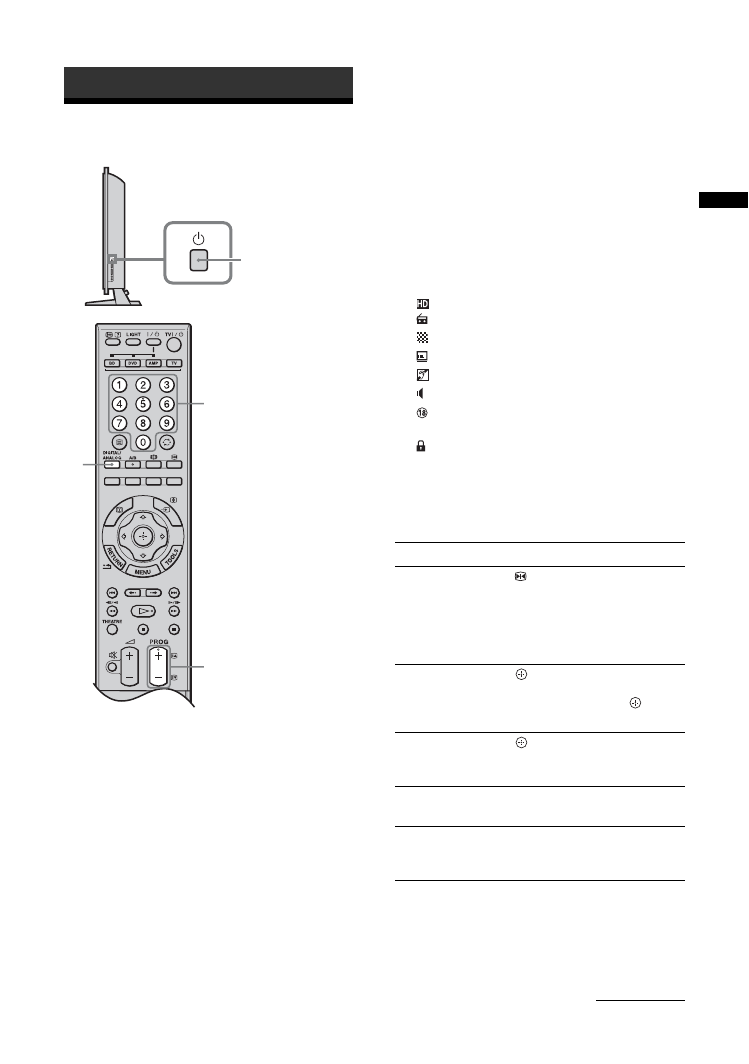
Watching TV
1
Press
1
on the right side of the TV to turn
on the TV.
When the TV is in standby mode (the
1
(standby)
indicator on the TV front panel is red), press
TV
"/1
on the remote to turn on the TV.
2
Press DIGITAL/ANALOG to switch
between digital and analogue modes.
The channels available vary depending on the
mode.
3
Press the number buttons or PROG +/– to
select a TV channel.
To select channel numbers 10 and above using the
number buttons, enter the second and third digits
quickly.
To select a digital channel using the Digital
Electronic Programme Guide (EPG), see page 17.
In digital mode
An information banner appears briefly. The
following icons may be indicated on the banner.
:
HD service
:
Radio service
:
Scrambled/Subscription service
:
Subtitles available
:
Subtitles available for the hearing impaired
:
Multiple audio languages available
:
Recommended minimum age for current
programme (from 4 to 18 years)
:
Parental Lock
c
(in red):
Current programme is being recorded
Additional operations
Watching TV
1
2
3
3
To
Press
Freeze the picture
(Picture freeze)
.
Press again to return to normal
TV mode.
~
This function is not available for a
PC input source.
Access the
Programme index
table (in analogue
mode only)
.
To select an analogue channel,
press
F
/
f
, then press
.
Access the Digital
Favourites (in digital
mode only)
.
For details, see page 19.
Mute the sound
%
.
Press again to restore.
Turn on the TV
without sound from
standby mode
%
.
Continued
Оглавление инструкции
- GB
- PL
- RU


