Инструкция для Sony BRAVIA KDL-40X3000
 1
 2
 3
 4
 5
 6
 7
 8
 9
 10
 11
 12
 13
 14
 15
 16
 17
 18
 19
 20
 21
 22
 23
 24
 25
 26
 27
 28
 29
 30
 31
 32
 33
 34
 35
 36
 37
 38
 39
 40
 41
 42
 43
 44
 45
 46
 47
 48
 49
 50
 51
 52
 53
 54
 55
 56
 57
 58
 59
 60
 61
 62
 63
 64
 65
 66
 67
 68
 69
 70
 71
 72
 73
 74
 75
 76
 77
 78
 79
 80
 81
 82
 83
 84
 85
 86
 87
 88
 89
 90
 91
 92
 93
 94
 95
 96
 97
 98
 99
 100
 101
 102
 103
 104
 105
 106
 107
 108
 109
 110
 111
 112
 113
 114
 115
 116
 117
 118
 119
 120
 121
 122
 123
 124
 125
 126
 127
 128
 129
 130
 131
 132
 133
 134
 135
 136
 137
 138
 139
 140
 141
 142
 143
 144
 145
 146
 147
 148
 149
 150
 151
 152
 153
 154
 155
 156
 157
 158
 159
 160
 161
 162
 163
 164
14
GB
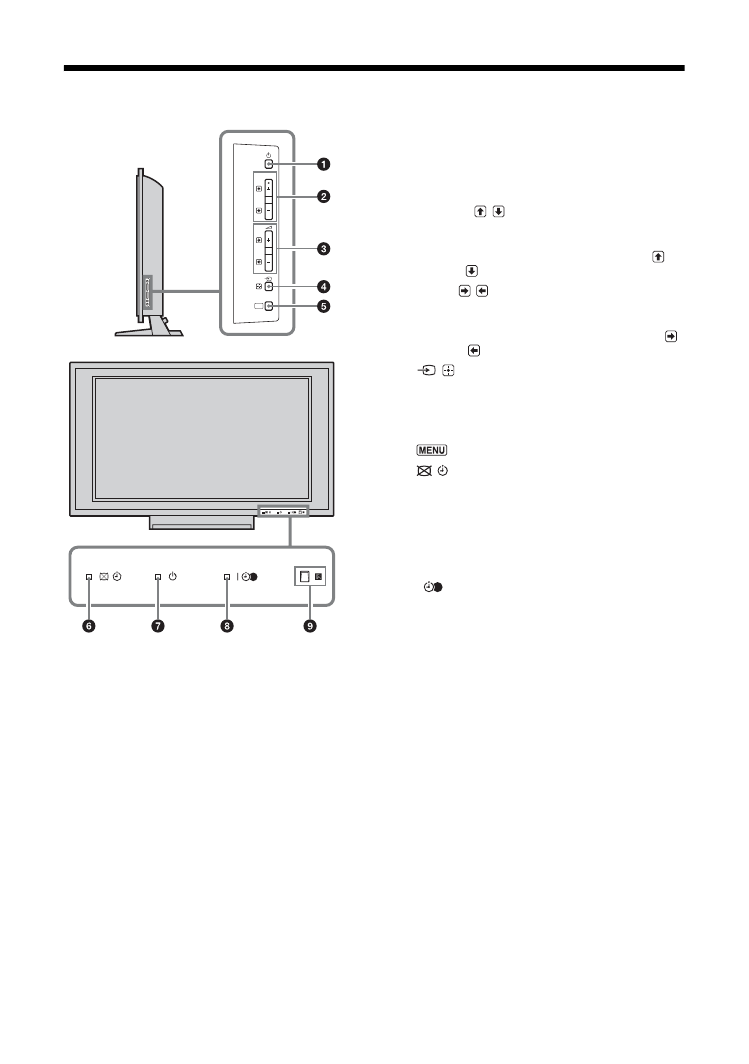
Overview of the TV buttons and indicators
1
1
— Power
Turns the TV on or off.
~
To disconnect the TV completely, pull the plug from the
mains.
2
PROG +/–/
/
• In TV mode: Selects the next (+) or previous (–)
channel.
• In TV menu: Moves through the options up (
) or
down (
).
3
2
+/–/
/
• In TV mode: Increases (+) or decreases (–) the
volume.
• In TV menu: Moves through the options right (
)
or left (
).
4
/
— Input select / OK
• In TV mode (page 22): Selects the input source
from equipment connected to the TV sockets.
• In TV menu: Selects the menu or option, and
confirms the setting.
5
6
— Picture Off / Timer indicator
• Lights up in green when the picture is switched off
• Lights up in orange when the timer is set
7
1
— Standby indicator
Lights up in red when the TV is in standby mode.
8
"
— Power / Timer REC programme indicator
• Lights up in green when the TV is turned on.
• Lights up in orange when the timer recording is set
• Lights up in red during the timer recording.
9
Remote control sensor / Light sensor (page 38)
• Receives IR signals from the remote.
• Do not put anything over the sensor, as its function
may be affected.
~
Make sure that the TV is completely turned off before
unplugging the mains lead. Unplugging the mains lead while
the TV is turned on may cause the indicator to remain lit or
may cause the TV to malfunction.
PROG
MENU
Оглавление инструкции
- GB
- PL
- RU