Инструкция для Sony BRAVIA KDL-40X3000
 1
 2
 3
 4
 5
 6
 7
 8
 9
 10
 11
 12
 13
 14
 15
 16
 17
 18
 19
 20
 21
 22
 23
 24
 25
 26
 27
 28
 29
 30
 31
 32
 33
 34
 35
 36
 37
 38
 39
 40
 41
 42
 43
 44
 45
 46
 47
 48
 49
 50
 51
 52
 53
 54
 55
 56
 57
 58
 59
 60
 61
 62
 63
 64
 65
 66
 67
 68
 69
 70
 71
 72
 73
 74
 75
 76
 77
 78
 79
 80
 81
 82
 83
 84
 85
 86
 87
 88
 89
 90
 91
 92
 93
 94
 95
 96
 97
 98
 99
 100
 101
 102
 103
 104
 105
 106
 107
 108
 109
 110
 111
 112
 113
 114
 115
 116
 117
 118
 119
 120
 121
 122
 123
 124
 125
 126
 127
 128
 129
 130
 131
 132
 133
 134
 135
 136
 137
 138
 139
 140
 141
 142
 143
 144
 145
 146
 147
 148
 149
 150
 151
 152
 153
 154
 155
 156
 157
 158
 159
 160
 161
 162
 163
 164
27
GB
Usi
ng Men
u
Fun
ct
ion
s
Navigating through
menus
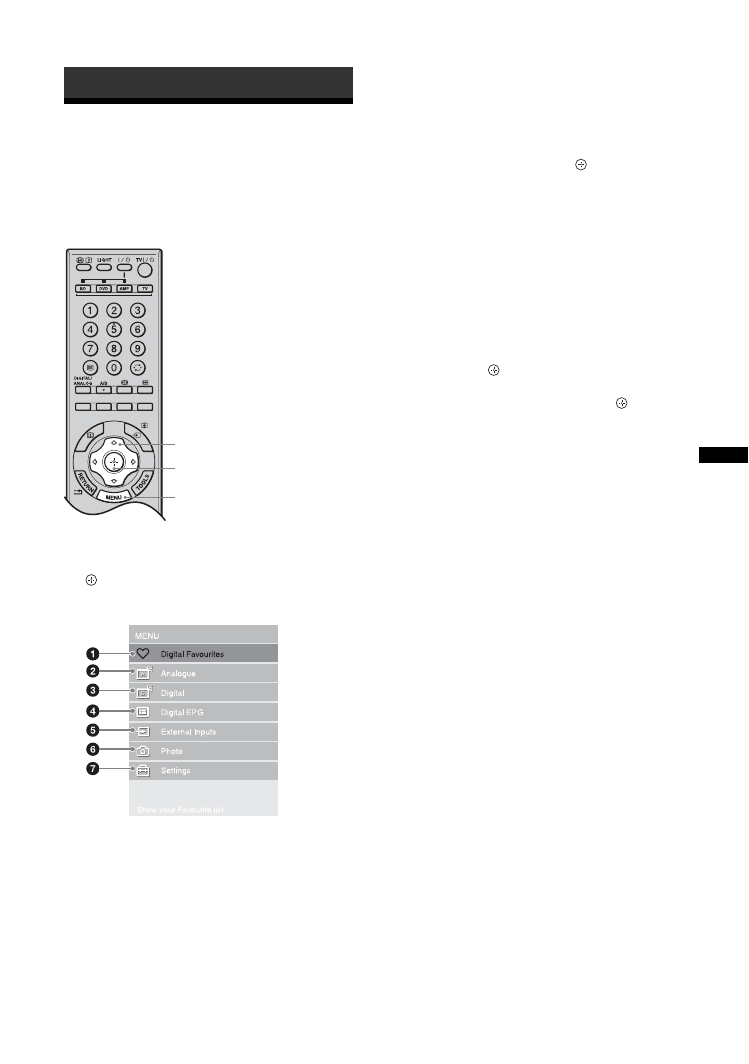
Menu functions allow you to enjoy various convenient
features of this TV. You can easily select channels or
inputs sources and change the settings for your TV.
1
Press MENU.
2
Press
F
/
f
to select an option, then press
.
To exit the menu, press MENU.
1
Digital Favourites
*
Displays the Favourite list (page 19).
2
Analogue
Returns to the last viewed analogue channel.
3
Digital
*
Returns to the last viewed digital channel.
4
Digital EPG
*
Displays the Digital Electronic Programme
Guide (EPG) (page 17).
5
External Inputs
Selects equipment connected to your TV.
• To watch the desired external input, select the
input source, then press
.
• To assign a label to an external input, select
“Edit AV Labels” (page 37).
• To select the connected HDMI control
compatible equipment, select “HDMI Device
Selection”.
6
Photo
The thumbnail screen appears (page 26).
7
Settings
Displays the “Settings” menu where most of the
advanced settings and adjustments are
performed.
1
Press
F
/
f
to select a menu icon, then
press .
2
Press
F
/
f
/
G
/
g
to select an option or
adjust a setting, then press
.
For details about settings, see pages 28 to 45.
~
The options you can adjust vary depending on the
situation. Unavailable options are greyed out or not
displayed.
* This function may not be available in some countries/
regions.
Using Menu Functions
2
1
2
Оглавление инструкции
- GB
- PL
- RU


