Инструкция для Sony BRAVIA KDL-40X3000
 1
 2
 3
 4
 5
 6
 7
 8
 9
 10
 11
 12
 13
 14
 15
 16
 17
 18
 19
 20
 21
 22
 23
 24
 25
 26
 27
 28
 29
 30
 31
 32
 33
 34
 35
 36
 37
 38
 39
 40
 41
 42
 43
 44
 45
 46
 47
 48
 49
 50
 51
 52
 53
 54
 55
 56
 57
 58
 59
 60
 61
 62
 63
 64
 65
 66
 67
 68
 69
 70
 71
 72
 73
 74
 75
 76
 77
 78
 79
 80
 81
 82
 83
 84
 85
 86
 87
 88
 89
 90
 91
 92
 93
 94
 95
 96
 97
 98
 99
 100
 101
 102
 103
 104
 105
 106
 107
 108
 109
 110
 111
 112
 113
 114
 115
 116
 117
 118
 119
 120
 121
 122
 123
 124
 125
 126
 127
 128
 129
 130
 131
 132
 133
 134
 135
 136
 137
 138
 139
 140
 141
 142
 143
 144
 145
 146
 147
 148
 149
 150
 151
 152
 153
 154
 155
 156
 157
 158
 159
 160
 161
 162
 163
 164
16
GB
To access Text
Press
/
. Each time you press
/
, the display changes
cyclically as follows:
Text and TV picture
t
Text
t
No Text (exit the
Text service)
To select a page, press the number buttons or
/
.
To hold a page, press
/
.
To reveal hidden information, press
/
.
z
• You can also jump directly to a page by selecting the page
number displayed on the screen. Press
and
F
/
f
/
G
/
g
to select the page number, then press
.
• When four coloured items appear at the bottom of the Text
page, Fastext is available. Fastext allows you to access
pages quickly and easily. Press the corresponding
coloured button to access the page.
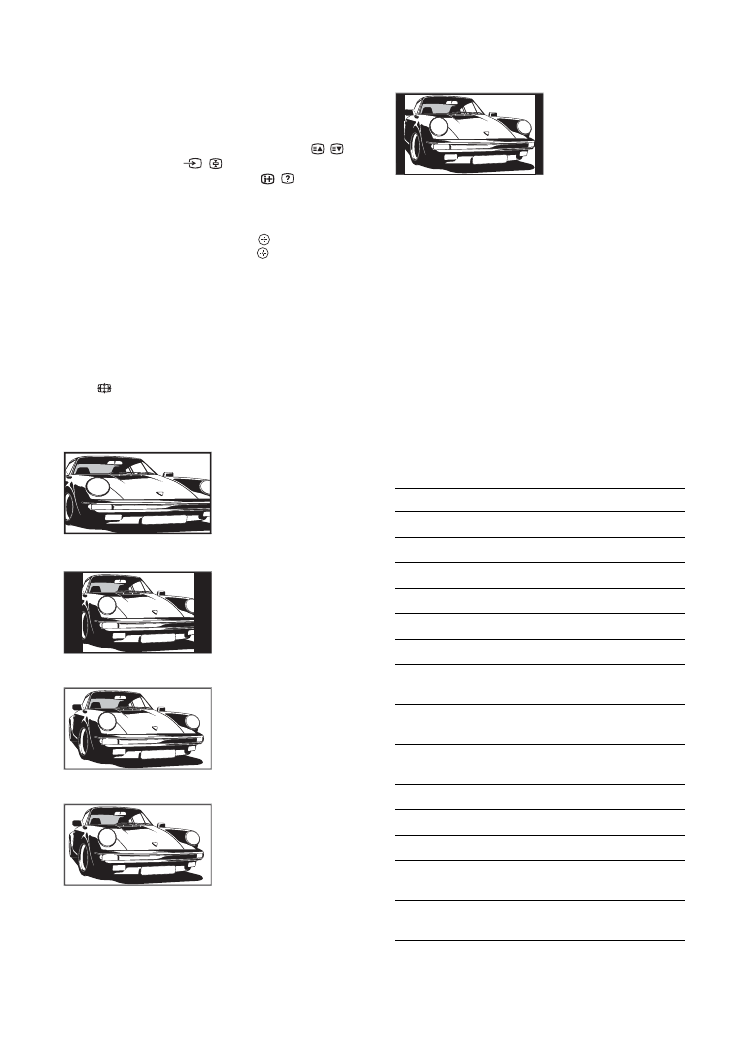
To change the screen format manually to
suit the broadcast
Press
repeatedly to select the desired screen
format.
* Parts of the top and bottom of the picture may be cut off.
~
Some characters and/or letters at the top and the bottom of
the picture may not be visible in “Smart”. In such a case, you
can select “Vertical Size” using the “Screen” menu and
adjust vertical size to make it visible.
z
• When “Auto Format” is set to “On”, the TV will
automatically select the best mode to suit the broadcast
(page 32).
• You can adjust the position of the picture when selecting
“Smart” (50Hz), “Zoom” or “14:9”. Press
F
/
f
to move
up or down (e.g. to read subtitles).
• Select “Smart” or “Zoom” to adjust for 720p, 1080i or
1080p source pictures with edge portions cut off.
Using the Tools menu
Press TOOLS to display the following options when
viewing a TV programme.
Smart
*
Displays conventional
4:3 broadcasts with an
imitation wide screen
effect. The 4:3 picture
is stretched to fill the
screen.
4:3
Displays conventional
4:3 broadcasts (e.g.
non-wide screen TV) in
the correct proportions.
Wide
Displays wide screen
(16:9) broadcasts in the
correct proportions.
Zoom
*
Displays cinemascopic
(letter box format)
broadcasts in the
correct proportions.
14:9
*
Displays 14:9
broadcasts in the
correct proportions. As
a result, black border
areas are visible on the
screen.
Options
Description
Close
Closes the Tools menu.
Picture Mode
Sound Mode
Motion Enhancer
Speaker
PAP
Audio Language (in
digital mode only)
Subtitle Setting (in
digital mode only)
Digital Favourites (in
digital mode only)
i
Volume
Sleep Timer
Power Saving
Auto Clock Set (in
analogue mode only)
Allows you to switch to digital
mode and obtain the time.
System Information (in
digital mode only)
Displays the system
information screen.
Оглавление инструкции
- GB
- PL
- RU