Инструкция для Sony BRAVIA KDL-40X3000
 1
 2
 3
 4
 5
 6
 7
 8
 9
 10
 11
 12
 13
 14
 15
 16
 17
 18
 19
 20
 21
 22
 23
 24
 25
 26
 27
 28
 29
 30
 31
 32
 33
 34
 35
 36
 37
 38
 39
 40
 41
 42
 43
 44
 45
 46
 47
 48
 49
 50
 51
 52
 53
 54
 55
 56
 57
 58
 59
 60
 61
 62
 63
 64
 65
 66
 67
 68
 69
 70
 71
 72
 73
 74
 75
 76
 77
 78
 79
 80
 81
 82
 83
 84
 85
 86
 87
 88
 89
 90
 91
 92
 93
 94
 95
 96
 97
 98
 99
 100
 101
 102
 103
 104
 105
 106
 107
 108
 109
 110
 111
 112
 113
 114
 115
 116
 117
 118
 119
 120
 121
 122
 123
 124
 125
 126
 127
 128
 129
 130
 131
 132
 133
 134
 135
 136
 137
 138
 139
 140
 141
 142
 143
 144
 145
 146
 147
 148
 149
 150
 151
 152
 153
 154
 155
 156
 157
 158
 159
 160
 161
 162
 163
 164
21
GB
Usi
ng Opt
io
nal
Equi
pment
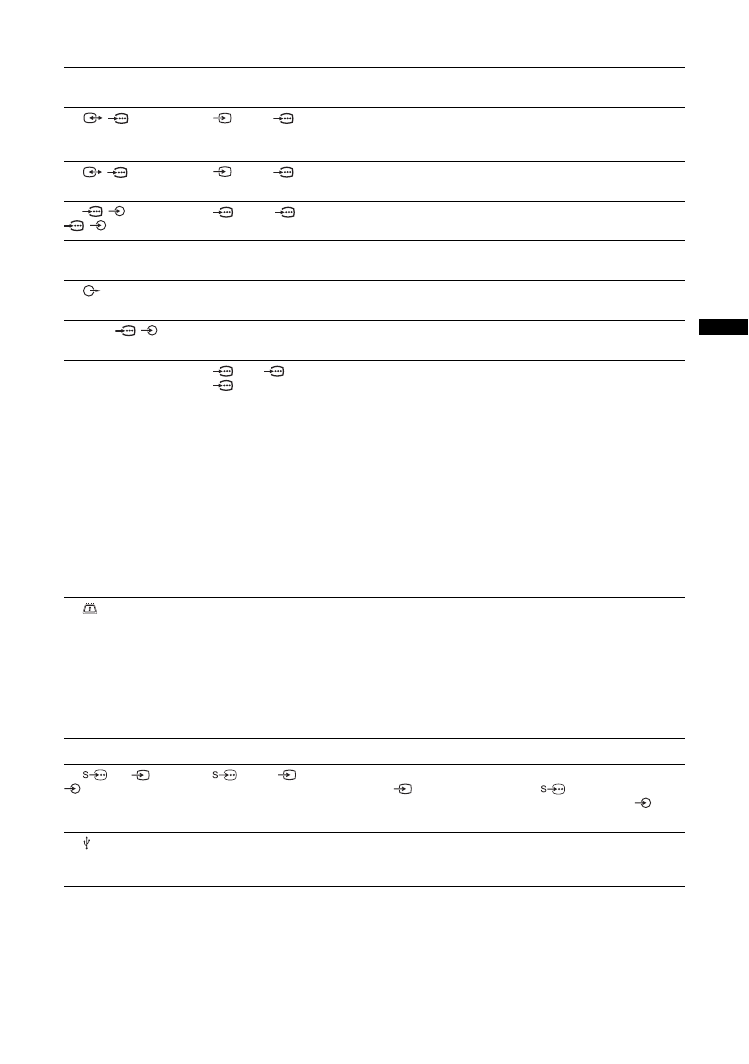
Connect to
Input symbol on
screen
Description
A
/
1
AV1 or
AV1
When you connect the decoder, the scrambled signal from the
TV tuner is output to the decoder, then the unscrambled signal
is output from the decoder.
B
/
2
AV2 or
AV2
SmartLink is a direct link between the TV and a VCR/DVD
recorder.
C
/
3
or
/
4
AV3 or
AV4
D
DIGITAL OUT
(OPTICAL)
Use an Optical audio cable.
E
You can listen to the sound from the TV on Hi-Fi audio
equipment.
F
PC IN
/
PC
It is recommended to use the supplied PC cable with ferrite
cores.
G
HDMI IN 5 or 6
K
HDMI IN 8
AV5, AV6
or
AV8
The digital video and audio signals are input from the
equipment.
In addition, when HDMI control compatible equipment is
connected, communication with the connected equipment is
supported. Refer to page 38 to set up this communication.
If the equipment has a DVI socket, connect the DVI socket to
the HDMI IN 5 socket through a DVI - HDMI adaptor interface
(not supplied), and connect the equipment’s audio out sockets
to the audio in the HDMI IN 5 sockets.
~
• The HDMI sockets only support the following video inputs: 480i,
480p, 576i, 576p, 720p, 1080i, 1080p and 1080/24p. For PC
video inputs, see page 47.
• Be sure to use only an HDMI cable that bears the HDMI logo.
• When connecting an HDMI control compatible audio system, be
sure to also connect to the DIGITAL OUT (OPTICAL) socket.
H
CAM
(Conditional Access
Module)
To use pay TV services. For details, refer to the instruction
manual supplied with your CAM.
To use the CAM, remove the “dummy” card from the CAM
slot. Turn off the TV when inserting your CAM into the CAM
slot. When you do not use the CAM, we recommend that the
“dummy” card be inserted and kept in the CAM slot.
~
CAM is not supported in some countries/regions. Check with your
authorized dealer.
I
Headphones
You can listen to sound from the TV on headphones.
J
7 or
7, and
7
AV7 or
AV7
To avoid picture noise, do not connect the camcorder to the
video
7 socket and the S video
7 socket at the same
time. If you connect mono equipment, connect to the
7 L
socket.
L
USB
You can view photographs on a Sony digital still camera,
camcorder or USB storage media connected to the TV. For
details, see page 26.
Оглавление инструкции
- GB
- PL
- RU