Инструкция для Sony BRAVIA KDL-40X3000
 1
 2
 3
 4
 5
 6
 7
 8
 9
 10
 11
 12
 13
 14
 15
 16
 17
 18
 19
 20
 21
 22
 23
 24
 25
 26
 27
 28
 29
 30
 31
 32
 33
 34
 35
 36
 37
 38
 39
 40
 41
 42
 43
 44
 45
 46
 47
 48
 49
 50
 51
 52
 53
 54
 55
 56
 57
 58
 59
 60
 61
 62
 63
 64
 65
 66
 67
 68
 69
 70
 71
 72
 73
 74
 75
 76
 77
 78
 79
 80
 81
 82
 83
 84
 85
 86
 87
 88
 89
 90
 91
 92
 93
 94
 95
 96
 97
 98
 99
 100
 101
 102
 103
 104
 105
 106
 107
 108
 109
 110
 111
 112
 113
 114
 115
 116
 117
 118
 119
 120
 121
 122
 123
 124
 125
 126
 127
 128
 129
 130
 131
 132
 133
 134
 135
 136
 137
 138
 139
 140
 141
 142
 143
 144
 145
 146
 147
 148
 149
 150
 151
 152
 153
 154
 155
 156
 157
 158
 159
 160
 161
 162
 163
 164
43
GB
Usi
ng Men
u
Fun
ct
ion
s
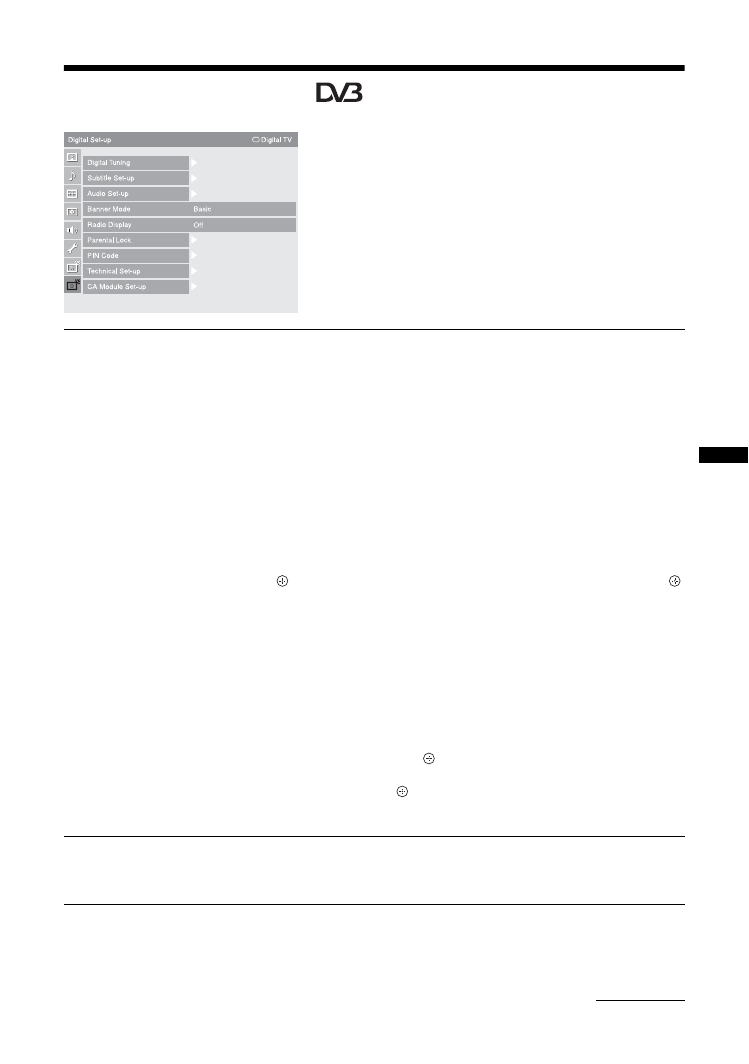
Digital Set-up menu
You can select the options listed below on the “Digital
Set-up” menu. To select options in “Settings”, refer to
“Navigating through menus” (page 27).
~
Some functions may not be available in some countries/
regions.
Digital Tuning
Digital Auto Tuning
Tunes in the available digital channels.
This option allows you to retune the TV after moving house, or to search for new
channels that have been launched by broadcasters. For details, see “Auto tuning the
TV” on page 7.
Programme List Edit
Removes any unwanted digital channels stored on the TV, and changes the order of
the digital channels stored on the TV.
1
Press
F
/
f
to select the channel you want to remove or move to a new
position.
Press the number buttons to enter the known three-digit programme number of the
broadcast you want.
2
Remove or change the order of the digital channels as follows:
To remove the digital channel
Press
. After a confirmation message appears, press
G
to select “Yes”, then press
.
To change the order of the digital channels
Press
g
, then press
F
/
f
to select the new position for the channel and press
G
.
3
Press RETURN.
Digital Manual Tuning
Tunes the digital channels manually. This feature is available when “Digital Auto
Tuning” is set to “Antenna”.
1
Press the number button to select the channel number you want to
manually tune, then press
F
/
f
to tune the channel.
2
When the available channels are found, press
F
/
f
to select the channel
you want to store, then press
.
3
Press
F
/
f
to select the programme number where you want to store the
new channel, then press
.
Repeat the above procedure to manually tune other channels.
Subtitle Set-up
“Subtitle Setting”:
When “For Hard Of Hearing” is selected, some visual aids may
also be displayed with the subtitles (if TV channels broadcast such information).
“Subtitle Language”:
Selects which language subtitles are displayed in.
Continued
Оглавление инструкции
- GB
- PL
- RU