Инструкция для Sony BRAVIA KDL-40X3000
 1
 2
 3
 4
 5
 6
 7
 8
 9
 10
 11
 12
 13
 14
 15
 16
 17
 18
 19
 20
 21
 22
 23
 24
 25
 26
 27
 28
 29
 30
 31
 32
 33
 34
 35
 36
 37
 38
 39
 40
 41
 42
 43
 44
 45
 46
 47
 48
 49
 50
 51
 52
 53
 54
 55
 56
 57
 58
 59
 60
 61
 62
 63
 64
 65
 66
 67
 68
 69
 70
 71
 72
 73
 74
 75
 76
 77
 78
 79
 80
 81
 82
 83
 84
 85
 86
 87
 88
 89
 90
 91
 92
 93
 94
 95
 96
 97
 98
 99
 100
 101
 102
 103
 104
 105
 106
 107
 108
 109
 110
 111
 112
 113
 114
 115
 116
 117
 118
 119
 120
 121
 122
 123
 124
 125
 126
 127
 128
 129
 130
 131
 132
 133
 134
 135
 136
 137
 138
 139
 140
 141
 142
 143
 144
 145
 146
 147
 148
 149
 150
 151
 152
 153
 154
 155
 156
 157
 158
 159
 160
 161
 162
 163
 164
17
GB
Wat
chi
ng T
V
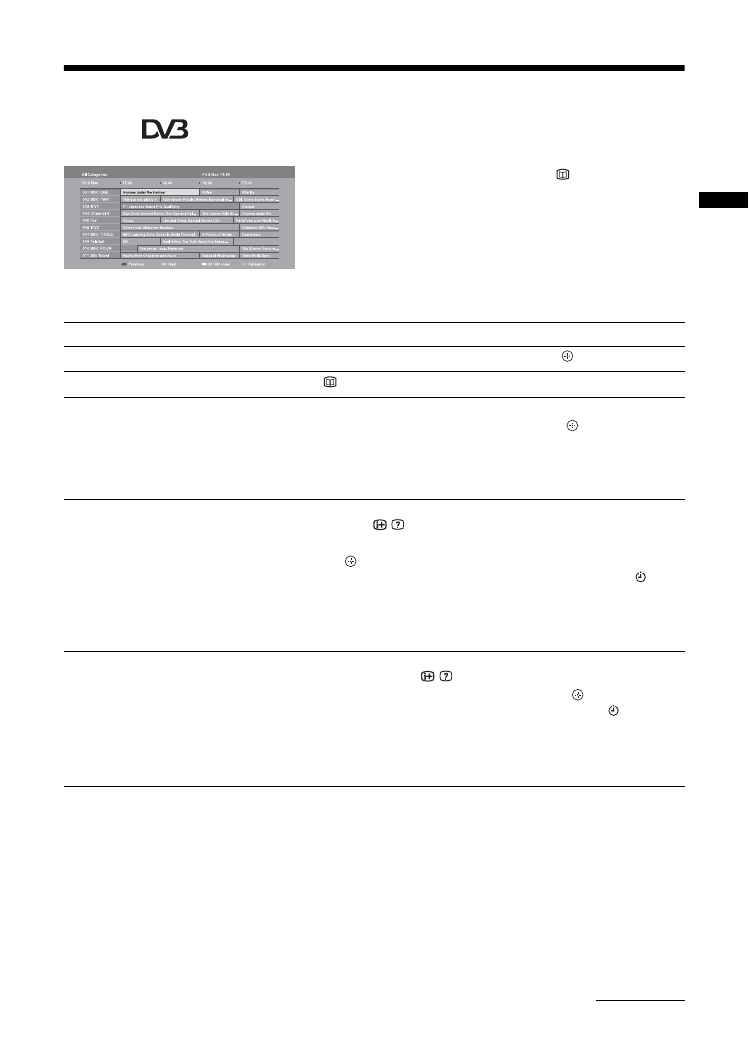
Using the Digital Electronic Programme Guide
(EPG)
*
1
In digital mode, press
.
2
Perform the desired operation as shown in
the following table or displayed on the
screen.
* This function may not be available in some countries/regions.
Digital Electronic Programme Guide (EPG)
To
Do this
Watch a programme
Press
F
/
f
/
G
/
g
to select the programme, then press
.
Turn off the EPG
Press
.
Sort the programme information by
category
– Category list
1
Press the blue button.
2
Press
F
/
f
to select a category, then press
.
The categories available include:
“All Categories”, “Radio”:
Contains all available channels.
Other category name (e.g. “News”):
Contains all programmes
corresponding to the selected category.
Set a programme to be recorded
– Timer REC
1
Press
F
/
f
/
G
/
g
to select the programme you want to record,
then press
/
.
2
Press
F
/
f
to select “Timer REC”.
3
Press
to set the TV and your VCR timers.
A red
c
symbol appears by that programme’s information. The
indicator on the TV front panel lights up in orange.
z
The above procedure can be used even if the programme to be recorded has already
started.
Set a programme to be displayed
automatically on the screen when it
starts
– Reminder
1
Press
F
/
f
/
G
/
g
to select the future programme you want to
display, then press
/
.
2
Press
F
/
f
to select “Reminder”, then press
.
A
c
symbol appears by that programme’s information. The
indicator on
the TV front panel lights up in orange.
~
If you switch the TV to standby mode, it will automatically turn itself on
when the programme is about to start.
Continued
Оглавление инструкции
- GB
- PL
- RU