Инструкция для Samsung LE40B620R3W, LE46B620R3W, LE52B620R3W
 1
 2
 3
 4
 5
 6
 7
 8
 9
 10
 11
 12
 13
 14
 15
 16
 17
 18
 19
 20
 21
 22
 23
 24
 25
 26
 27
 28
 29
 30
 31
 32
 33
 34
 35
 36
 37
 38
 39
 40
 41
 42
 43
 44
 45
 46
 47
 48
 49
 50
 51
 52
 53
 54
 55
 56
 57
 58
 59
 60
 61
 62
 63
 64
 65
 66
 67
 68
 69
 70
 71
 72
 73
 74
 75
 76
 77
 78
 79
 80
 81
 82
 83
 84
 85
 86
 87
 88
 89
 90
 91
 92
 93
English - 44
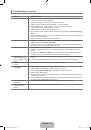
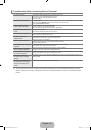
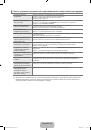
Troubleshooting: Before Contacting Service Personnel
No sound or picture
Check that the mains lead has been connected to a wall socket.
Check that you have pressed the button on your set.
Check the picture contrast and brightness settings.
Check the volume.
Normal picture but no sound
Check the volume.
Check whether the
MuTE
M
button has been pressed on the remote control.
Check the
Speaker Select
settings.
Screen is black and power
indicator light blinks steadily
On your computer check; Power, Signal Cable.
The TV is using its power management system.
Move the computer’s mouse or press any key on the keyboard.
No picture or black and white
picture
Adjust the colour settings.
Check that the broadcast system selected is correct.
Sound and picture interference
Try to identify the electrical appliance that is affecting the set and move it further away.
Plug your set into a different mains socket.
Blurred or snowy picture,
distorted sound
Check the direction, location and connections of your aerial.
This interference is often due to the use of an indoor aerial.
Remote control malfunctions
Replace the remote control batteries.
Clean the upper edge of the remote control (transmission window).
Check the battery terminals.
‘Check signal cable.’ message is
displayed
Check that the signal cable is firmly connected to the PC or video sources.
Check that the PC or video sources are turned on.
On PC mode, ‘Not Supported
Mode.’ message is displayed
Check the maximum resolution and the frequency of the video adaptor.
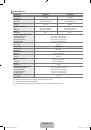
Compare these values with the data in the Display Modes.
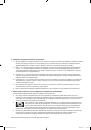
The damaged picture appears in
the corner of the screen
If
Screen Fit
is selected in some external devices, the damaged picture may appear in the corner of the
screen. This symptom is caused by external devices, not TV.
The ‘Resets all settings to
the default values.’ message
appears.
This appears when you press and hold the
EXIT
button for a while. The product settings are reset to the
factory defaults.
You may see small particles if
you look closely at the edge of
the bezel surrounding the TV
screen.
This is part of the product’s design and is not a defect.
This TFT LCD panel uses a panel consisting of sub pixels (6 220 800) which require sophisticated technology to produce.
However, there may be few bright or dark pixels on the screen. These pixels will have no impact on the performance of the
product.
¦
N
BN68-02097D-Eng.indd 44
2009-03-19 �� 8:15:55
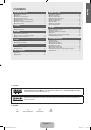
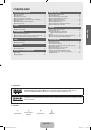
Оглавление инструкции
- Cover
- Eng
- Setting up Your TV
- Viewing the Control Panel
- Accessories
- Viewing the Connection Panel
- Viewing the Remote Control
- Installing Batteries in the Remote Control
- Viewing the menus
- Placing Your Television in Standby Mode
- Plug & Play Feature
- CHANNEL
- PICTURE
- SOUND
- SETUP
- INPUT / SUPPORT
- Media Play (USB)
- ANYNET+
- RECOMMENDATIONS
- Setting up Your TV
- Rus