Инструкция для Samsung LE40B620R3W, LE52B620R3W
 1
 2
 3
 4
 5
 6
 7
 8
 9
 10
 11
 12
 13
 14
 15
 16
 17
 18
 19
 20
 21
 22
 23
 24
 25
 26
 27
 28
 29
 30
 31
 32
 33
 34
 35
 36
 37
 38
 39
 40
 41
 42
 43
 44
 45
 46
 47
 48
 49
 50
 51
 52
 53
 54
 55
 56
 57
 58
 59
 60
 61
 62
 63
 64
 65
 66
 67
 68
 69
 70
 71
 72
 73
 74
 75
 76
 77
 78
 79
 80
 81
 82
 83
 84
 85
 86
 87
 88
 89
 90
 91
 92
 93
 94
 95
 96
 97
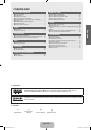
English - 6
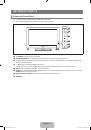
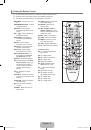
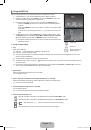
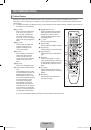
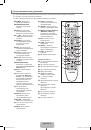
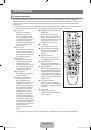
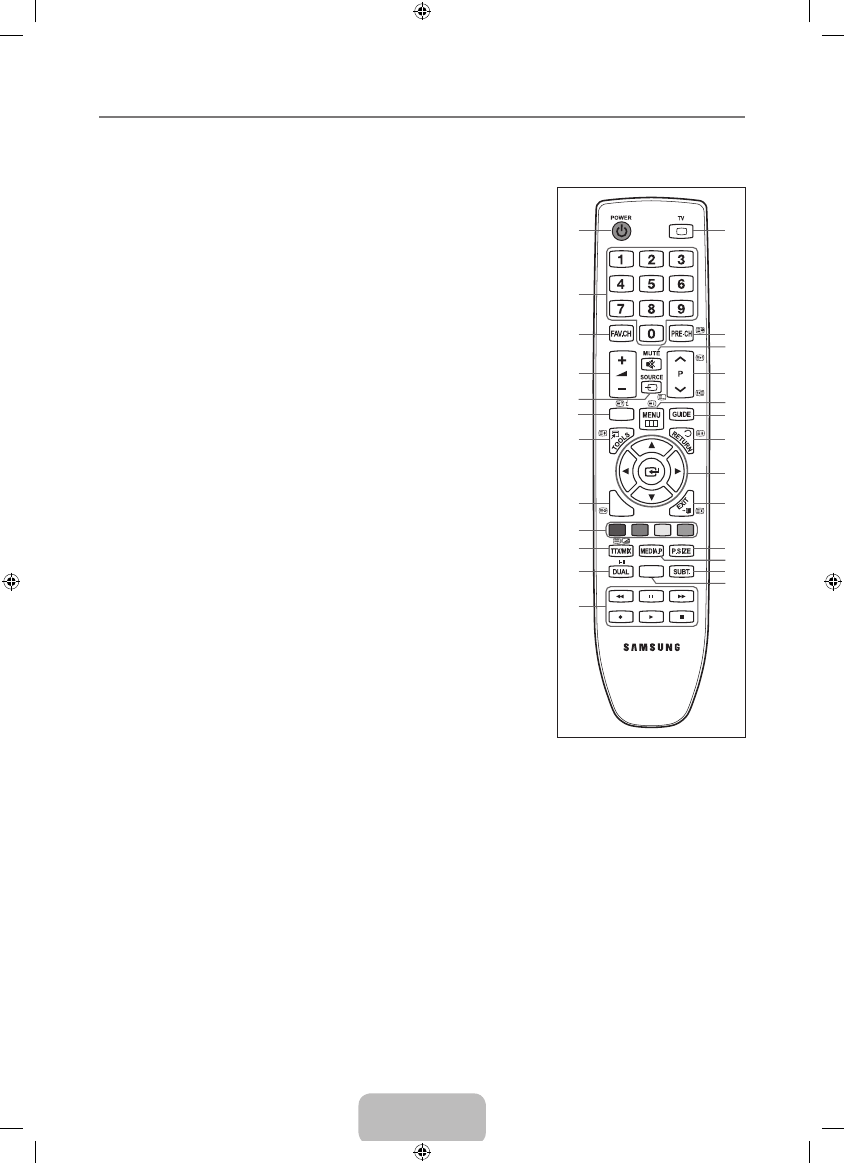
Viewing the remote Control
You can use the remote control up to a distance of about 23 feet from the TV.
The performance of the remote control may be affected by bright light.
The product colour and shape may vary depending on the model.
1
PoWEr
: Turns the TV on and
off.
2
NUMErIC BUTToNS
: Press to
change the channel.
3
FAV.CH
: Used to display
Favourites Channel Lists on the
screen.
4
Y
: Press to increase or
decrease the volume.
5
SoUrCE
: Press to display
and select the available video
sources.
6
INFo
: Press to display
information on the TV screen.
7
TooLS
: Use to quickly select
frequently used functions.
8
CH LIST
: Used to display
Channel Lists on the screen.
9
CoLoUrS BUTToNS
: Use
these buttons in the
Channel
list
,
Media Play
menu, etc.
!
DUAL
:
Sound effect selection
@
Use these buttons in the
Media
Play
and
Anynet
+
modes. (
∏
:
This remote can be used to
control recording on Samsung
recorders with the Anynet
+
feature)
#
TV
: Selects the TV mode
directly.
$
PrE-CH :
Enables you to return
to the previous channel you were
watching.
%
MUTE
M
:
Press to temporarily
cut off the sound.
^
>
P
<
: Press to change
channels.
&
MENU
: Displays the main on-
screen menu.
*
GUIDE
: Electronic Programme
Guide (EPG) display.
(
rETUrN
: Returns to the
previous menu
)
UP▲ / DoWN▼ / LEFT◄ /
rIGHT► / ENTEr
E
: Use to
select on-screen menu items and
change menu values.
a
EXIT
: Press to exit the menu.
b
P.SIZE
: Picture size selection.
c
MEDIA.P
: Allows you to play
music files and pictures.
d
SUBT.
: Digital subtitle display
e
AD
: Audio Description selection.
Teletext Functions
5
0
: Teletext mode selection
(LIST / FLOF)
6
5
: Teletext reveal
7
4
: Teletext size selection
8
8
: Teletext store
9
Fastext topic selection
0
/
: Alternately select
Teletext, Double, or Mix.
#
:
: Exit from the Teletext
display
$
1
: Teletext sub page
^
2
: Teletext next page
3
: Teletext previous page
&
6
: Teletext index
(
9
: Teletext hold
a
7
: Teletext cancel
¦
N
N
N
INFO
CH
LIS
T
AD
1
#
$
^
*
(
)
a
b
c
e
d
%
&
2
3
4
5
6
7
8
9
0
!
@
BN68-02356G.indb 6
2009-09-03 ¿ÀÈÄ 4:22:15