Инструкция для Sony KDL-40(46)(52)Z4500
 1
 2
 3
 4
 5
 6
 7
 8
 9
 10
 11
 12
 13
 14
 15
 16
 17
 18
 19
 20
 21
 22
 23
 24
 25
 26
 27
 28
 29
 30
 31
 32
 33
 34
 35
 36
 37
 38
 39
 40
 41
 42
 43
 44
 45
 46
 47
 48
 49
 50
 51
 52
 53
 54
 55
 56
 57
 58
 59
 60
 61
 62
 63
 64
 65
 66
 67
 68
 69
 70
 71
 72
 73
 74
 75
 76
 77
 78
 79
 80
 81
 82
 83
 84
 85
 86
 87
 88
 89
 90
 91
 92
 93
 94
 95
 96
 97
 98
 99
 100
 101
 102
 103
 104
 105
 106
 107
 108
 109
 110
 111
 112
 113
 114
 115
 116
 117
 118
 119
 120
 121
 122
 123
 124
 125
 126
 127
 128
 129
 130
 131
 132
 133
 134
 135
 136
 137
 138
 139
 140
 141
 142
 143
 144
 145
 146
 147
 148
 149
 150
 151
 152
 153
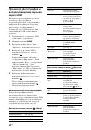 154
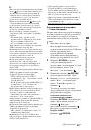 155
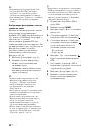 156
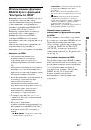 157
 158
 159
 160
 161
 162
 163
 164
 165
 166
 167
 168
 169
 170
 171
 172
 173
 174
 175
 176
 177
 178
 179
 180
 181
 182
 183
 184
 185
 186
 187
 188
 189
 190
 191
 192
 193
 194
 195
56
GB
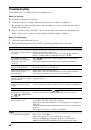
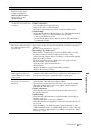
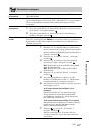
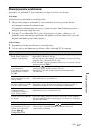
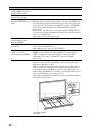
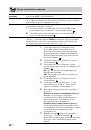
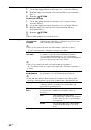
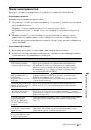
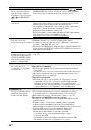
Troubleshooting
Check whether the
1
(standby) indicator is flashing in red.
When it is flashing
The self-diagnosis function is activated.
1
Count how many
1
(standby) indicator flashes between each two second break.
For example, the indicator flashes three times, then there is a two second break, followed by
another three flashes, etc.
2
Press
1
on the top edge of the TV to turn it off, disconnect the mains lead, and inform your
dealer or Sony service centre of how the indicator flashes (number of flashes).
When it is not flashing
1
Check the items in the tables below.
2
If the problem still persists, have your TV serviced by qualified service personnel.
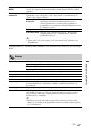
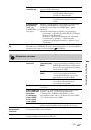
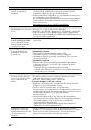
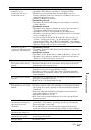
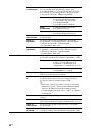
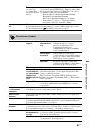
Condition
Explanation/Solution
Picture
No picture (screen is dark) and
no sound
• Check the aerial/cable connection.
• Connect the TV to the mains, and press
1
on the top edge of the TV.
• If the
1
(standby) indicator lights up in red, press
TV
"
/
1
.
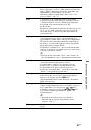
No picture or no menu
information from equipment
connected to the scart
connector
• Press
/
to display the connected equipment list, then select the
desired input.
• Check the connection between the optional equipment and the TV.
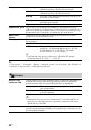
Double images or ghosting
(only in analogue mode)
• Check the aerial/cable connection.
• Check the aerial location and direction.
Only snow and noise appear
on the screen (only in
analogue mode)
• Check if the aerial is broken or bent.
• Check if the aerial has reached the end of its serviceable life (three to
five years in normal use, one to two years at the seaside).
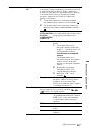
Picture or sound noise when
viewing a TV channel (only in
analogue mode)
• Adjust “AFT” (Automatic Fine Tuning) to obtain better picture
reception (page 47).
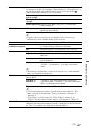
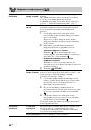
Some tiny black points and/or
bright points appear on the
screen
• The picture of a display unit is composed of pixels. Tiny black points
and/or bright points (pixels) on the screen do not indicate a malfunction.
No colour on programmes
• Select “Reset” (page 39).
No colour or irregular colour
when viewing a signal from
the /
COMPONENT
IN sockets
• Check the connection of the
/
COMPONENT IN sockets and
check if each sockets are firmly seated in their respective sockets.
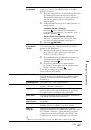
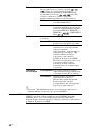
Picture freezes or contains
blocks on the screen
• Check signal level (page 50). If signal bar is red (no signal) or amber
(low signal), check the aerial/cable connection.
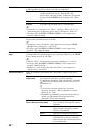
• Remove the connected USB device. It can be damaged or not supported
by the TV.
Check the website below for updated information about compatible USB
devices:
http://support.sony-europe.com/TV/compatibility/
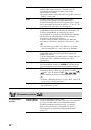
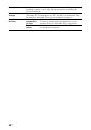
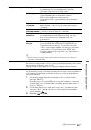
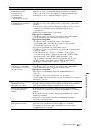
Sound
No sound, but good picture
• Press
2
+/– or
%
(Mute).
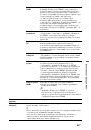
• Check if the “Speaker” is set to “TV Speaker” (page 45).
• When using HDMI input with Super Audio CD or DVD-Audio,
DIGITAL AUDIO OUT (OPTICAL) may not output audio signals.
Оглавление инструкции
- GB
- PL
- RU


