Инструкция для B&W Zeppelin Wireless
 1
 2
 3
 4
 5
 6
 7
 8
 9
 10
 11
 12
 13
 14
 15
 16
 17
 18
 19
 20
 21
 22
 23
 24
 25
 26
 27
 28
 29
 30
 31
 32
 33
 34
 35
 36
 37
 38
 39
 40
 41
 42
 43
 44
 45
 46
 47
 48
 49
 50
 51
 52
 53
 54
 55
 56
 57
 58
 59
 60
 61
 62
 63
 64
 65
 66
 67
 68
 69
 70
 71
 72
 73
 74
 75
 76
 77
 78
 79
 80
 81
 82
 83
 84
 85
 86
 87
 88
 89
 90
 91
 92
 93
 94
 95
 96
 97
 98
 99
 100
 101
 102
 103
3
ENGLISH
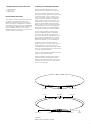
1. Zeppelin Wireless Carton Contents
i. Zeppelin Wireless
ii. Power cable
iii. Literature pack
Environmental Information
This product complies with international directives,
including but not limited to the Restriction of
Hazardous Substances (RoHS) in electrical and
electronic equipment, the Registration, Evaluation,
Authorisation and restriction of Chemicals (REACH)
and the disposal of Waste Electrical and Electronic
Equipment (WEEE). Consult your local waste
disposal authority for guidance on how properly to
recycle or dispose of this product.
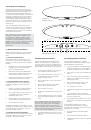
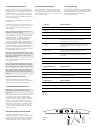
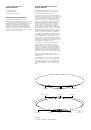
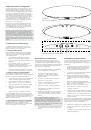
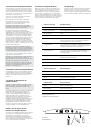
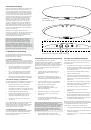
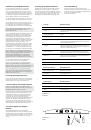
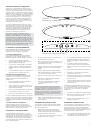
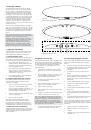
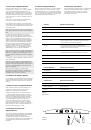
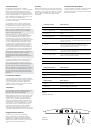
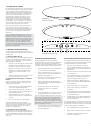
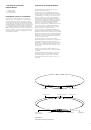
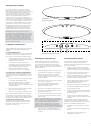
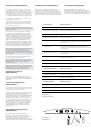
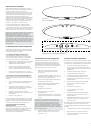
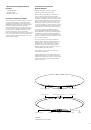
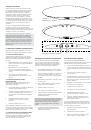
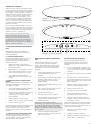
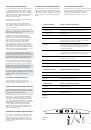
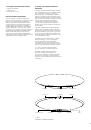
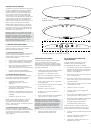
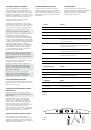
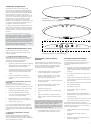
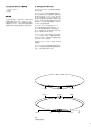
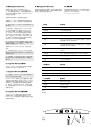
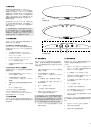
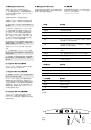
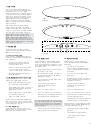
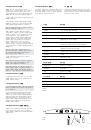
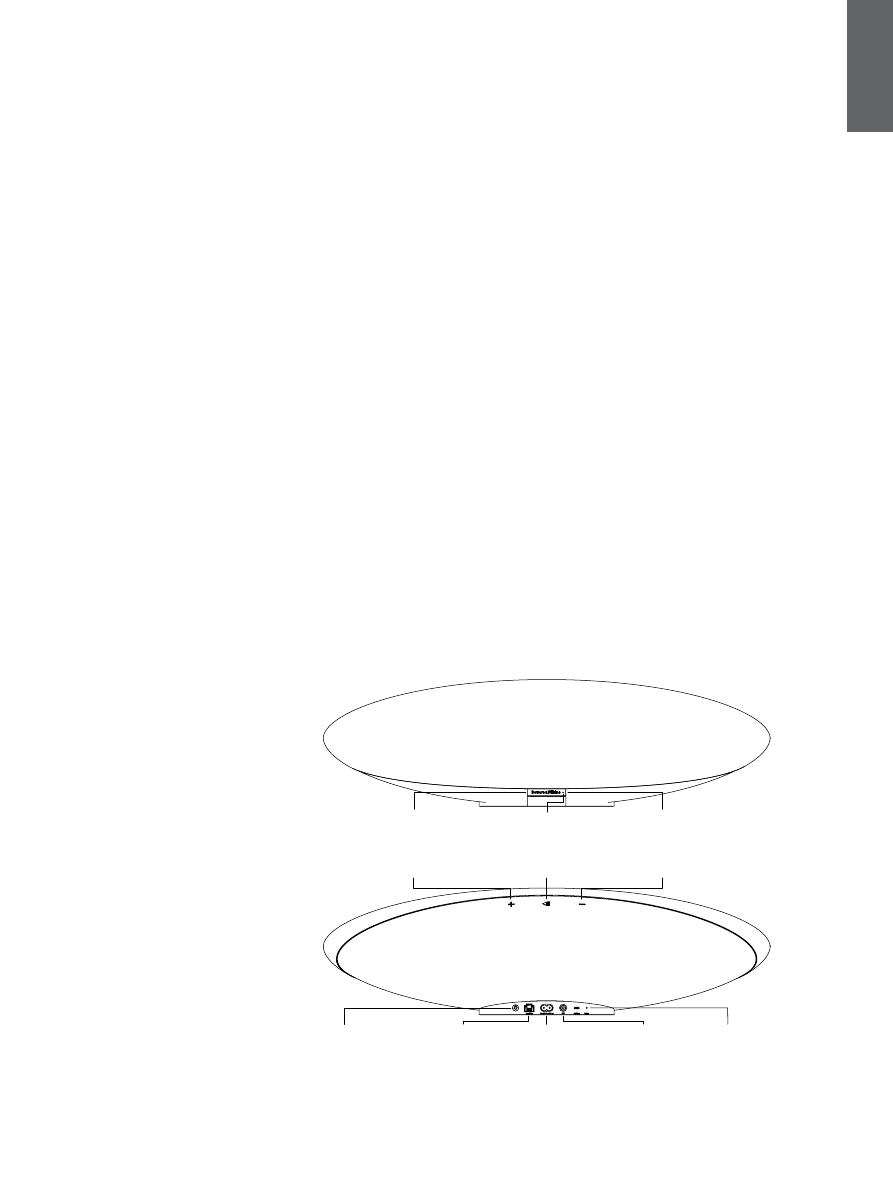
Diagram 1
Buttons and connection sockets
Bluetooth
button
AUX button
Indicator
Play/Pause
Volume up
Volume down
Power on/off
ETHERNET
Power
AUX (Auxilary)
RESET
2. Getting to know Zeppelin Wireless
Zeppelin Wireless is designed for very high
performance and convenient music streaming.
On the top of Zeppelin Wireless are the volume
and playback controls. These can be used to raise
or lower the volume, to play or pause a music
stream and to select the next or previous track.
A status indicator is located within the Bowers
& Wilkins logo on the front of the product. The
status indicator changes colour and illumination
pattern to indicate different operational states.
Status indicator colours and illumination patterns
are listed in Section 6 of this manual. Zeppelin
Wireless also provides some audible feedback
during
Bluetooth
pairing and connecting events.
On each side of the Bowers & Wilkins logo at
the front of Zeppelin Wireless are a
Bluetooth
touch button and indicator and an AUX input
touch button and indicator. The
Bluetooth
button
is on the right and the AUX button is on the left.
Bluetooth
pairing and use of the AUX input are
described in Sections 3.5 and 4.4 respectively.
Connection sockets on the rear of Zeppelin
Wireless comprise a mains power input, a 3.5mm
analogue AUX input, a network socket and a
micro-USB interface used for service only. A power
button and a pin-hole reset button are also located
on the rear of Zeppelin Wireless.
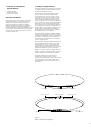
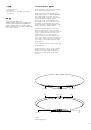
Diagram 1 illustrates Zeppelin Wireless, its buttons,
indicators and connection sockets.
Zeppelin Wireless is designed to be simple and
convenient in operation and will automatically
play the most recent audio stream or input signal
it receives. There is no need to manually select
sources or the AUX input.
Оглавление инструкции
- ENGLISH
- 1. Zeppelin Wireless Carton Contents
- Environmental Information
- 2. Getting to know Zeppelin Wireless
- 3. Switching on and setting up
- 4. Zeppelin Wireless sources
- 5. Operating Zeppelin Wireless
- 6. Zeppelin Wireless Indicators
- 7. Zeppelin Wireless Reset Function
- 8. Zeppelin Wireless Firmware Update
- 9. Cleaning Zeppelin Wireless
- 10. Troubleshooting
- Specifications
- FRANÇAIS
- 1. Contenu du carton du Zeppelin Wireless
- Information sur l’environnement
- 2. Faites connaissance avec votre Zeppelin Wireless
- 3. Mise sous tension et configuration
- 4. Sources du Zeppelin Wireless
- 6. Indicateurs lumineux du Zeppelin Wireless
- 7. Fonction de réinitialisation du Zeppelin Wireless
- 8. Mise à jour du logiciel interne (firmware) du Zeppelin Wireless
- 9. Entretien du Zeppelin Wireless
- 10. Dépannage
- Spécifications
- DEUTSCH
- 1. Kartoninhalt des Zeppelin Wireless
- Umweltinformationen
- 2. Die wesentlichen Features
- 3. Einschalten und Setup
- 4. Die Funkstandards des Zeppelin Wireless
- 6. Anzeige des Zeppelin Wireless
- 7. Reset-Funktion des Zeppelin Wireless
- 8. Firmware-Update des Zeppelin Wireless
- 9. Reinigung des Zeppelin Wireless
- 10. Fehlerbehebung
- Technische Daten
- ESPAÑOL
- 1. Contenido del Embalaje del Zeppelin Wireless
- Información Medioambiental
- 2. Conociendo su Zeppelin Wireless
- 3. Puesta en marcha y configuración
- 4.Fuentes Zeppelin Wireless
- 5. Funcionamiento del Zeppelin Wireless
- 6. Indicadores Luminosos del Zeppelin Wireless
- 7. Función de Reinicialización del Zeppelin Wireless
- 8. Actualización del Firmware del Zeppelin Wireless
- 9. Limpieza del Zeppelin Wireless
- 10. Problemas y Posibles Soluciones
- Características Técnicas
- PORTUGUÊS
- 1. Conteúdo da embalagem do Zeppelin Wireless
- Informações ambientais
- 2. Conheça o Zeppelin Wireless
- 3. Como ligar e desligar
- 4. Fontes do Zeppelin Wireless
- 5. Como utilizar o Zeppelin Wireless
- 6. Indicadores do Zeppelin Wireless
- 7. Função de reinício do Zeppelin Wireless
- 8. Atualização do firmware do Zeppelin Wireless
- 9. Limpeza do Zeppelin Wireless
- 10. Resolução de problemas
- Especificações
- ITALIANO
- 1. Contenuto della confezione
- Informazioni per l’ambiente
- 2. Descrizione
- 3. Prima accensione ed impostazioni
- 4. Ingressi
- 6. Indicazioni luminose
- 7. Ripristino
- 8. Aggiornamento firmware
- 9. Pulizia
- 10. Risoluzione dei problemi
- Caratteristiche tecniche
- NEDERLANDS
- 1. Inhoud verpakking Zeppelin Wireless
- Milieu-informatie
- 2. De Zeppelin Wireless leren kennen
- 3. Inschakelen en instellen
- 4. Bronnen voor de Zeppelin Wireless
- 5. Zeppelin Wireless bedienen
- 6. Statusindicaties op de Zeppelin Wireless
- 7. Resetfunctie Zeppelin Wireless
- 8. Firmware-update voor de Zeppelin Wireless
- 9. De Zeppelin Wireless schoonmaken
- 10. Problemen oplossen
- Specificaties
- ΕΛΛΗΝΙΚΑ
- 1. Περιεχόμενα συσκευασίας Zeppelin Wireless
- Πληροφορίες σχετικά με το περιβάλλον
- 2. Εξοικείωση με το Zeppelin Wireless
- 3. Ενεργοποίηση και ρύθμιση
- 3.1 Ασύρματη σύνδεση δικτύου
- 4. Πηγές του Zeppelin Wireless
- 4.1 AirPlay
- 5. Χειρισμός του Zeppelin Wireless
- 6. Ενδεικτικές λυχνίες του Zeppelin Wireless
- 7. Λειτουργία επαναφοράς του Zeppelin Wireless
- 8. Ενημέρωση υλικολογισμικού στο Zeppelin Wireless
- 9. Καθαρισμός του Zeppelin Wireless
- 10. Αντιμετώπιση προβλημάτων
- Προδιαγραφές
- РУССКИЙ
- 1. Содержимое коробки с Zeppelin Wireless
- Информация о защите окружающей среды
- 2. Знакомство с Zeppelin Wireless
- 3. Включение и настройка
- 4. Источники для Zeppelin Wireless
- 5. Использование Zeppelin Wireless
- 6. Индикаторы Zeppelin Wireless
- 7. Функция сброса Zeppelin Wireless (Reset)
- 8. Обновления прошивки ПО Zeppelin Wireless
- 9. Очистка Zeppelin Wireless
- 10. Устранение неисправностей
- Технические характеристики
- ČESKY
- 1. Balení přístroje Zeppelin Wireless obsahuje
- Informace k životnímu prostředí
- 2. Seznamte se s přístrojem Zeppelin Wireless
- 3. Zapnutí a nastavení
- 4. Zeppelin Wireless zdroje
- 5. Používání Zeppelin Wireless
- 6. Indikátory na Zeppelin Wireless
- 7. Resetování přístroje Zeppelin Wireless
- 8. Aktualizace firmware Zeppelin Wireless
- 9. Čištění přístroje Zeppelin Wireless
- 10. Odstraňování problémů
- Specifikace
- SLOVENČINA
- 1. Balenie prístroja Zeppelin Wireless obsahuje
- Informácie k životnému prostrediu
- 2. Zoznámte se s prístrojom Zeppelin Wireless
- 3. Zapnutie a nastavenie
- 4. Zeppelin Wireless zdroje
- 5. Používanie Zeppelin Wireless
- 6. Indikátory na Zeppelin Wireless
- 7. Resetovanie prístroja Zeppelin Wireless
- 8. Aktualizácia firmware Zeppelin Wireless
- 9. Čistenie prístroja Zeppelin Wireless
- 10. Odstraňovanie problémov
- Špecifikácia
- MAGYAR
- 1. A Zeppelin Air dobozának tartalma
- Környezetvédelmi tájékoztatás
- 2. Ismerje meg a Zeppelin Wireless készüléket
- 3. Bekapcsolás és beállítás
- 4. Zeppelin Wireless források
- 6. A Zeppelin Wireless kijelzője
- 7. Zeppelin Wireless Beállítások törlése (Reset) funkció
- 8. Zeppelin Wireless Firmware frissítés
- 9. A Zeppelin Wireless tisztítása
- 10. Hibaelhárítás
- Műszaki adatok
- POLSKI
- 1. Zawartość pudełka Zeppelin Wireless
- Informacje o wpływie na środowisko
- 2. Poznawanie Zeppelin Wireless
- 3. Włączanie i konfigurowanie
- 4. Źródła Zeppelin Wireless
- 6. Diody Zeppelin Wireless
- 7. Funkcja resetu Zeppelin Wireless
- 8. Aktualizacja oprogramowania Zeppelin Wireless
- 9. Czyszczenie Zeppelin Wireless
- 10. Rozwiązywanie problemów
- Specyfikacja
- 简体中文
- 繁體中文
- 日本語
- 한국어

