Инструкция для Samsung PS43F4900AK, PS51F4900AW, PS51F4900AK
 1
 2
 3
 4
 5
 6
 7
 8
 9
 10
 11
 12
 13
 14
 15
 16
 17
 18
 19
 20
 21
 22
 23
 24
 25
 26
 27
 28
 29
 30
 31
 32
 33
 34
 35
 36
 37
 38
 39
 40
 41
 42
 43
 44
 45
 46
 47
 48
 49
 50
 51
 52
 53
 54
 55
 56
 57
 58
 59
 60
 61
 62
 63
 64
 65
 66
 67
 68
 69
 70
 71
 72
 73
 74
 75
 76
 77
 78
 79
 80
 81
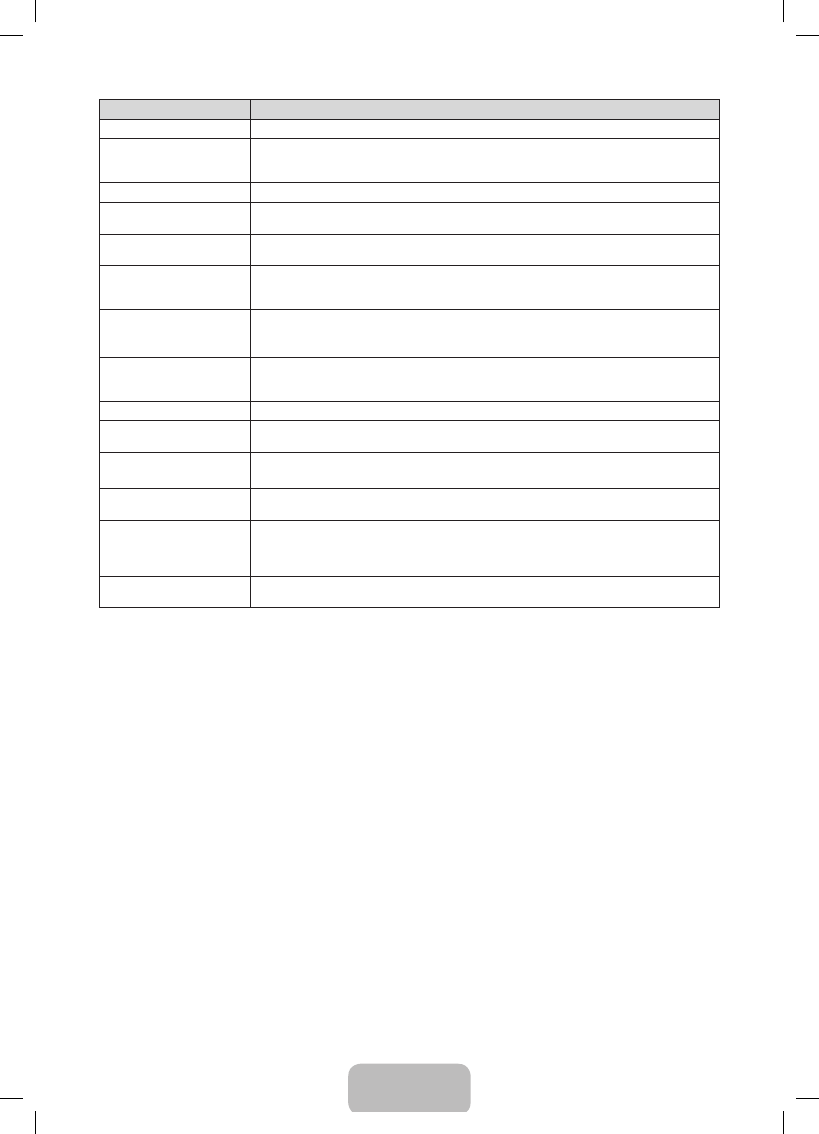
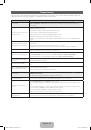
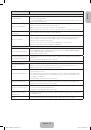
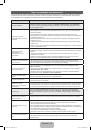
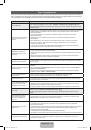
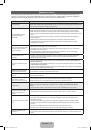
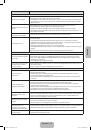
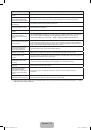
Issues
Solutions and Explanations
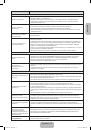
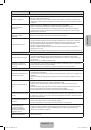
There is a plastic smell from the TV.
•
This smell is normal and will dissipate over time.
The TV
Signal Information
is
unavailable in the
Self Diagnosis
Test menu.
•
This function is only available with digital channels from an Aerial / RF / Coax connection.
TV is tilted to the right or left side.
•
Remove the stand base from the TV and reassemble it.
There are difficulties assembling the
stand base.
•
Make sure the TV is placed on a flat surface. If you can not remove the screws from the TV, please use a magnetized
screw driver.
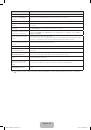
The
Broadcasting
menu is grey out
(unavailable).
•
The
Broadcasting
menu is only available when the TV source is selected.
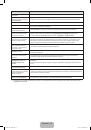
Your settings are lost after 30 minutes
or every time the TV is turned off.
•
If the TV is in the
Store Demo
mode, it will reset audio and picture settings every 30 minutes. If you want to change the
settings from
Store Demo
mode to
Home Use
, press the
SOURCE
button to select
TV
mode, and go to
MENU
→
Support
→
Use Mode
.
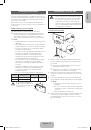
You have intermittent loss of audio
or video.
•
Check the cable connections and reconnect them.
•
Loss of audio or video can be caused by using overly rigid or thick cables. Make sure the cables are flexible enough for
long term use. If mounting the TV to the wall, we recommend using cables with 90 degree connectors.
You see small particles when you
look closely at the edge of the frame
of the TV.
•
This is part of the product’s design and is not a defect.
The
PIP
menu is not available.
•
PIP
functionality is only available when you are using a HDMI or components source.
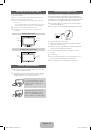
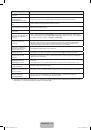
You turned the TV off 45 minutes
ago, and it turned on again.
•
It is normal. The TV operates the OTA (Over The Aerial) function itself to upgrade firmware downloaded whilst your
watching TV.
The message “
Scrambled Signal
” or
“
Weak or No Signal
” appears.
•
If you are using a CAM CARD (CI/CI+), check that it is installed into the common interface slot.
•
If there is still a problem, pull the CAM CARD out of the TV and insert it into the slot again.
There are recurrent picture/sound
issues.
•
Check and change the signal/source.
A reaction may occur between the
rubber cushion pads on the base
stand and the top finish of some
furniture.
•
To prevent this, use felt pads on any surface of the TV that comes in direct contact with furniture.
The message “
This file may not be
playable properly.
” appears.
•
This may appear because of high bit rate of content. Content generally will play but could experience some playability
issue.
✎
You can keep your TV in optimum operating condition by upgrading to the latest firmware (www.samsumg.com
→
support) by
USB.
English - 16
[PF4900-RU]BN68-04783J.indb 16
2013-03-21 3:42:44