Инструкция для D-Link DKVM-IP8
 1
 2
 3
 4
 5
 6
 7
 8
 9
 10
 11
 12
 13
 14
 15
 16
 17
 18
 19
 20
 21
 22
 23
 24
 25
 26
 27
 28
 29
 30
 31
 32
 33
 34
 35
 36
 37
 38
 39
 40
 41
 42
 43
 44
 45
 46
 47
 48
 49
 50
 51
 52
 53
 54
 55
 56
 57
 58
 59
 60
 61
 62
 63
 64
 65
 66
 67
 68
 69
 70
 71
 72
 73
 74
 75
 76
 77
 78
 79
 80
 81
 82
 83
 84
 85
 86
 87
 88
 89
 90
 91
 92
 93
 94
 95
 96
 97
 98
 99
 100
 101
 102
 103
 104
DKVM-IP8 User Manual
94 / 104
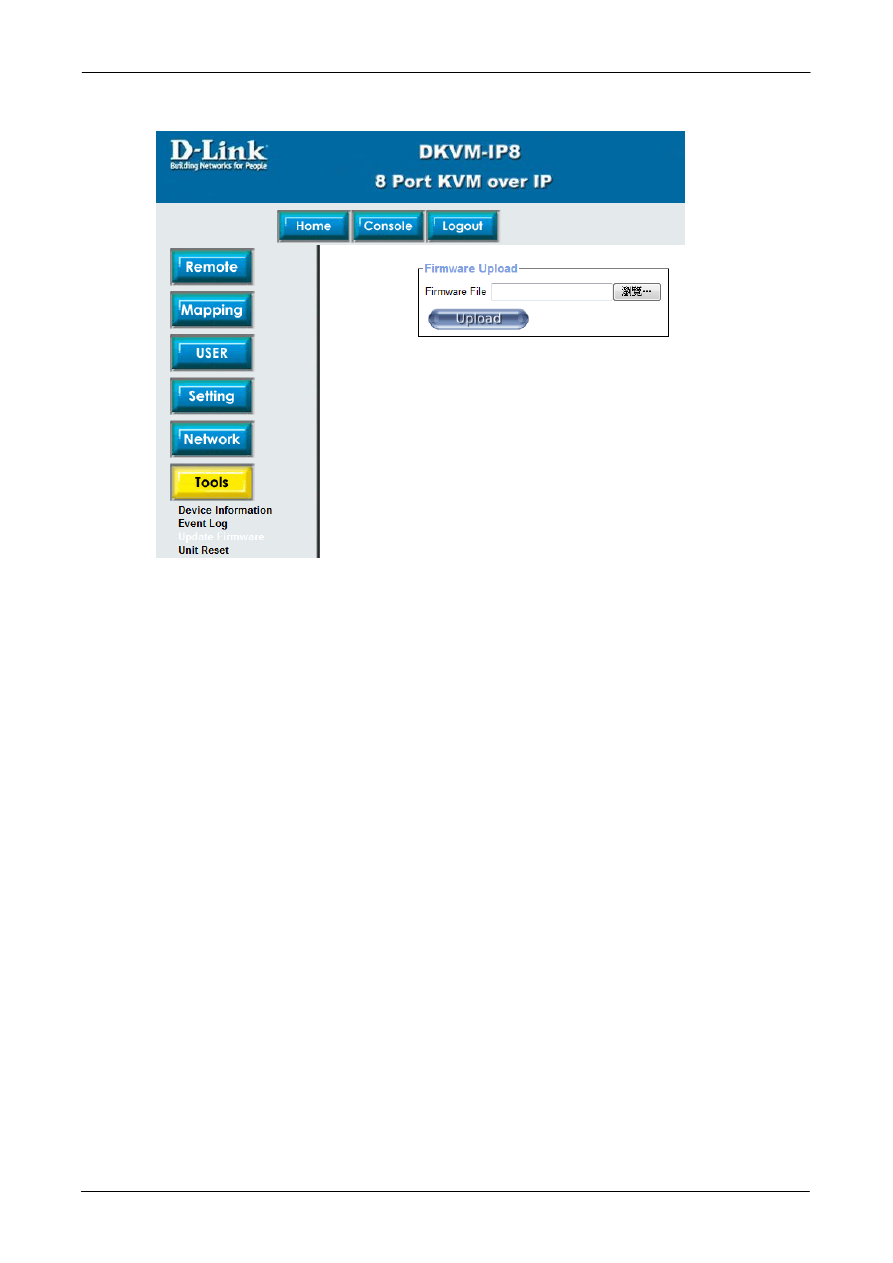
6.7.3 Update Firmware
Figure 6-38. Update Firmware
The DKVM-IP8 is a complete standalone computer. The software it runs is called
firmware. The firmware of the DKVM-IP8 can be updated remotely in order to install
new functionality or special features.
A new firmware update is a binary file which will be sent to you by email or which you
can download from the supplier web site. If the firmware file is compressed (file
suffix .zip) then you must unzip it before you can proceed. Under the Windows
operating system you may use WinZip from http://www.winzip.com/ for decompression.
Other operating systems might provide a program called unzip.
Before you can start updating the firmware of your DKVM-IP8 the new uncompressed
firmware file has to be accessible on the system that you use for connecting to the
DKVM-IP8.
Updating the firmware is a three-stage process:
• Firstly, the new firmware file is uploaded onto the DKVM-IP8. In order to do that you
need to select the file on your local system using the button “Browse” of the Upload
Firmware panel. Once the firmware file has been uploaded, it is checked whether it is
a valid firmware file and whether there were any transmission errors. In case of any
error the Upload Firmware function will be aborted.
• Secondly, if everything went well, you see the Update Firmware panel. The panel
shows you the version number of the currently running firmware and the version
number of the uploaded firmware. Pressing the button “Update” will store the new
version and substitute the old one completely.
Оглавление инструкции
- Install JVM on Client system
- Connect the DKVM-IP8 unit via Web Browser
- The super user has all permissions to administrate your DKVM-IP8:
- After login, the system will prompt for changing the default username and password to user specific settings.
- Control servers via Remote Console
- Hardware
- Software
- 3.4.1 Login Windows
- 3.4.2 Port Name
- 3.4.3 Main Menu
- 3.4.4 Language
- 3.4.5 Port Name Edit
- 3.4.6 Port Search
- 3.4.7 User Security
- 3.4.8 Access List
- 3.4.9 Hotkey
- 3.4.10 Time Settings
- 3.4.11 OSD Mouse
- 4.1.1 Initial configuration via serial console
- 4.2.1 DKVM-IP8 keyboard settings
- 4.2.2 Remote Mouse Settings
- 4.2.3 Automatic mouse speed and mouse synchronization
- 4.2.4 Host system mouse settings
- 4.2.5 Single and Double Mouse Mode
- 4.2.6 Recommended Mouse Settings
- 4.2.7 Video Modes
- 5.2.1 Login into the DKVM-IP8
- 5.2.2 Logout from the DKVM-IP8
- 5.4.1 Remote Console Control Bar
- 5.4.2 Remote Console Status Line
- 6.1.1 KVM Console
- 6.1.2 Telnet Console
- 6.3.1 Floppy Disk
- 6.3.2 CD–ROM Image
- 6.3.3 Drive redirection
- 6.3.4 Options
- 6.4.1 Change Password
- 6.4.2 Users and Groups
- 6.5.1 User Console
- 6.5.2 Keyboard/Mouse
- 6.5.3 Video
- 6.6.1 Network
- 6.6.2 Dynamic DNS
- 6.6.3 Security
- 6.6.4 Certificate
- 6.6.5 Authentication
- 6.6.6 Serial Port
- 6.6.7 Date / Time
- 6.6.8 Event Log
- 6.7.1 Device Information
- 6.7.2 Even log
- 6.7.3 Update Firmware
- 6.7.4 Unit Reset
- The remote mouse doesn’t work or is not synchronous