Инструкция для D-Link DKVM-IP8
 1
 2
 3
 4
 5
 6
 7
 8
 9
 10
 11
 12
 13
 14
 15
 16
 17
 18
 19
 20
 21
 22
 23
 24
 25
 26
 27
 28
 29
 30
 31
 32
 33
 34
 35
 36
 37
 38
 39
 40
 41
 42
 43
 44
 45
 46
 47
 48
 49
 50
 51
 52
 53
 54
 55
 56
 57
 58
 59
 60
 61
 62
 63
 64
 65
 66
 67
 68
 69
 70
 71
 72
 73
 74
 75
 76
 77
 78
 79
 80
 81
 82
 83
 84
 85
 86
 87
 88
 89
 90
 91
 92
 93
 94
 95
 96
 97
 98
 99
 100
 101
 102
 103
 104
DKVM-IP8 User Manual
69 / 104
Pre-configured
The pre-configured settings deliver the best result because of optimized
adjustment of compression and colour depth for the indicated network speed.
Manually
Allows to adjust both compression rate and the colour depth individually.
Depending on the selected compression rate the data stream between the
DKVM-IP8 and the Remote Console will be compressed in order to save
bandwidth. Since high compression rates consum more computing power of
DKVM-IP8, they should not be used while several users are accessing the
DKVM-IP8 simultaneously.
The standard color depth is 16 Bit (65536 colors). The other color depths are
intended for slower network connections in order to allow a faster transmission
of data. Therefore compression level 0 (no compression) uses only 16 Bit color
depth. At lower bandwidths only 4 Bit (16 colors) and 2 Bit (4 gray scales) are
recommended for typical desktop interfaces. Photo-like pictures have best
results with 4 Bit (16 gray scales). 1 Bit color depth (black/white) should only be
used for extremely slow network connections.
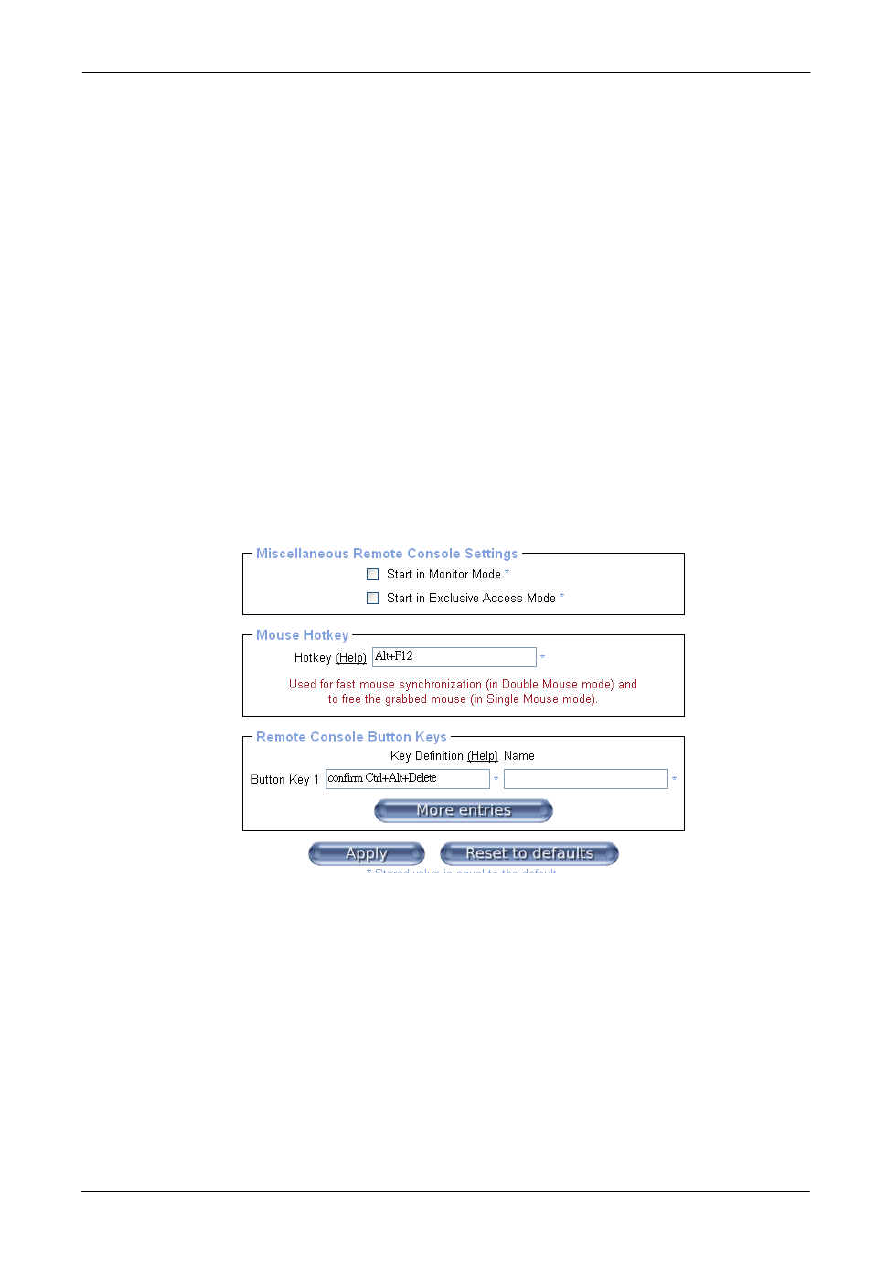
Figure 6-21. User Console Settings (Part 2)
Remote Console Type
Specifies, which Remote Console Viewer to use.
Default Java-VM
Uses the default Java Virtual Machine of your Browser. This may be the
Microsoft JVM for the Internet Explorer, or the Sun JVM if it is configured this
way. Use of the Sun JVM may also be forced (see below).
Sun Microsystems Java Browser Plugin
Instructs the web browser of your administration system to use the JVM of Sun
Microsystems. The JVM in the browser is used to run the code for the Remote
Оглавление инструкции
- Install JVM on Client system
- Connect the DKVM-IP8 unit via Web Browser
- The super user has all permissions to administrate your DKVM-IP8:
- After login, the system will prompt for changing the default username and password to user specific settings.
- Control servers via Remote Console
- Hardware
- Software
- 3.4.1 Login Windows
- 3.4.2 Port Name
- 3.4.3 Main Menu
- 3.4.4 Language
- 3.4.5 Port Name Edit
- 3.4.6 Port Search
- 3.4.7 User Security
- 3.4.8 Access List
- 3.4.9 Hotkey
- 3.4.10 Time Settings
- 3.4.11 OSD Mouse
- 4.1.1 Initial configuration via serial console
- 4.2.1 DKVM-IP8 keyboard settings
- 4.2.2 Remote Mouse Settings
- 4.2.3 Automatic mouse speed and mouse synchronization
- 4.2.4 Host system mouse settings
- 4.2.5 Single and Double Mouse Mode
- 4.2.6 Recommended Mouse Settings
- 4.2.7 Video Modes
- 5.2.1 Login into the DKVM-IP8
- 5.2.2 Logout from the DKVM-IP8
- 5.4.1 Remote Console Control Bar
- 5.4.2 Remote Console Status Line
- 6.1.1 KVM Console
- 6.1.2 Telnet Console
- 6.3.1 Floppy Disk
- 6.3.2 CD–ROM Image
- 6.3.3 Drive redirection
- 6.3.4 Options
- 6.4.1 Change Password
- 6.4.2 Users and Groups
- 6.5.1 User Console
- 6.5.2 Keyboard/Mouse
- 6.5.3 Video
- 6.6.1 Network
- 6.6.2 Dynamic DNS
- 6.6.3 Security
- 6.6.4 Certificate
- 6.6.5 Authentication
- 6.6.6 Serial Port
- 6.6.7 Date / Time
- 6.6.8 Event Log
- 6.7.1 Device Information
- 6.7.2 Even log
- 6.7.3 Update Firmware
- 6.7.4 Unit Reset
- The remote mouse doesn’t work or is not synchronous