Инструкция для JVC KD-AVX22
 1
 2
 3
 4
 5
 6
 7
 8
 9
 10
 11
 12
 13
 14
 15
 16
 17
 18
 19
 20
 21
 22
 23
 24
 25
 26
 27
 28
 29
 30
 31
 32
 33
 34
 35
 36
 37
 38
 39
 40
 41
 42
 43
 44
 45
 46
 47
 48
 49
 50
 51
 52
 53
 54
 55
 56
 57
 58
 59
 60
 61
 62
 63
 64
 65
 66
 67
 68
 69
 70
 71
 72
 73
 74
 75
 76
 77
 78
 79
 80
 81
 82
 83
 84
 85
 86
 87
 88
 89
 90
 91
 92
 93
 94
 95
 96
 97
 98
 99
 100
 101
 102
 103
 104
 105
 106
 107
 108
 109
 110
 111
 112
 113
 114
 115
 116
 117
 118
 119
 120
 121
 122
 123
 124
 125
 126
 127
 128
 129
 130
 131
 132
 133
 134
 135
 136
 137
 138
 139
 140
 141
 142
 143
 144
 145
 146
 147
 148
 149
 150
 151
 152
 153
 154
 155
 156
 157
 158
 159
 160
 161
 162
 163
 164
 165
 166
 167
 168
 169
 170
 171
 172
 173
 174
 175
 176
 177
 178
 179
 180
 181
 182
 183
 184
 185
 186
 187
 188
 189
 190
 191
 192
 193
 194
 195
 196
 197
 198
 199
 200
 201

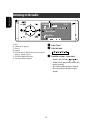
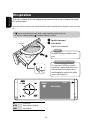
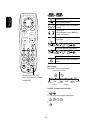
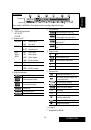
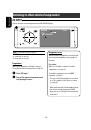
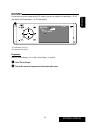
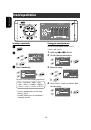
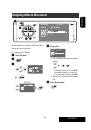
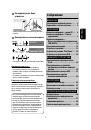
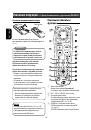
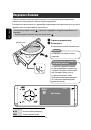
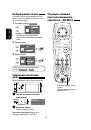
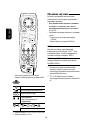
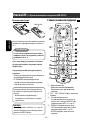
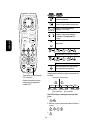
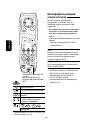
OPERATIONS
11
ENGLISH
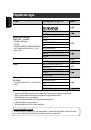
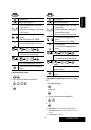
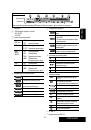
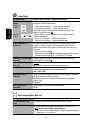
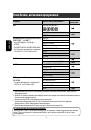
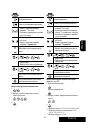
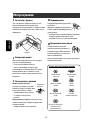
5
• Enters numbers (while holding SHIFT). (
☞
pages
14, 23 to 26, and 42)
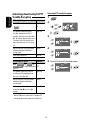
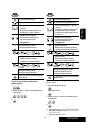
• “Tuner” and “DAB”: Selects the preset stations.
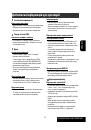
6
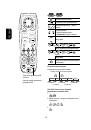
Displays the on-screen bar.
7
Functions with other buttons (see
3
,
5
, and
o
)
8
Displays the display information.
9
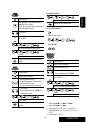
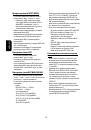
“Tuner”:
•
5
/
∞
: Selects preset stations.
•
4
/
¢
: Searches for stations.
–
Auto
Search
–
Manual
Search
[Hold]
“DAB”:
•
5
/
∞
: Selects services.
•
4
/
¢
: Searches for ensembles.
–
Auto
Search
–
Manual
Search
[Hold]
“Disc” and “Changer”:
•
5
/
∞
:
– DVD: Selects the title.
– DVD-VR: Selects the program/play list.
– Other discs (except VCD/CD): Selects the
folders.
•
4
/
¢
:
– Reverse skip/forward skip
– Reverse search/forward search
[Hold]
“USB”:
•
5
/
∞
: Selects the folders.
•
4
/
¢
:
– Reverse skip/forward skip
– Reverse search/forward search
[Hold]
“USB iPod”:
•
5
/
∞
: Selects previous/next item.
•
4
/
¢
:
– Reverse skip/forward skip
– Reverse search/forward search
[Hold]
“iPod”:
•
∞
: Pauses or resumes playback.
•
5
: Enters the main menu (then
5
/
∞
/
4
/
¢
work as the menu selecting buttons).
*4
•
4
/
¢
:
– Reverse skip/forward skip
– Reverse search/forward search
[Hold]
In menu selecting mode:
– Selects an item. (Then, press
∞
to confirm the
selection.)
– Skips 10 items at a time
[Hold]
.
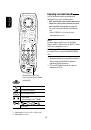
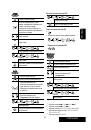
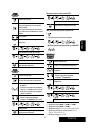
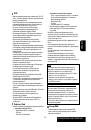
p
“Disc,” “USB,” and “USB iPod”: Forward search
q
Selects the source.
w
“Disc,” “USB,” and “USB iPod”: Starts and pauses
playback.
e
Changes the aspect ratio of the playback pictures.
r
• “Tuner” and “DAB”: Selects the bands.
• “Disc” and “USB”: Stops playback.
• Does not function as “ .”
t
VCD: Returns to the PBC menu.
y
• DVD Video/DivX 6: Displays the disc menu.
• VCD: Resumes PBC playback. (
☞
page 25)
• DVD-VR: Displays the Play List screen.
u
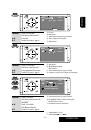
• Makes selection/settings.
•
@
/
#
: Skips back or forward by 5 minutes for
DivX/MPEG1/MPEG2.
•
%
/
fi
: Changes discs for “Changer.”
i
Activates or deactivates Dual Zone.
o
• Changes the surround mode.
*1
(
☞
page 27)
• “Disc” and “USB”: Switches the number entry
mode (while holding SHIFT).
• Erases the misentry after entering a wrong
number (while holding SHIFT).
*
1
When Dual Zone is activated, these buttons cannot be
used.
*
2
Not used for this unit.
*
3
Functions as a number button only (see
5
).
*
4
5
: Returns to the previous menu.
∞
: Confirms the selection.