Инструкция для LG 42LA621V, 42LA620V, 32LN655V, 32LN570V, 32LA662V
 1
 2
 3
 4
 5
 6
 7
 8
 9
 10
 11
 12
 13
 14
 15
 16
 17
 18
 19
 20
 21
 22
 23
 24
 25
 26
 27
 28
 29
 30
 31
 32
 33
 34
 35
 36
 37
 38
 39
 40
 41
 42
 43
 44
 45
 46
 47
 48
 49
 50
 51
 52
 53
 54
 55
 56
 57
 58
 59
 60
 61
 62
 63
 64
 65
 66
 67
 68
 69
 70
 71
 72
 73
 74
 75
 76
 77
 78
 79
 80
 81
 82
 83
 84
 85
 86
 87
 88
 89
 90
 91
 92
 93
 94
 95
 96
 97
 98
 99
 100
 101
 102
 103
 104
 105
 106
 107
 108
 109
 110
 111
 112
 113
 114
 115
 116
 117
 118
 119
 120
 121
 122
 123
 124
 125
 126
 127
 128
 129
 130
 131
 132
 133
 134
 135
 136
 137
 138
 139
 140
 141
 142
 143
 144
 145
 146
 147
 148
 149
 150
 151
 152
 153
 154
 155
 156
 157
 158
25
ENGLISH
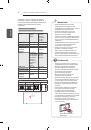
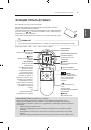
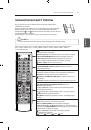
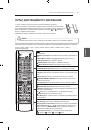
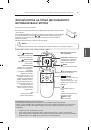
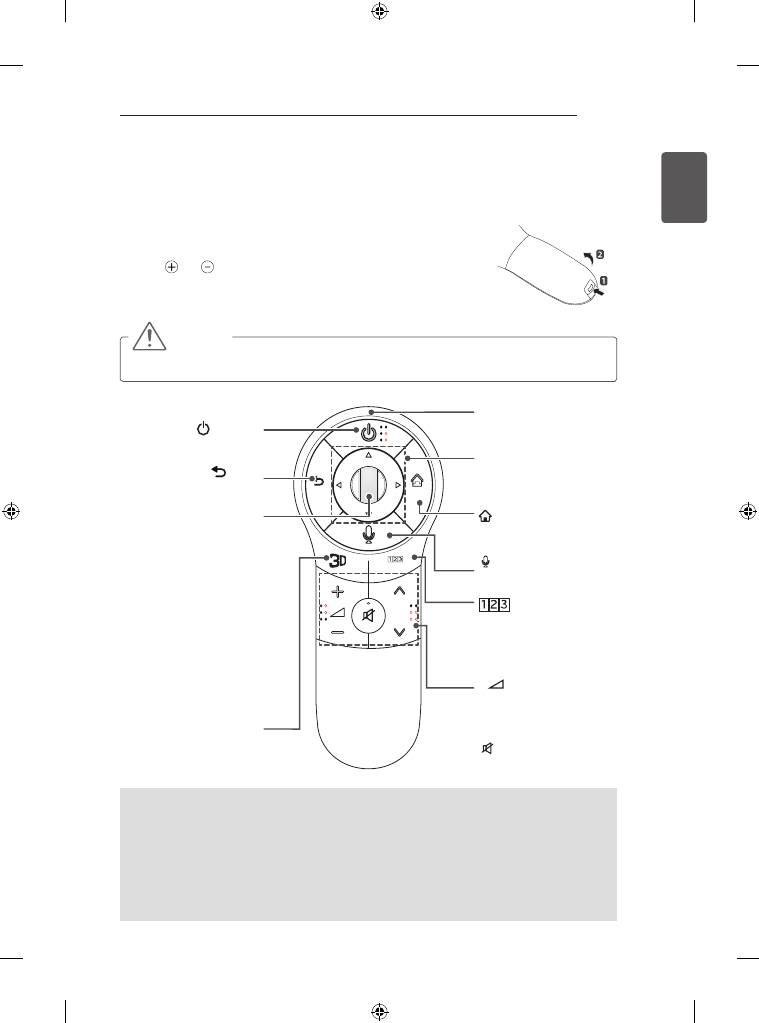
Magic ReMote contRol Functions
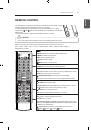
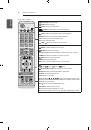
MaGIc REMotE coNtRoL FuNctIoNS
this item is not included for all models.
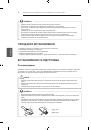
When the message “Magic Remote control battery is low. change the battery.”
is displayed, replace the battery.
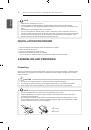
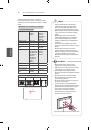
to replace batteries, open the battery cover, replace batteries (1.5 V aa)
matching and ends to the label inside the compartment, and close the
battery cover. Be sure to point the remote control toward the remote control
sensor on the tV.
to remove the batteries, perform the installation actions in reverse.
cautIoN
y
Do not mix old and new batteries, as this may damage the remote control.
(only la66**, la69** , la71**, la74**, ln578* , ln65**)
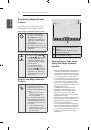
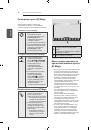
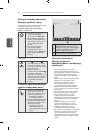
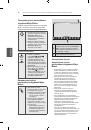
Voice recognition
(Depending on model)
network connection is required to use the voice recognition function.
the recognition rate may vary depending on the user’s characteristics (voice, pronunciation, intonation
and speed) and the environment (noise and tV volume).
1.
Press the Voice recognition button.
2.
speak when the voice display window appears on the left of the tV screen.
•
the voice recognition may fail when you speak too fast or too slow.
•
use the Magic remote control no further than 10 cm from your face.
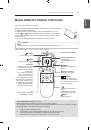
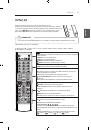
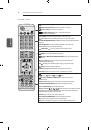
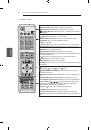
(PoWER)
turns the tV on or off.
BacK
Returns to the previous
level.
Wheel(oK)
selects menus or options
and confirms your input.
scrolls through the saved
programmes.
if you press the navigation
button while moving the
pointer on the screen, the
pointer disappears, and the
Magic Remote control works
as a regular remote control.
to display the pointer again,
shake the Magic Remote
control from side to side.
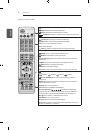
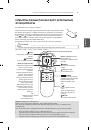
3D
used for viewing 3D video.
(Depending on model)
Pointer (RF transmitter)
Navigation buttons
(up/
down/left/right)
scrolls through menus or
options.
SMaRt
accesses the smart Home
menus.
Voice recognition
(Depending on model)
/Q.MENu
accesses the quick menus.
accesses the universal con-
trol. (this feature is not avail-
able in all countries.)
+
-
adjusts the volume level.
ꕌ
P
ꕍ
scrolls through the saved
programmes or channels.
MutE
Mutes all sounds.
P
BACK
SMART
/Q.MENU