Инструкция для Samsung UE75H6400AK, UE65H6400AK, UE55H6400AK, UE48H6400AK, UE40H6400AK
 1
 2
 3
 4
 5
 6
 7
 8
 9
 10
 11
 12
 13
 14
 15
 16
 17
 18
 19
 20
 21
 22
 23
 24
 25
 26
 27
 28
 29
 30
 31
 32
 33
 34
 35
 36
 37
 38
 39
 40
 41
 42
 43
 44
 45
 46
 47
 48
 49
 50
 51
 52
 53
 54
 55
 56
 57
 58
 59
 60
 61
 62
 63
 64
 65
 66
 67
 68
 69
 70
 71
 72
 73
 74
 75
 76
 77
 78
 79
 80
 81
 82
 83
 84
 85
 86
 87
 88
 89
 90
 91
English - 16
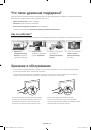
Viewing more TV features
The
e-Manual
contains more detailed information on the TV features. Refer to the embedded
e-Manual
(
Support
>
e-Manual
).
Launching the e-Manual
The embedded e-Manual contains information.
- You can also download a copy of the e-Manual from Samsung's website, and read it on your computer or print it out.
- Yellow words indicate a menu item; white bold words indicate remote control buttons. Arrows are used to indicate the
menu path. (Example:
Picture
>
Picture Mode
)
1.
Select
e-Manual
. The e-Manual loads.
2.
Select a category from the side of the screen. Once a selection has been made, the contents of the selected category
appear.
3.
Select an item from the list. This opens the e-Manual on the corresponding page.
If a description doesn't fit on a single screen...
You can scroll pages in one of the following ways.
•
Position the focus on the page to display
/
on the screen. Press
<
,
>
button.
Additional e-Manual Features
Loading Pages using Keywords
Select
Search
from the side of the screen to bring up the search screen. Enter a search term and then select
Done
. Select an
item from the search results to load the corresponding page.
[UH6400-RU]BN68-05816A-03L04.indb 16
2014-05-23 3:04:02