Инструкция для Samsung UE75H6400AK, UE65H6400AK, UE55H6400AK, UE48H6400AK, UE40H6400AK
 1
 2
 3
 4
 5
 6
 7
 8
 9
 10
 11
 12
 13
 14
 15
 16
 17
 18
 19
 20
 21
 22
 23
 24
 25
 26
 27
 28
 29
 30
 31
 32
 33
 34
 35
 36
 37
 38
 39
 40
 41
 42
 43
 44
 45
 46
 47
 48
 49
 50
 51
 52
 53
 54
 55
 56
 57
 58
 59
 60
 61
 62
 63
 64
 65
 66
 67
 68
 69
 70
 71
 72
 73
 74
 75
 76
 77
 78
 79
 80
 81
 82
 83
 84
 85
 86
 87
 88
 89
 90
 91
English - 10
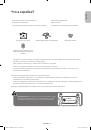
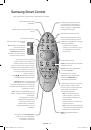
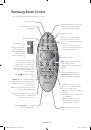
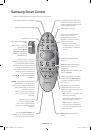
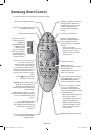
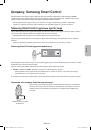
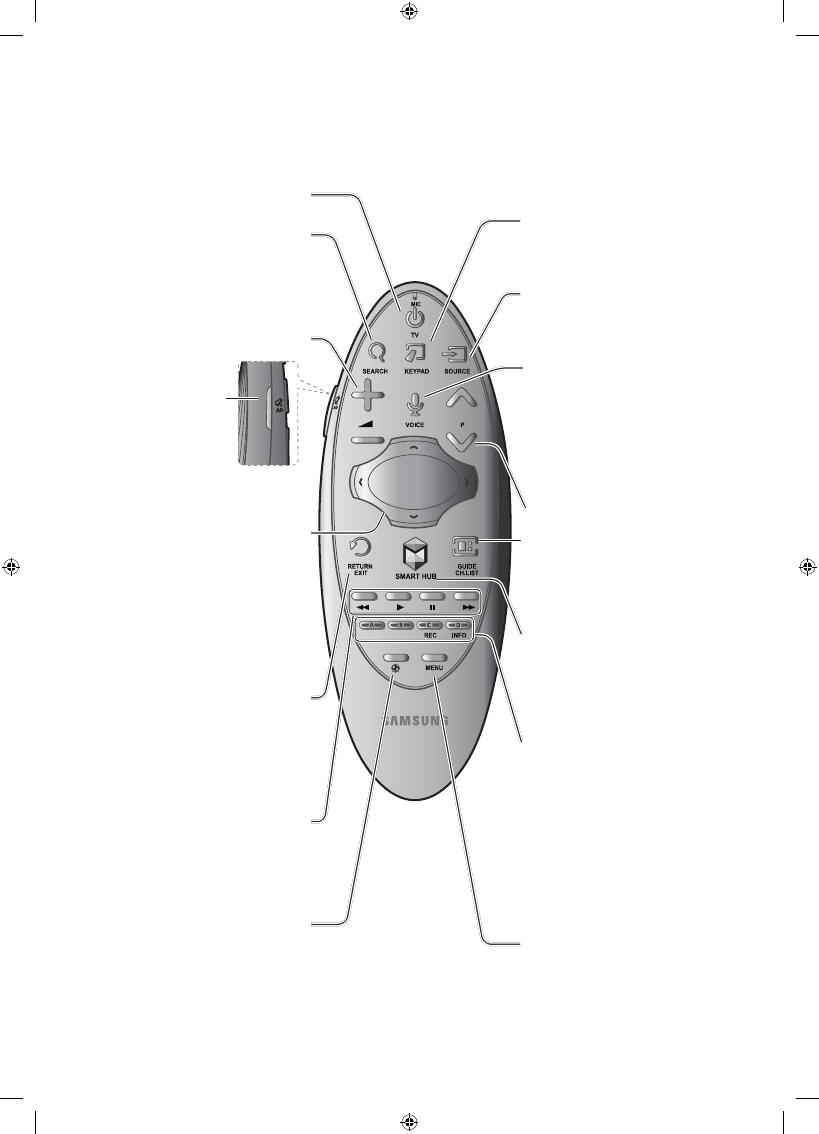
Samsung Smart Control
- Colours and shape may vary depending on the model.
Turns the TV on/off.
Changes the source.
Changes the channel.
Press this button to use the
search window.
With the virtual remote control on the
screen, you can easily enter digits,
control content, and use functions.
Changes the volume.
Starts voice recognition. When the
microphone icon appears on the
screen, say a voice command into the
microphone.
- Say a voice command 10 cm to
15 cm from the microphone and
at an appropriate volume.
- Touchpad: Place a finger on the
touch pad and move the Samsung
Smart Control. The pointer on the
screen moves in the direction and as
much as the Samsung Smart Control
is moved. Press the touchpad to run
the focused item.
-
<
>
¡
£
: Moves the pointer or
focus.
RETURN
: Returns to the previous menu.
Additionally, when you press this button
while watching TV, you can return to the
previous channel.
EXIT
: Press and hold this button to exit all
currently running applications.
Use these buttons with specific features.
Use these buttons according to the
directions on the TV screen.
Launches Smart Hub. Pressing
SMART HUB
while an application is
running terminates the application.
GUIDE
: Displays the digital channel
broadcasting schedule.
CH.LIST
: Press and hold to launch the
CH.LIST
.
Colour button: Use these colour
buttons to access additional options
specific to the feature in use.
-
REC
: Press and hold to record the
broadcast.
Availability depends on the specific
model and area.
-
INFO
: Press and hold to view
information about the current
digital channel or media file.
MENU
: Displays the menu on the
screen.
Enable
Football Mode
for an optimal
sports viewing experience.
¢
: Turns the sound
on/off.
AD
: Press and hold this
button to bring up the
Accessibility Shortcuts
panel. Select the
options to turn them on
or off.
[UH6400-RU]BN68-05816A-03L04.indb 10
2014-05-23 3:04:00