Инструкция для Samsung UE46D6530WS, UE40D6510WS, UE32D6530WS, UE32D6510WS, UE55D6530WS
 1
 2
 3
 4
 5
 6
 7
 8
 9
 10
 11
 12
 13
 14
 15
 16
 17
 18
 19
 20
 21
 22
 23
 24
 25
 26
 27
 28
 29
 30
 31
 32
 33
 34
 35
 36
 37
 38
 39
 40
 41
 42
 43
 44
 45
 46
 47
 48
 49
 50
 51
 52
 53
 54
 55
 56
 57
 58
 59
 60
 61
 62
 63
 64
 65
 66
 67
 68
 69
 70
 71
 72
 73
 74
 75
 76
 77
 78
 79
 80
 81
 82
English - 5
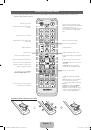
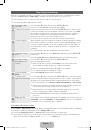
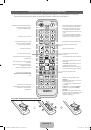
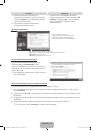
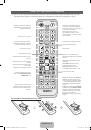
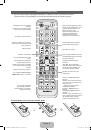
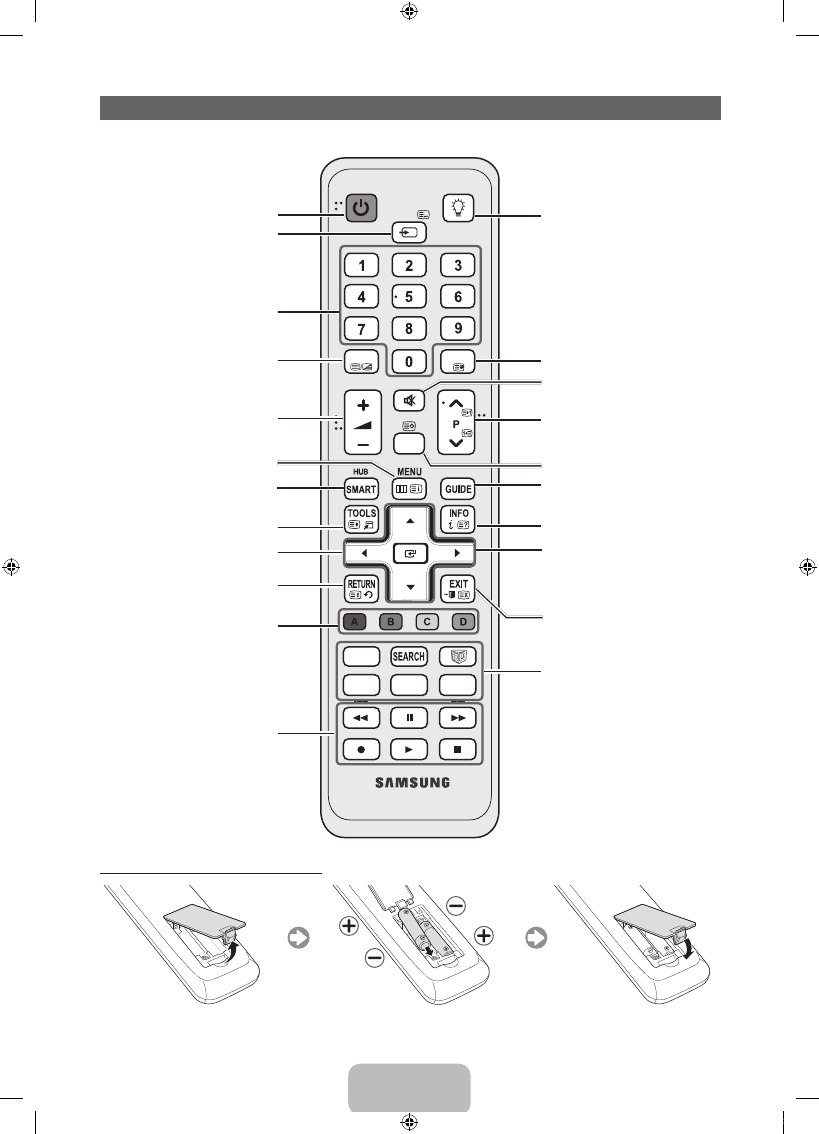
Viewing the Remote Control
✎
This is a special remote control for the visually impaired persons and has Braille points on the Power,
Channel and Volume buttons.
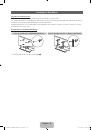
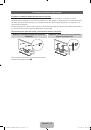
Installing batteries (Battery size: AAA)
CH LIST
MUTE
POWER
SOURCE
PRE-CH
E-MANUAL
P.SIZE
AD/SUBT.
TTX/MIX
ON/OFF
SOCIAL
TV
Turns the TV on and off.
Displays and selects the available video
sources.
Turns the remote control light on or off.
When on, the buttons become illuminated
for a moment when pressed.
(Using the remote control with this button
set to On will reduce the battery usage
time.)
Returns to the previous channel.
Cuts off the sound temporarily.
Changes channels.
Displays channel lists on the screen.
Displays the EPG (Electronic Programme
Guide).
Displays information on the TV screen.
Exits the on-screen menu.
Have direct access to channels.
Adjusts the volume.
Alternately select Teletext ON, Double,
Mix or OFF.
Opens the OSD.
Quickly select frequently used functions.
Link to various application services.
Returns to the previous menu.
Selects the on-screen menu items and
changes the values seen on the menu.
These buttons are for the
Channel
Manager, SMART HUB
menu, etc.
Use these buttons in a specific feature.
For details, refer to e-Manual.
SOCIAL TV
: Displays the
Social TV
screen.
SEARCH
: Support to recommendation
search word and search function.
W
: Sets the video, which provided with
3D
signal.
E-MANUAL:
Displays the
e-Manual
.
P.SIZE
: Selects the
Picture Size
.
AD/SUBT.
: Turns the audio description
on and off. This is not available in some
locations. / Displays digital subtitles.
u
/
d
/
l
/
r
: Move the cursor on-screen
menu item.
ENTER
E
: Selects the menu and
changes the corresponding item value.
[UD6500-RU]BN68-03482J-01L04.indb 5
2011-05-09 오후 3:59:39