Инструкция для LG 32LB561V
 1
 2
 3
 4
 5
 6
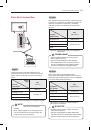 7
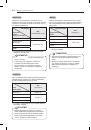 8
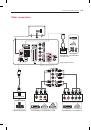 9
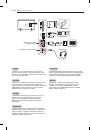 10
 11
 12
 13
 14
 15
 16
 17
 18
 19
 20
 21
 22
 23
 24
 25
 26
 27
 28
 29
 30
 31
 32
 33
 34
 35
 36
 37
 38
 39
 40
 41
 42
 43
 44
 45
 46
 47
 48
 49
 50
 51
 52
 53
 54
 55
 56
 57
 58
 59
 60
 61
 62
 63
 64
 65
 66
 67
 68
 69
 70
 71
 72
 73
 74
 75
 76
 77
 78
 79
 80
 81
 82
 83
 84
 85
 86
 87
 88
 89
 90
 91
 92
 93
 94
 95
 96
 97
 98
 99
 100
 101
 102
 103
 104
 105
 106
 107
 108
 109
 110
 111
 112
 113
 114
 115
 116
 117
 118
 119
 120
 121
 122
 123
 124
 125
 126
 127
 128
 129
 130
 131
 132
 133
 134
 135
 136
 137
 138
 139
 140
 141
 142
 143
 144
 145
 146
 147
 148
 149
 150
 151
 152
 153
 154
 155
 156
 157
 158
 159
 160
 161
 162
 163
 164
 165
 166
 167
 168
 169
 170
 171
 172
 173
 174
 175
 176
 177
 178
 179
 180
 181
 182
 183
 184
 185
 186
 187
 188
 189
 190
 191
 192
 193
 194
 195
 196
 197
 198
 199
 200
 201
 202
 203
 204
 205
 206
 207
 208
 209
 210
 211
 212
 213
 214
 215
 216
 217
 218
 219
 220
 221
 222
 223
 224
 225
 226
 227
 228
 229
 230
 231
 232
 233
 234
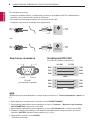 235
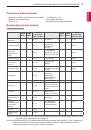 236
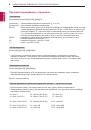 237
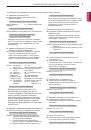 238
 239
 240
 241
 242
 243
 244
 245
 246
 247
 248
 249
 250
 251
 252
 253
 254
 255
 256
 257
 258
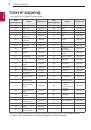 259
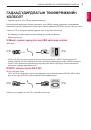 260
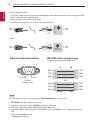 261
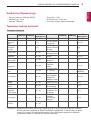 262
 263
 264
 265
 266
 267
 268
 269
 270
20
ENG
EN
G
LIS
H
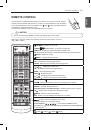
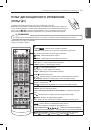
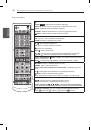
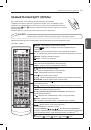
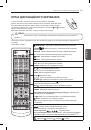
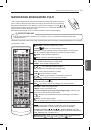
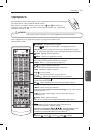
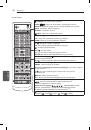
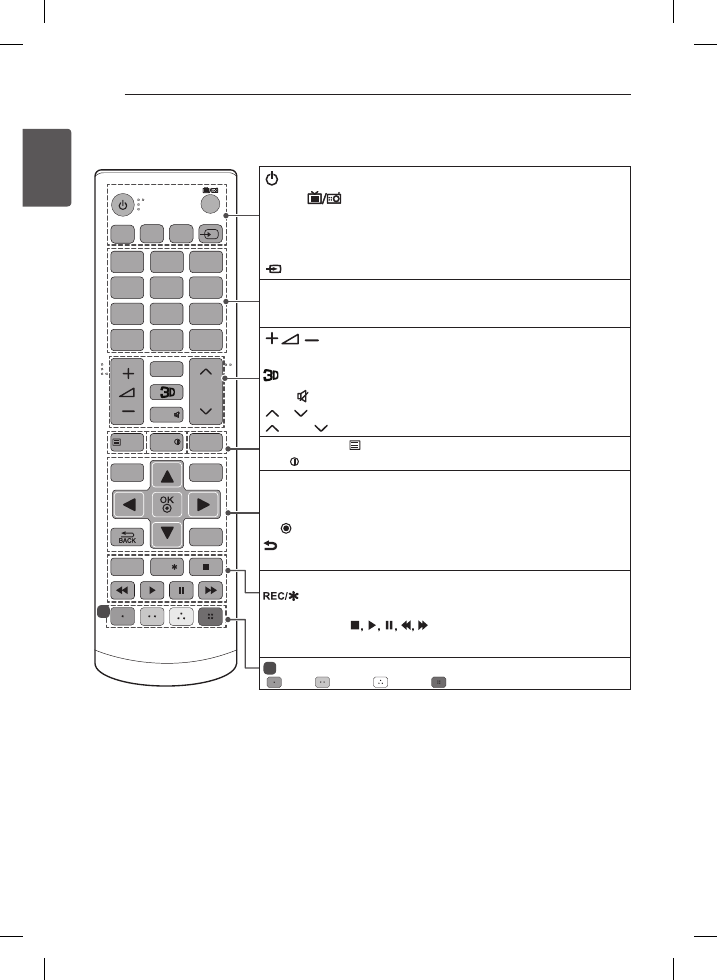
REMOTE CONTROL
(Only LB62**)
1
4
5
6
7
8
9
LIST
SUBTITLE
TEXT
SETTINGS
Q.MENU
EXIT
INFO
T.OPT
Q.VIEW
P
0
FAV
MUTE
2
3
INPUT
TV/
RAD
PAGE
AD
REC/
GUIDE
AV MODE
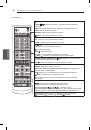
1
1
(POWER)
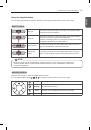
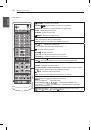
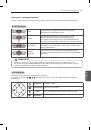
Turns the TV on or off.
TV/RAD
Selects Radio, TV and DTV programme.
SUBTITLE
Recalls your preferred subtitle in digital mode.
GUIDE
Shows programme guide.
AV MODE
Selects an AV mode.
INPUT
Changes the input source.
Number buttons
Enters numbers.
LIST
Accesses the saved programme list.
Q.VIEW
Returns to the previously viewed programme.
Adjusts the volume level.
FAV
Accesses your favourite programme list.
Used for viewing 3D video.
MUTE
Mutes all sounds.
P
Scrolls through the saved programmes.
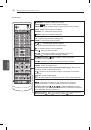
PAGE
Moves to the previous or next screen.
Teletext buttons ( TEXT / T.OPT)
These buttons are used for teletext.
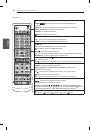
INFO
Views the information of the current programme and screen.
SETTINGS
Accesses the main menus.
Q.MENU
Accesses the Quick menus.
Navigation buttons (up/down/left/right)
Scrolls through menus or options.
OK
Selects menus or options and confirms your input.
BACK
Returns to the previous level.
EXIT
Clears on-screen displays and returns to TV viewing.
AD
By pressing the AD button, audio descriptions function will be enabled.
Starts to record and displays record menu.
(Only Time Machine
Ready
supported model)
Control buttons (
)
Controls the MY MEDIA menus,
Time Machine
Ready
control or the SIMPLINK compatible devices (USB, SIM-
PLINK or Time Machine
Ready
).
1
Coloured buttons
These access special functions in some menus.
(
: Red,
: Green,
: Yellow,
: Blue)