Инструкция для LG 29LN450U, 29LN457U, 28LN457U, 28LN450U, 26LN457U
 1
 2
 3
 4
 5
 6
 7
 8
 9
 10
 11
 12
 13
 14
 15
 16
 17
 18
 19
 20
 21
 22
 23
 24
 25
 26
 27
 28
 29
 30
 31
 32
 33
 34
 35
 36
 37
 38
 39
 40
 41
 42
 43
 44
 45
 46
 47
 48
 49
 50
 51
 52
 53
 54
 55
 56
 57
 58
 59
 60
 61
 62
 63
 64
 65
 66
 67
 68
 69
 70
 71
 72
 73
 74
 75
 76
 77
 78
 79
 80
 81
 82
 83
 84
 85
 86
 87
 88
 89
 90
 91
 92
 93
 94
 95
 96
 97
 98
 99
 100
 101
 102
 103
 104
 105
 106
 107
 108
 109
 110
 111
 112
 113
 114
20
ENG
ENGLISH
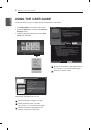
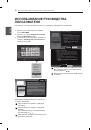
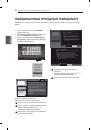
USING THE USER GUIDE
USING THE USER GUIDE
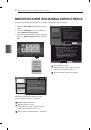
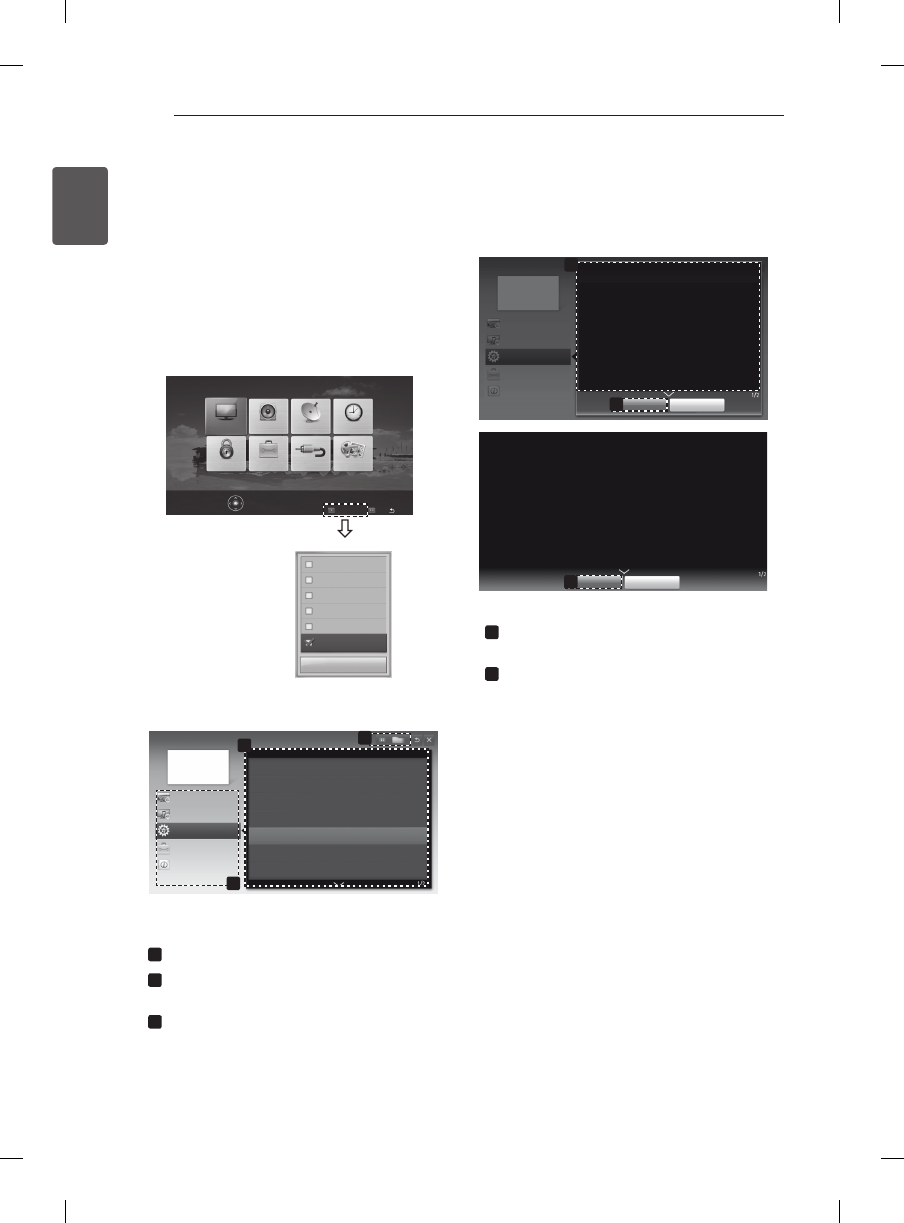
User Guide allows you to more easily access the detailed TV information.
1 Press
SETTINGS
to access the main menus.
2 Press the
RED
button to access the
Customer
Support
menus.
3 Press the Navigation buttons to scroll to
User
Guide
and press
OK
.
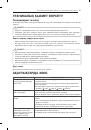
Image shown may differ from your TV.
1
Allows to select the category you want.
2
Allows to select the item you want.
You can use
ꕌ
/
ꕍ
to move between pages.
3
Allows to browse the description of the
function you want from the index.
1
2
User Guide
OPTION > To set language
SETTING
OPTION
Language
You can select the language of the menu displayed on the screen and the digital
sound broadcasting.
y
Menu Language : Selects a language for the display text.
y
Audio Language [In Digital Mode Only] : Selects the desired language when
watching digital broadcasting containg several voice languages.
y
Subtitle Language [In Digital Mode Only] : Use the Subtitle function when two
or more subtitle languages are broadcast.
✎
If subtitle data in a selected language is not broadcast, the default
language subtitle will be displayed.
Close
Zoom In
OPTION
PROGRAMME Setting
PICTURE, SOUND Setting
Advanced Function
Information
2
Close
Zoom Out
SETTING
OPTION
Language
You can select the language of the menu displayed on the screen and the digital
sound broadcasting.
y
Menu Language : Selects a language for the display text.
y
Audio Language [In Digital Mode Only] : selects the desired language when
watching digital broadcasting containg several voice languages.
y
Subtitle Language [In Digital Mode Only] : Use the Subtitle function when two
or more subtitle languages are broadcast.
✎
If subtitle data in a selected language is not broadcast, the default
language subtitle will be displayed.
1
Shows the description of the selected menu.
You can use
ꕌ
/
ꕍ
to move between pages.
2
Zooms in or out the screen.
2
User Guide
OPTION
PROGRAMME Setting
PICTURE, SOUND Setting
Advanced Function
To use input device
To use PIP (Picture In Picture)
To set TV lock options
To set language
To set country
To set time options
To set ODC (Over Driving Circuit)
3
Information
1
Software Update
Picture Test
Sound Test
Signal Test
Product/Service Info.
User Guide
Close
PICTURE
AUDIO
SETUP
TIME
MY MEDIA
INPUT
OPTION
LOCK
Press OK(
) to set picture settings.
Customer Support
Exit
FAQ
Оглавление инструкции
- MFL67707907_A
- MFL67707901_eng
- MFL67707907_rus
- MFL67707907_kaz
- MFL67707907_ukr
- MFL67707907_B
- MFL67707907_0.pdf