Инструкция для LG 29LN450U, 29LN457U, 28LN457U, 28LN450U, 26LN457U
 1
 2
 3
 4
 5
 6
 7
 8
 9
 10
 11
 12
 13
 14
 15
 16
 17
 18
 19
 20
 21
 22
 23
 24
 25
 26
 27
 28
 29
 30
 31
 32
 33
 34
 35
 36
 37
 38
 39
 40
 41
 42
 43
 44
 45
 46
 47
 48
 49
 50
 51
 52
 53
 54
 55
 56
 57
 58
 59
 60
 61
 62
 63
 64
 65
 66
 67
 68
 69
 70
 71
 72
 73
 74
 75
 76
 77
 78
 79
 80
 81
 82
 83
 84
 85
 86
 87
 88
 89
 90
 91
 92
 93
 94
 95
 96
 97
 98
 99
 100
 101
 102
 103
 104
 105
 106
 107
 108
 109
 110
 111
 112
 113
 114
19
ENG
ENGLISH
ENTERTAINMENT
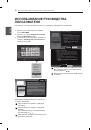
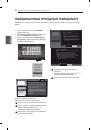
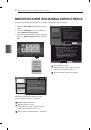
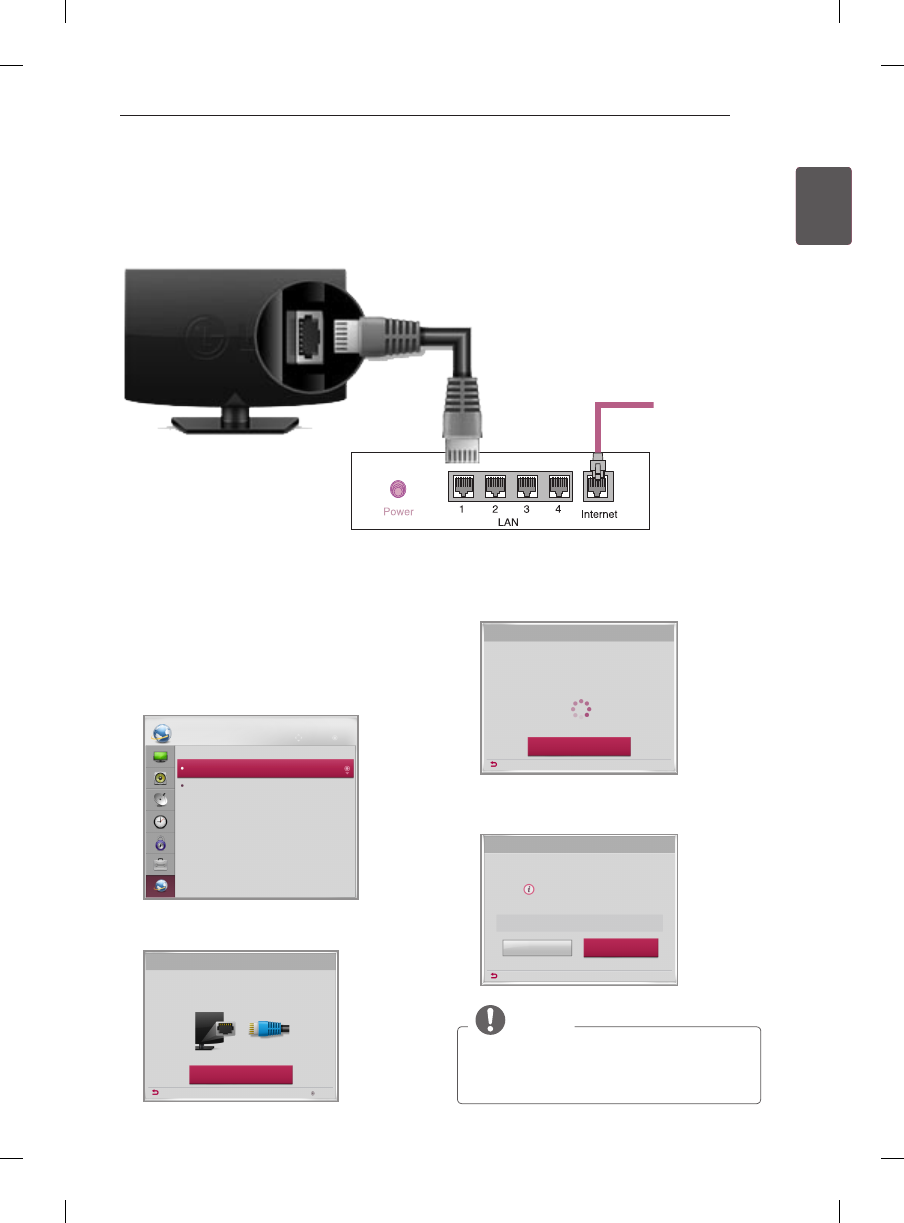
Network setting
1 Press the
SETTING
button to access the main
menu.
2 Select the
NETWORK
→
Network Setting
menu.
NETWORK
Network Setting
Move
OK
Network Status
3 Select the
Start Connection
.
Connect a LAN cable to the back of TV.
Setting your network will enable network-related features on the TV.
Previous
Network Setting
Start Connection
Next
4 The device automatically tries to connect to the
network.
Previous
Network connecting...
Network Setting
Cancel
5 The connected network is displayed.
Select the
Complete
to confirm the network
connection.
Network Setting
For detailed settings, select [Set Expert].
Previous
Wired network is connected.
Complete
Set Expert
ENTERTAINMENT
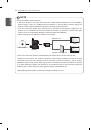
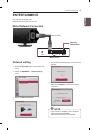
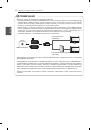
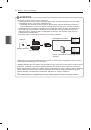
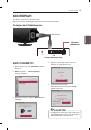
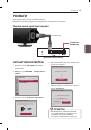
Only LN45*U model(Only UK)
Image shown may differ from your TV.
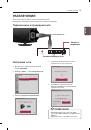
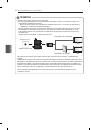
Wired Network Connection
Internet
connection
Wired router
(*Not Provided)
NOTE
y
U.K: LAN port is available. (The LAN port is
added to support HD MHEG.)
y
Other areas: LAN port is not available.
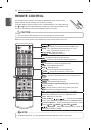
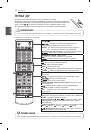
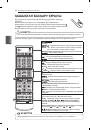
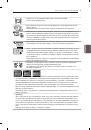
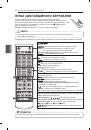
Selects Radio, TV and DTV programme.
Recalls your preferred subtitle in digital mode.
AD/PIP
AD : Switches the audio description on or off. /
PIP : Turns the PIP mode on or off
User Guide
Sees User Guide.
Changes the input source.
Number buttons
Enters numbers
Accesses the saved programme list.
Returns to the previously viewed programme.
Adjusts the volume level.
Accesses your favourite programme list.
GUIDE
Shows programme guide.
MUTE
Mutes all sounds.
P
Scrolls through the saved programmes.
PAGE
Moves to the previous or next screen.
TELETEXT buttons
These buttons are used for teletext.
Views the information of the current programme and
screen.
Accesses the main menus.
Accesses the Quick menus.
Navigation buttons (up/down/left/right)
Scrolls through
menus or options.
Selects menus or options and confirms your input.
BACK
Returns to the previous level.
EXIT
Clears on-screen displays and return to TV viewing.
SIMPLINK
Accesses the AV devices connected with the HDMI
cable through HDMI-CEC. Opens the SIMPLINK menu.
TV/PC
Selects TV or PC mode.
Control buttons( )
Controls the MY MEDIA
menus, or the SIMPLINK compatible devices (USB,SIMPLINK).
Coloured buttons
These access special functions in some
menus.
( RED GREEN YELLOW BLUE)
(Backlight)
Adjusts the brightness of the screen by
controlling the screen backlight.
Оглавление инструкции
- MFL67707907_A
- MFL67707901_eng
- MFL67707907_rus
- MFL67707907_kaz
- MFL67707907_ukr
- MFL67707907_B
- MFL67707907_0.pdf