Инструкция для Samsung LE32B450C4W, LE26B450C4W
 1
 2
 3
 4
 5
 6
 7
 8
 9
 10
 11
 12
 13
 14
 15
 16
 17
 18
 19
 20
 21
 22
 23
 24
 25
 26
 27
 28
 29
 30
 31
 32
 33
 34
 35
 36
 37
 38
 39
 40
 41
 42
 43
 44
 45
 46
 47
 48
 49
 50
 51
 52
 53
 54
 55
 56
 57
 58
 59
 60
 61
 62
 63
 64
 65
 66
 67
 68
 69
 70
 71
 72
 73
 74
 75
 76
 77
 78
 79
 80
 81
 82
 83
 84
 85
 86
 87
 88
 89
 90
 91
 92
 93
 94
 95
 96
 97
 98
 99
 100
 101
 102
 103
 104
 105
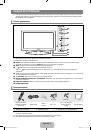
English -
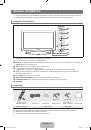
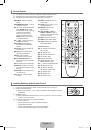
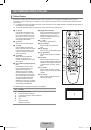
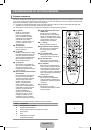
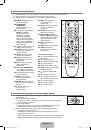
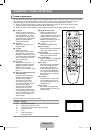
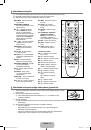
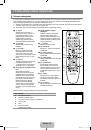
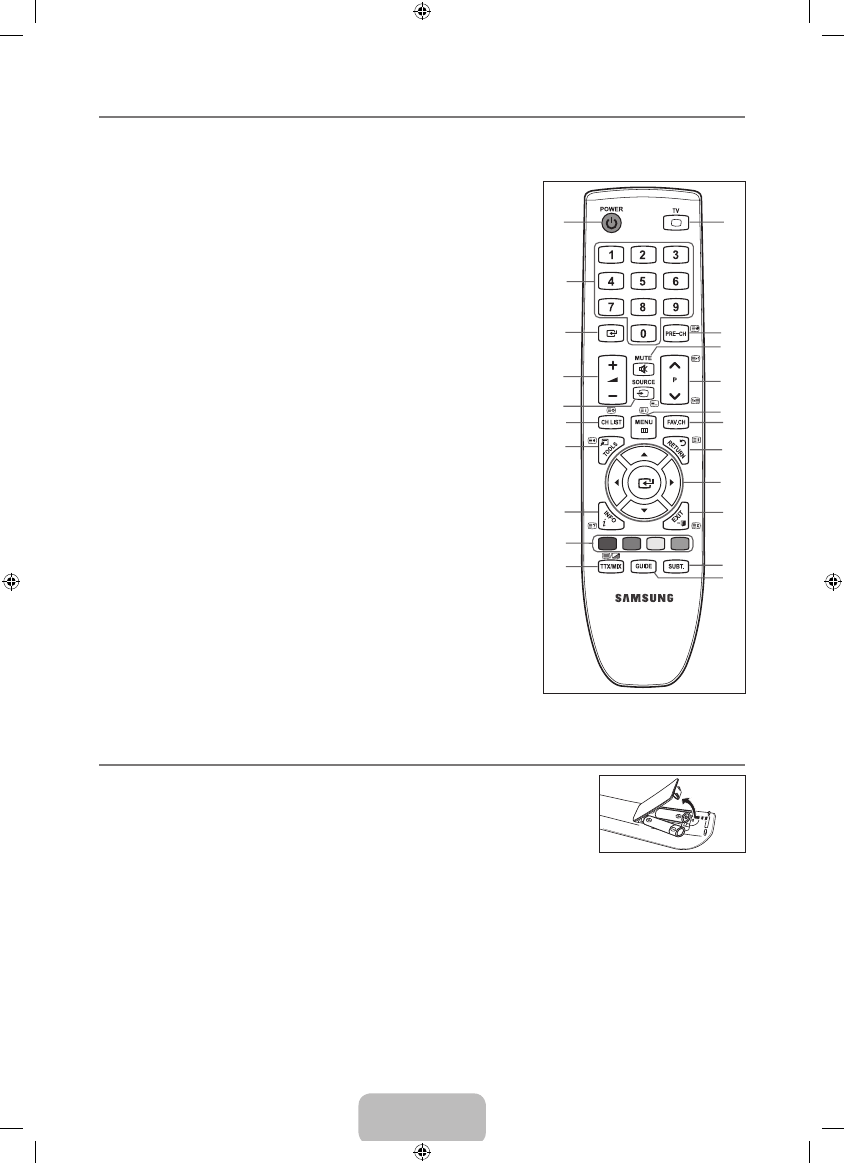
Remote Control
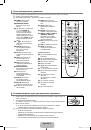
You can use the remote control up to a distance of about 23 feet from the TV.
The performance of the remote control may be affected by bright light.
The product colour and shape may vary depending on the model.
1
POWER
: Television Standby
button.
2
NUMERIC BUTTONS
: Press to
change the channel.
3
E
:
Performs the same function
as the
ENTER
E
key of the
directional keys. When switching
channels with the numeric
buttons, and you press the
channel number and then the
ENTER
E
key, the channel is
immediately switched.
4
Y
: Press to increase or
decrease the volume.
5
SOURCE
: Press to display
and select the available video
sources.
6
CH LIST
: Displays the Channel
List on screen
7
TOOLS
: Use to quickly select
frequently used functions.
8
INFO
: Press to display
information on the TV screen.
9
COLOURS BUTTONS
: Use
these buttons in the Channel list
menus etc.
!
TV
: Selects the TV mode directly.
@
PRE-CH:
Enables you to return
to the previous channel you were
watching.
#
MUTE
M
:
Press to temporarily
cut off the sound.
$
P
<
/
P
>
: Press to change
channels.
%
MENU
: Displays the main on-
screen menu
^
FAV.CH
: Press to switch to your
favourites channels.
&
RETURN
: Returns to the
previous menu
*
UP▲ / DOWN▼ / LEFT◄ /
RIGHT► / ENTER
E
: Use to
select on-screen menu items and
change menu values.
(
EXIT
: Press to exit the menu.
)
SUBT.
: Digital subtitle display
a
GUIDE
: Electronic Programme
Guide (EPG) display
Teletext Functions
5
0
: Teletext mode selection
(LIST / FLOF)
6
8
: Teletext store
7
4
: Teletext size selection
8
5
: Teletext reveal
9
Fastext topic selection
0
/
: Alternately select
Teletext, Double, or Mix.
!
:
: Exit from the teletext display
@
1
: Teletext sub page
$
2
: Teletext next page
3
: Teletext previous page
%
6
: Teletext index
&
9
: Teletext hold
(
7
: Teletext cancel
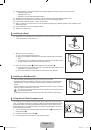
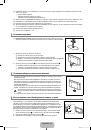
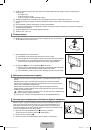
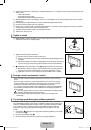
Installing Batteries in the Remote Control
1.
Lift the cover at the back of the remote control upward as shown in the figure.
2.
Install two AAA size batteries.
Make sure to match the ‘+’ and ‘–’ ends of the batteries with the diagram inside the
compartment.
3.
Replace the cover.
Remove the batteries and store them in a cool, dry place if you won’t be using the
remote control for a long time.
If the remote control doesn’t work, check the following:
Is the TV power on?
Are the plus and minus ends of the batteries reversed?
Are the batteries drained?
Is there a power outage or is the power cord unplugged?
Is there a special fluorescent light or neon sign nearby?
¦
N
N
N
¦
N
N
N
–
–
–
–
–
1
2
3
4
5
6
7
8
9
0
!
@
#
$
&
*
(
)
a
%
^
BN68-01981H-00.indb 5
2009-03-18 �� 1:58:13