Инструкция для Karcher BD 100/250 R I Bp Pack
 1
 2
 3
 4
 5
 6
 7
 8
 9
 10
 11
 12
 13
 14
 15
 16
 17
 18
 19
 20
 21
 22
 23
 24
 25
 26
 27
 28
 29
 30
 31
 32
 33
 34
 35
 36
 37
 38
 39
 40
 41
 42
 43
 44
 45
 46
 47
 48
 49
 50
 51
 52
 53
 54
 55
 56
 57
 58
 59
 60
 61
 62
 63
 64
 65
 66
 67
 68
 69
 70
 71
 72
 73
 74
 75
 76
 77
 78
 79
 80
 81
 82
 83
 84
 85
 86
 87
 88
 89
 90
 91
 92
 93
 94
 95
 96
 97
 98
 99
 100
 101
 102
 103
 104
 105
 106
 107
 108
 109
 110
 111
 112
 113
 114
 115
 116
 117
 118
 119
 120
 121
 122
 123
 124
 125
 126
 127
 128
 129
 130
 131
 132
 133
 134
 135
 136
 137
 138
 139
 140
 141
 142
 143
 144
 145
 146
 147
 148
 149
 150
 151
 152
 153
 154
 155
 156
 157
 158
 159
 160
 161
 162
 163
 164
 165
 166
 167
 168
 169
 170
 171
 172
 173
 174
 175
 176
 177
 178
 179
 180
 181
 182
 183
 184
 185
 186
 187
 188
 189
 190
 191
 192
 193
 194
 195
 196
 197
 198
 199
 200
 201
 202
 203
 204
 205
 206
 207
 208
 209
 210
 211
 212
 213
 214
 215
 216
 217
 218
 219
 220
 221
 222
 223
 224
 225
 226
 227
 228
 229
 230
 231
 232
 233
 234
 235
 236
 237
 238
 239
 240
 241
 242
 243
 244
 245
 246
 247
 248
 249
 250
 251
 252
 253
 254
 255
 256
 257
 258
 259
 260
 261
 262
 263
 264
 265
 266
 267
 268
 269
 270
 271
 272
 273
 274
 275
 276
 277
 278
 279
 280
 281
 282
 283
 284
 285
 286
 287
 288
 289
 290
 291
 292
 293
 294
 295
 296
 297
 298
 299
 300
 301
 302
 303
 304
 305
 306
 307
 308
 309
 310
 311
 312
 313
 314
 315
 316
 317
 318
 319
 320
 321
 322
 323
 324
 325
 326
 327
 328
 329
 330
 331
 332
 333
 334
 335
 336
 337
 338
 339
 340
 341
 342
 343
 344
 345
 346
 347
 348
 349
 350
 351
 352
 353
 354
 355
 356
 357
 358
 359
 360
 361
 362
 363
 364
 365
 366
 367
 368
 369
 370
-
11
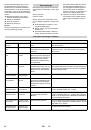
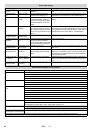
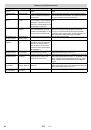
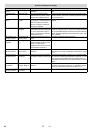
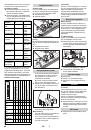
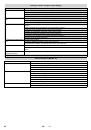
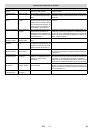
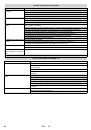
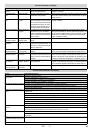
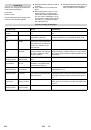
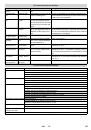
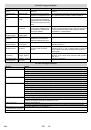
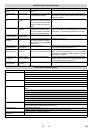
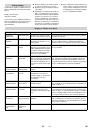
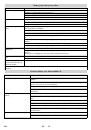
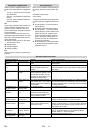
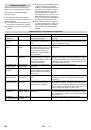
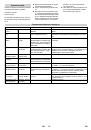
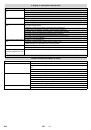
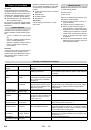
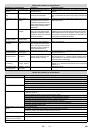
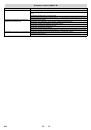
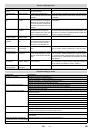
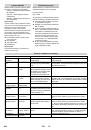
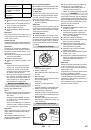
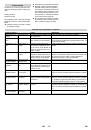
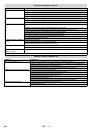
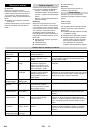
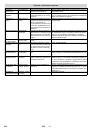
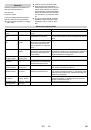
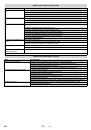
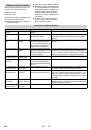
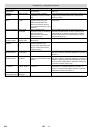
Faults with display
Display
Cause
Remedy
Sitzschalter unter-
brochen
seat switch open
Seat contact switch has not been
activated.
The machine operates only if the operator is seated on the
seat.
Gaspedal loslas-
sen!
release throttle?
The gas pedal is depressed
when the main switch is on.
Take your foot off the accelerator before switching on the
main switch. If the fault recurs, call customer service.
Batterie leer -> Lad-
en!
battery empty ->
charge!
The discharge level of the battery
has been reached. Cleaning
units can no longer be operated.
Drives and lighting can be acti-
vated.
Drive the machine to the charging station and charge the
battery.
Batterie tiefentladen battery totally dis-
charged!
More than the permissible bat-
tery capacity has been utilised.
All units will be switched off. Ma-
chine is no longer ready for oper-
ations.
Manually unlock the front wheel brake. (Caution! The ap-
pliance does not have any braking effect now!) If unlocking
is not possible, then call customer service. Move the ma-
chine slowly to the charging station. Charge battery.
Schmutztank voll
Reinigung stoppt
sewage tank full
cleaning stops
Dirt water reservoir is full.
Empty the dirt water reservoir.
Betriebsstunden auf
0 gesetzt!
operating hours set
to 0!
Internal machine error while sav-
ing the number of operating
hours. During restart, the operat-
ing hours are always reset to 0.
None, for information.
Steuerung heiss!
Abkühlen lassen!
moduletemp. high
let cool down!
Controls are too hot.
Set main switch to “0”. Wait at least 10 minutes. Set main
switch to “1”.
Fahrmotor heiss!
Abkühlen lassen!
drive motor hot! let
cool down!
Drive motor has got overheated
due to a steep climb or locked
brake.
Set main switch to “0”. Wait at least 10 minutes. Set main
switch to “1”. If possible, use the unit only on level surfac-
es. If required, check the functioning of the immobilising
brake and driving pedal.
Schütz offen!! Not-
Aus-Taste??
contactor open!!
emergcy. button?
Press emergency-stop button.
Release emergency-stop button by turning. Set the key
switch to "0". Wait at least 10 minutes. Set the key switch
to "1".
Abschaltung, Bus-
versorgung fehlt
Shutdown, missing
bus supply
Inform Customer Service
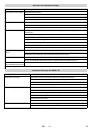
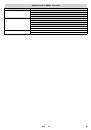
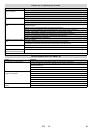
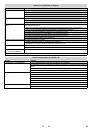
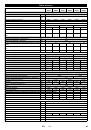
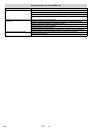
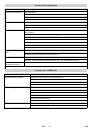
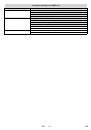
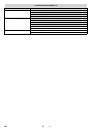
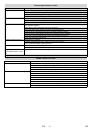
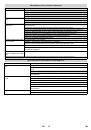
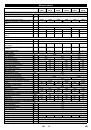
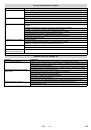
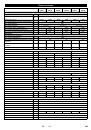
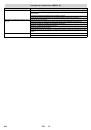
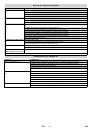
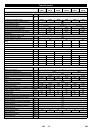
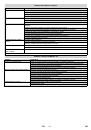
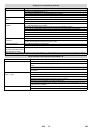
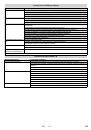
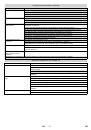
Faults without display on the console
Fault
Remedy
Appliance cannot be started
Insert battery plug.
Set main switch to “1”.
Check fuse F1, replace if required. *
Check battery; charge it, if needed
Insufficient water quantity
Check fresh water level, refill tank if necessary.
Check hoses for blockages; clean if required.
Clean the fresh water filter.
Insufficient vacuum perform-
ance
Clean the seals between dirt water reservoir and cover and check for tightness, replace if required.
Clean the flat-fold filters at the suction support of the suction turbine.
Clean the vacuum lips on the vacuum bar, replace if required
Check suction hose for blockages; clean if required.
Check the suction hose for tightness; replace if required.
Check if the cover on the dirt water discharge hose is closed
Check the setting of the vacuum bar.
Insufficient cleaning result
Set/ adjust contact pressure.
Check the brushes for wear, replace if required.
If the bristles are shorter than 10 mm, the brushes are worn out.
Brushes do not turn
Reduce contact pressure.
Check if foreign matters block the brushes; remove foreign matter if required.
Optional overall lamp and/or
working lamp is not functioning
Check fuse F3, replace if required. *
* The fuses are located in the flat insertion sockets on the wiring plate and can be accessed by opening the front panel.
26
EN