Инструкция для LG 42LA690V
 1
 2
 3
 4
 5
 6
 7
 8
 9
 10
 11
 12
 13
 14
 15
 16
 17
 18
 19
 20
 21
 22
 23
 24
 25
 26
 27
 28
 29
 30
 31
 32
 33
 34
 35
 36
 37
 38
 39
 40
 41
 42
 43
 44
 45
 46
 47
 48
 49
 50
 51
 52
 53
 54
 55
 56
 57
 58
 59
 60
 61
 62
 63
 64
 65
 66
 67
 68
 69
 70
 71
 72
 73
 74
 75
 76
 77
 78
 79
 80
 81
 82
 83
 84
 85
 86
 87
 88
 89
 90
 91
 92
 93
 94
 95
 96
 97
 98
 99
 100
 101
 102
 103
 104
 105
 106
 107
 108
 109
 110
 111
 112
 113
 114
 115
 116
 117
 118
 119
 120
 121
 122
 123
 124
 125
 126
 127
 128
 129
 130
 131
 132
 133
 134
 135
 136
 137
 138
 139
 140
 141
 142
 143
 144
 145
 146
 147
 148
 149
 150
 151
 152
 153
 154
 155
 156
 157
 158
24
ENG
ENGLISH
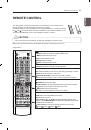
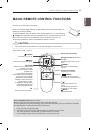
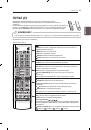
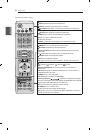
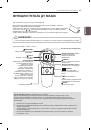
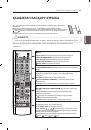
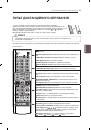
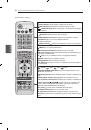
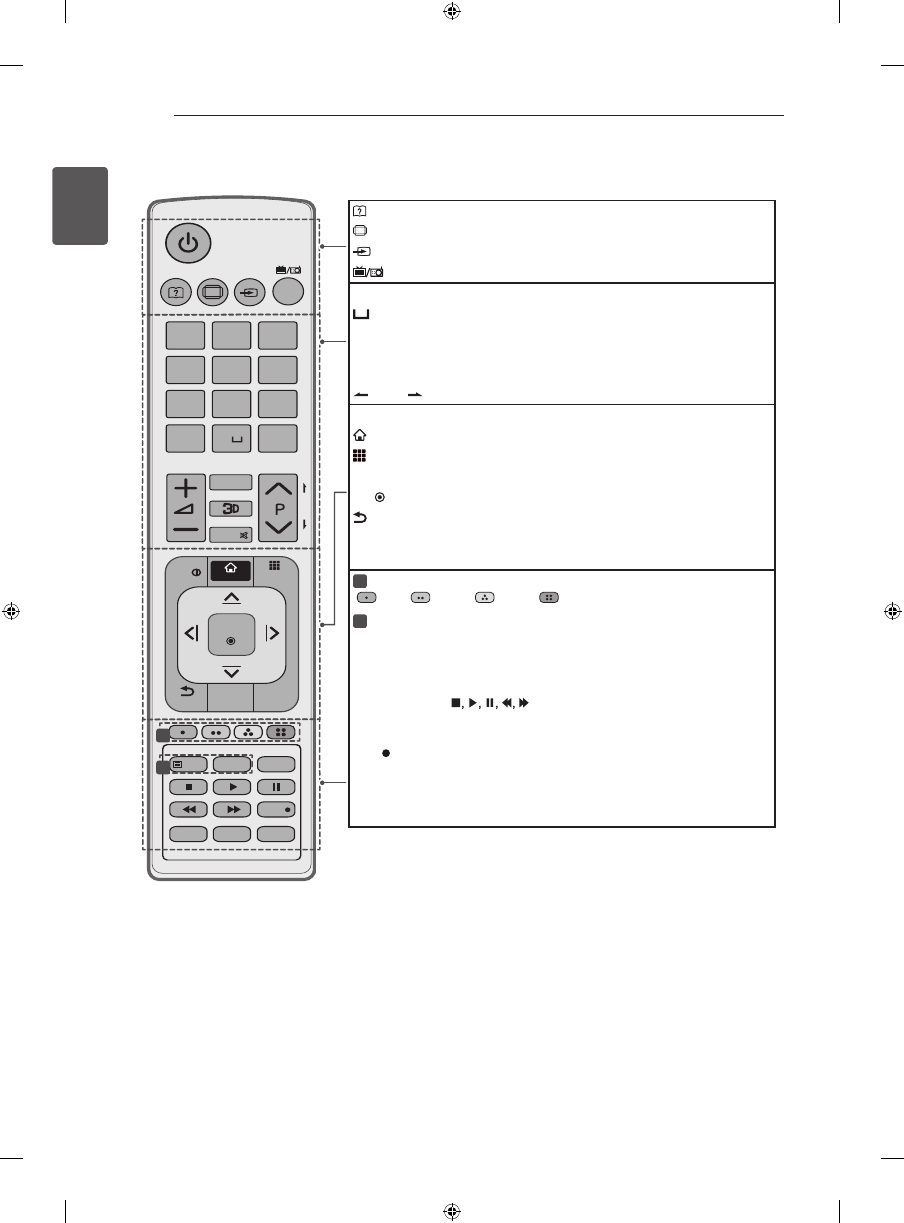
REMOTE CONTROL
(Only LA62**, LA64**)
P
A
G
E
TV/
RAD
RATIO
INPUT
FAV
MUTE
EXIT
OK
GUIDE
MY APPS
LIVE TV
REC
TEXT
T.OPT
SUBTITLE
Q.MENU
AD
BACK
SETTINGS
INFO
1
.,;@
2
abc
3
def
4
ghi
5
jkl
6
mno
7
pqrs
8
tuv
0
9
wxyz
LIST
Q.VIEW
SMART
APP/*
(User Guide)
Sees user-guide.
RATIO
Resizes an image.
INPUT
Changes the input source.
TV/RAD
Selects Radio, TV and DTV programme.
LIST
Accesses the saved programme list.
(Space)
Opens an empty space on the screen keyboard.
Q.VIEW
Returns to the previously viewed programme.
FAV
Accesses your favourite programme list.
3D
Used for viewing 3D video.
PAGE
Moves to the previous or next screen.
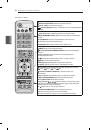
INFO
Views the information of the current programme and screen.
SMART
Accesses the Smart Home menus.
MY APPS
Shows the list of Apps.
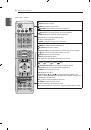
Navigation buttons
(up/down/left/right) Scrolls through menus or options.
OK
Selects menus or options and confirms your input.
BACK
Returns to the previous level.
GUIDE
Shows programme guide.
EXIT
Clears on-screen displays and return to TV viewing.
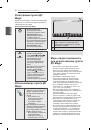
1
Colour buttons
These access special functions in some menus.
(
: Red,
: Green,
: Yellow,
: Blue)
2
TELETEXT BUTTONS
These buttons are used for teletext.
SUBTITLE
Recalls your preferred subtitle in digital mode.
Q. MENU
Accesses the quick menus.
LIVE TV
Return to LIVE TV.
Control buttons
(
) Controls the Premium contents, Time
Machine or Smart Share menus or the SIMPLINK compatible devices (USB
or SIMPLINK or Time Machine).
REC
Start to record and display record menu.
SETTINGS
Accesses the main menus.
AD
Switches the Audio Description On or Off.
APP/*
Select the MHP TV menu source. (Only Italy.) (Depending on model)
1
2