Инструкция для Vitek VT-3503
 1
 2
 3
 4
 5
 6

11
После этого радио отключится. Но если не
отменить режим пробуждения, то на следующий
день он сработает.
5.7.Если вы хотите, чтобы радиоприемник продолжал
работать, установите переключатель в положение
“ON”. Чтобы проверить установленное время
пробуждения, нажмите на кнопку, и оно высветится
на дисплее.
6. ПРОБУЖДЕНИЕ С СИГНАЛОМ БУДИЛЬНИКА
6.1.Следуйте описанию пунктов 105 в разделе
“Пробуждение под музыку”.
6.2.Установите регулятор в положение “BUZZ/OFF”.
Сигнал будильника включится автоматически в
установленное время. Чтобы отключить сигнал
будильника,
переведите
переключатель
в
положение “OFF”.
7. ФУНКЦИЯ КОРОТКОГО СНА
Если вы хотите подремать еще 9 минут, нажмите на
кнопку “SNOOZE” в режиме работы будильника. Через
9 мин молчания сигнал пробуждения повторится (либо
сигнал будильника, либо музыка).
8. ЗАСЫПАНИЕ И ПРОБУЖДЕНИЕ ПОД МУЗЫКУ
ИЛИ ПОД СИГНАЛ БУДИЛЬНИКА
8.1. Следуйте описанию пунктов в разделе 5
“Пробуждение под музыку” и в разделе 6
“Пробуждение с сигналом будильника”.
8.2. Нажмите на кнопку и установите нужный
промежуток времени для включения сигнала
будильника и радио.
6
9. BATTERY BACK UP
Note:
The clock radio has a back0up power system to
ensure continuous operation of the dock radio and alarm
in the event of a power failure. The switch from AC to bat0
tery power is automatic. However under battery power the
clock display will not illuminate even through the clock will
maintain approx. the current time and will store the alarm
time in its memory. The system operates on a 9V battery
(not included) we recommended the use of a long life bat0
tery to ensure maximum performance.
Note:
This battery back0up features is intended to retain
the clock time and memory functions during a power fail0
ure for short periods. The clocks should not be left for long
periods of time without mains supply as the battery will
drain fairly quickly. Remove the battery if the unit is dis0
connected from the mains.
Care:
The cabinet can be dusted with soft cloth or if nec0
essary cleaned with a soft cloth dampened with water. The
power plug should be disconnected before cleaning.
Never use polish, solvent, abrasives or strong detergents
on the cabinet since these can damage the finish.
SPECIFICATIONS
Frequency range
FM1 64088 MHz
FM2 880108 MHz
Speaker impedance
8 Ohm
ENGLISH
РУССКИЙ
3503-2.qxd 22.08.03 12:22 Page 8
Оглавление инструкции
- Страница 1 из 7
3503-2.qxd 22.08.03 12:22 Page 2 ENGLISH LIST OF CONTROLS 1. Hour set button 2. Minute set button 3. Alarm set button 4. Sleep button 5. Tuning control 6. Volume control 7. Time set button 8. Band switch 9. Snooze button 10. Power switch 1. CONNECTING THE POWER Insert correctly wired plug into a
- Страница 2 из 7
3503-2.qxd 22.08.03 12:22 Page 4 ENGLISH 4. TO GO TO SLEEP WITH RADIO 4.1. Set the power switch switch to the "off" or auto posi0 tion. 4.2. Press the sleep button. The LED display shows 59 minutes. The radio turns on anb then turns off automat0 ically after 59 minutes. 4.3. To select a time less
- Страница 3 из 7
3503-2.qxd 22.08.03 12:22 Page 6 РУССКИЙ 8.3. Прибор запрограммирован на автоматическое отключение, и вы имеете возможность заснуть под любимую мелодию. Он автоматически разбудит вас в установленное время. 9. ПИТАНИЕ ОТ БАТАРЕЕК Питание от батареек позволяет обеспечить бесперебойную работу
- Страница 4 из 7
3503-2.qxd 22.08.03 12:22 Page 8 ENGLISH 9. BATTERY BACK UP Note: The clock radio has a back0up power system to ensure continuous operation of the dock radio and alarm in the event of a power failure. The switch from AC to bat0 tery power is automatic. However under battery power the clock display
- Страница 5 из 7
3503-2.qxd 22.08.03 12:22 Page 10 РУССКИЙ 4. СОН ПОД МУЗЫКУ 4.1. Установите переключатель в положение “OFF” или “AUTO”. 4.2. Нажмите на кнопку “SLEEP”. На дисплее высветится “59 минут”, показывая, что радио автоматически отключится через 59 минут. 4.3. Если вы хотите уменьшить время автоматического
- Страница 6 из 7
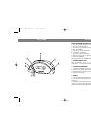
3503-2.qxd 22.08.03 12:22 Page 12 РУССКИЙ РУССКИЙ РАСПОЛОЖЕНИЕ РЕГУЛЯТОРОВ 1. Кнопка установки нужного часа 2. Кнопка установки минут 3. Кнопка установки сигнала будильника 4. Кнопка “SLEEP” 5. Регулятор настройки радио 6. Регулятор громкости 7. Кнопка установки времени 8. Переключатель частотных
- Страница 7 из 7