Инструкция для Hyundai H-1509
 1
 2
 3
 4
 5
 6
 7

2
3
Instruction manual
Instruction manual
exhausted or there may be some deviation in
accuracy.
• When the battery is exhausted, it should
be removed from the set to prevent leakage.
If you do not wish to take advantage of the
battery back-up system, your set will work
normally without a battery. However, if
disconnected from the mains, the clock figures
will flash when the mains are re-connected and
you must re-set the clock.
AС operation
• The appliance is for household use only.
• Before the first connecting of the unit
check that voltage indicated on the rating label
corresponds the mains voltage in your home.
• Insert the plug into the power supply.
• The set is now working as an electronic
clock. Figures will blink on the display showing
that clock should be set.
Setting the clock
• Press and hold TIME button.
• Do not release TIME button; press HOUR
button or MIN button to set the clock display to
the correct time.
• Release all the buttons when finished the
setting.
Radio operation
Tuner operations
• Slide AUTO/OFF/ON switch to ON position.
• Slide BAND switch to AM or FM position to
select the needed band.
• Use VOLUME regulator to adjust volume
level.
• Adjust the program using TUNING
regulator.
Antenna
• For AM reception, the unit is equippped
with a built-in sensitive ferrite antenna.
• For FM reception, the unit is equipped with
an external wire antenna. Be sure to untwist
the antenna to its fullest length for a better
reception.
Sleep to music
The radio can be set to play and to switch
off automatically after a preset time. Minimal
time is 1 minute, maximal period is 1 hour 59
minutes.
• Slide AUTO/OFF/ON switch to AUTO
position.
• To set for a desired period of sleep, press
and hold SLEEP button and, without releasing
it, press MIN or HOUR button to set the desired
period of the sleep time.
• If you want to turn off the radio before sleep
time expires, press SNOOZE button.
Alarm operation
Setting the alarm
• Slide AUTO/OFF/ON switch to AUTO
position.
• Press and hold ALM button.
• Without releasing ALM button, press
HOUR button and MIN button to set the
desired wake up time.
• Release ALM button to show the current
time.
• The radio will play automatically at the
preset time. To switch the alarm off, press ALM
button.
• The preset wake up time will be saved
in the memory of the unit, and the alarm will
sound at the same time next day.
Alarm sound setting
Follow the steps of “Setting the alarm”
and set VOLUME regulator to Buzz position.
You will be awakened by the buzzer alarm.
The buzzer can be switched by pressing
ALM button, or you can switch the buzzer to
radio by setting AUTO/OFF/ON switch to ON
position.
Snooze control
When the alarm is on, press SNOOZE button
once, after approximately 9 minutes the alarm
will be on again.
Оглавление инструкции
- Страница 1 из 8
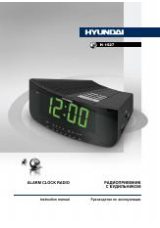
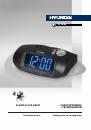
H-1509 ALARM CLOCK RADIO РАДИОПРИЕМНИК С БУДИЛЬНИКОМ Instruction manual Руководство по эксплуатации
- Страница 2 из 8
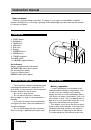
Instruction manual Dear customer! Thank you for purchasing our product. For safety, it is strongly recommended to read this manual carefully before connecting, operating and/or adjusting the product and keep the manual for reference in future. Description 1. SLEEP button 2. ALM button 3. TIME
- Страница 3 из 8
Instruction manual exhausted or there may be some deviation in accuracy. • When the battery is exhausted, it should be removed from the set to prevent leakage. If you do not wish to take advantage of the battery back-up system, your set will work normally without a battery. However, if disconnected
- Страница 4 из 8
Instruction manual Dimmer function This unit is equipped with dimmer function intended for adjustment of the display brightness. You can adjust the brightness with DIMMER switch, having to levels: high (HI position) and low (LO position). Accessories Receiver Instruction manual Warranty card
- Страница 5 из 8
Руководство по эксплуатации Уважаемый покупатель! Благодарим Вас за покупку нашего изделия. Чтобы понять, как правильно и безопасно пользоваться Вашей моделью изделия, рекомендуется тщательно изучить настоящее руководство перед включением, регулировкой и эксплуатацией изделия. Сохраняйте
- Страница 6 из 8
Руководство по эксплуатации батареи его дисплей перестает светиться, и включается режим памяти. Благодаря включению режима памяти Вы можете не переустанавливать время каждый раз. Режим памяти используется при возникновении кратковременных сбоев в сети питания. При длительном отсутствии питания в
- Страница 7 из 8
Руководство по эксплуатации • Установленное время будильника будет сохранено в памяти устройства. На следующий день будильник сработает в установленное время. Выбор звукового сигнала в качестве будильника Повторите шаги раздела «Установка будильника» и установите регулятор VOLUME в положение
- Страница 8 из 8