Инструкция для Yamaha RX-V563
 1
 2
 3
 4
 5
 6
 7
 8
 9
 10
 11
 12
 13
 14
 15
 16
 17
 18
 19
 20
 21
 22
 23
 24
 25
 26
 27
 28
 29
 30
 31
 32
 33
 34
 35
 36
 37
 38
 39
 40
 41
 42
 43
 44
 45
 46
 47
 48
 49
 50
 51
 52
 53
 54
 55
 56
 57
 58
 59
 60
 61
 62
 63
 64
 65
 66
 67
 68
 69
 70
 71
 72
 73
 74
 75
 76
 77
 78
 79
 80
 81
 82
 83
 84
 85
 86
 87
 88
 89
 90
 91
 92
 93
 94
 95
 96
 97
 98
 99
 100
 101
 102
 103
 104
 105
 106
 107
 108
 109
 110
 111
 112
 113
 114
 115
 116
 117
 118
 119
 120
 121
 122
 123
 124
 125
 126
 127
 128
 129
 130
 131
 132
 133
 134
 135
 136
 137
 138
 139
 140
 141
 142
 143
 144
 145
 146
 147
 148
 149
 150
 151
 152
 153
 154
 155
 156
 157
 158
 159
 160
 161
 162
 163
 164
 165
 166
 167
 168
 169
 170
 171
 172
 173
 174
 175
 176
 177
 178
 179
 180
 181
 182
 183
 184
 185
 186
 187
 188
 189
 190
 191
 192
 193
 194
 195
 196
 197
 198
 199
 200
 201
 202
Quick start guide
6
En
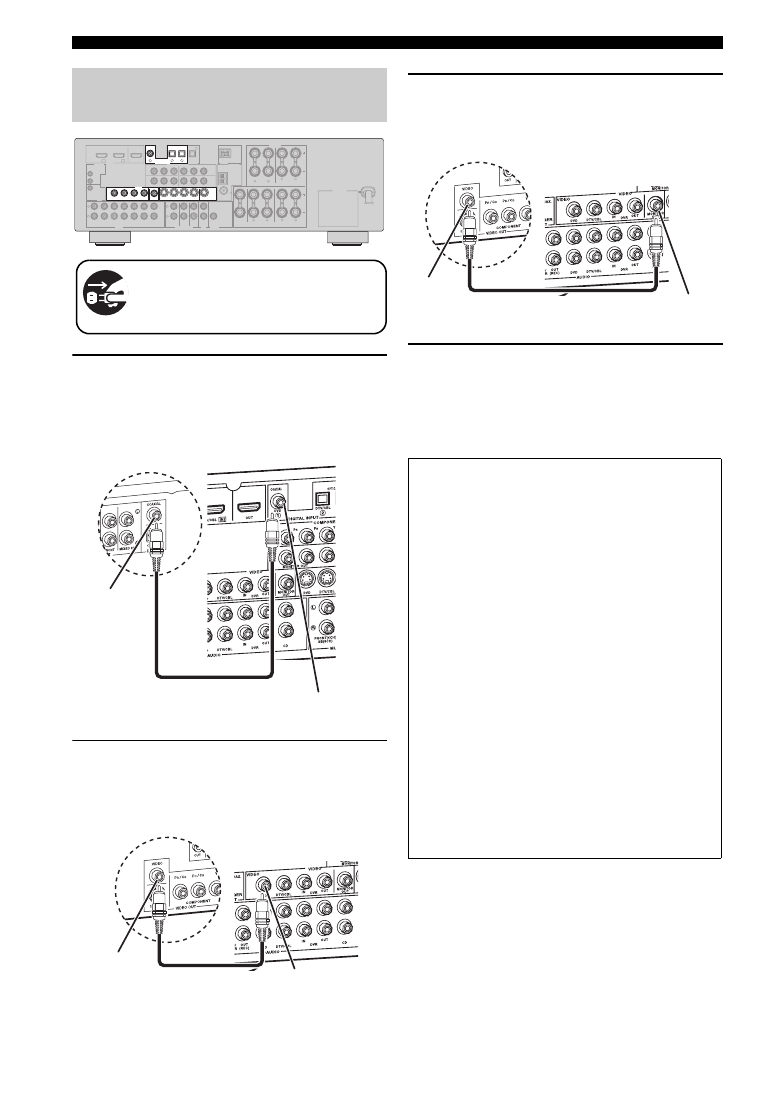
1
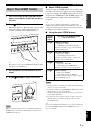
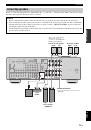
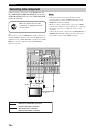
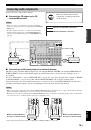
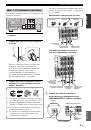
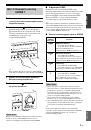
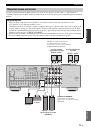
Connect the digital coaxial audio cable to the
digital coaxial audio output jack of your DVD
player and the DVD DIGITAL INPUT COAXIAL
jack of this unit.
2
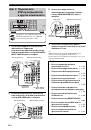
Connect the video cable to the composite
video output jack of your DVD player and the
DVD VIDEO jack of this unit.
3
Connect the video cable to the video input
jack of your video monitor and the VIDEO
MONITOR OUT jack of this unit.
4
Connect the power plug of this unit and other
components into the AC wall outlet.
y
This unit is equipped with AC OUTLET(S) for the power supply
of the other components (except Korea model). See page 22 for
details.
Step 2: Connect your DVD player
and other components
L
R SURROUND
L
R
FRONT B
L
R
FRONT A
CENTER
L
R
SURROUND BACK/BI-AMP
SINGLE
SWITCHED
MONITOR
OUT
L
R
DTV/CBL
DVR
DVD
MD/
CD-R
OUT
(REC)
IN
(PLAY)
OUT
IN
DTV/CBL
DVR
DVD
OUT
OUT
+12V
15mA MAX.
IN
IN
MONITOR
OUT
DTV/CBL
DVR
DVD
OUT
S VIDEO
IN
CD
L
R
SUB
WOOFER
SUB
WOOFER
SURROUND
CENTER
MULTI CH INPUT
AUDIO
VIDEO
OUTPUT
ZONE 2
OUT
FRONT(6CH)
SB(8CH)
1
2
3
DTV/CBL
DTV/CBL
CD
OUT
DTV/CBL
DVR
DVD
DVD
OPTICAL
COAXIAL
DVD
PR
PB
Y
PR
PB
Y
MONITOR OUT
AM
GND
FM
75
UNBAL.
COMPONENT VIDEO
ANTENNA
SPEAKERS
HDMI
REMOTE
TRIGGER
OUT
DIGITAL INPUT
VIDEO
IN1
IN2
AC OUTLETS
4
MD/CD-R
DIGITAL
OUTPUT
DOCK
MONITOR
OUT
DTV/CBL
DVR
DVD
OUT
IN
MONITOR
OUT
DTV/CBL
DVR
DVD
OUT
S VIDEO
IN
VIDEO
1
2
3
DTV/CBL
CD
DVD
OPTICAL
COAXIAL
DIGITAL INPUT
VIDEO
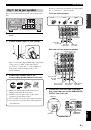
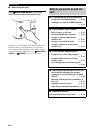
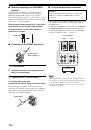
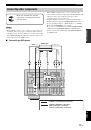
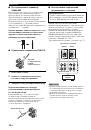
Make sure that this unit and the DVD
player are unplugged from the AC wall
outlets.
Digital coaxial
audio output jack
Digital coaxial audio
cable
DVD DIGITAL INPUT
COAXIAL jack
DVD player
AV receiver
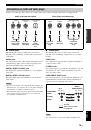
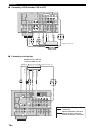
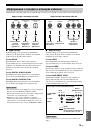
Composite video
output jack
Video cable
DVD VIDEO jack
DVD player
AV receiver
■
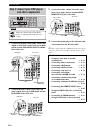
For further connections
• Using the other kind of speaker
combinations
☞
P. 11
• Connecting video components
☞
P. 16
• Connecting a DVD player
☞
P. 17
• Connecting a DVD recorder
☞
P. 18
• Connecting a set-top box
☞
P. 18
• Connecting a CD player
and a CD recorder/MD recorder
☞
P. 19
• Connecting a multi-format player
or an external decoder
☞
P. 19
• Connecting a Yamaha iPod/Bluetooth dock
☞
P. 20
• Connecting the REMOTE IN/OUT jacks
☞
P. 20
• Using the VIDEO AUX jacks on the front
panel
☞
P. 21
• Connecting an FM/AM antenna
☞
P. 21
• Using the USB jack on the front panel
☞
P. 51
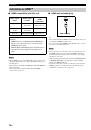
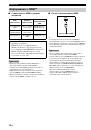
Video monitor
AV receiver
Video input
jack
VIDEO MONITOR OUT
jack
Video cable
Оглавление инструкции
- English
- Features
- Getting started
- Quick start guide
- Connections
- Rear panel
- Placing speakers
- Connecting speakers
- Information on jacks and cable plugs
- Information on HDMI™
- Audio and video signal flow
- Connecting video components
- Connecting other components
- Connecting audio components
- Connecting a Yamaha iPod™ universal dock or Bluetooth™ adapter
- Using REMOTE IN/OUT jacks
- Using the VIDEO AUX jacks on the front panel
- Connecting the FM and AM antennas
- Connecting the power cable
- Turning on and off the power
- Front panel display
- Optimizing the speaker setting for your listening room
- Selecting the SCENE templates
- Playback
- Basic operations
- Selecting audio input jacks (AUDIO SELECT)
- Selecting the MULTI CH INPUT component
- Displaying the current status of this unit on a video monitor
- Using your headphones
- Muting the audio output
- Playing video sources in the background of an audio source
- Displaying the input source information
- Using the sleep timer
- Sound field programs
- Using audio features
- FM/AM tuning
- Radio Data System tuning (Europe and Russia models only)
- Using a USB memory device or a USB portable audio player
- Using iPod™
- Using Bluetooth™ components
- Recording
- SET MENU
- Remote control features
- Using multi-zone configuration
- Advanced setup
- Troubleshooting
- Glossary
- Specifications
- Index
- Русский
- Описание
- Подготовка
- Краткое руководство пользователя
- Подключения
- Задняя панель
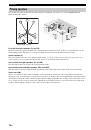
- Размещение колонок
- Подключение колонок
- Информация о гнездах и штекерах кабелей
- Информация о HDMI™
- Поток аудио и видео сигнала
- Подключение видеокомпонентов
- Подключение других компонентов
- Подключение аудиокомпонентов
- Подключение универсального дока Yamaha для iPod. или адаптера Bluetooth
- Использование гнезд REMOTE IN/OUT
- Использование гнезд VIDEO AUX на фронтальной панели
- Подключение ЧМ и АМ антенн
- Подключение силового кабеля
- Включение и выключение питания
- Дисплей фронтальной панели
- Оптимизация настройки колонок для комнаты для прослушивания
- Выборе шаблонов SCENE
- Воспроизведение
- Основные операции
- Выбор аудиовходных гнезд (AUDIO SELECT)
- Выбор компонента MULTI CH INPUT
- Отображение текущего состояния данного аппарата на видеоэкране
- Использование наушников
- Приглушение выводимого звучания
- Воспроизведение видеоисточников в качестве фона для аудиоисточника
- Отображение информации источника приема
- Применение таймера сна
- Программы звукового поля
- Использование аудиофункций
- Настройка радиопрограмм диапазона ЧМ/AM
- Настройка Системы Радиоданных (Только модели для Европы и России)
- Использование устройства памяти USB или переносного аудиоплеера USB
- Использование iPod™
- Использование компонентов Bluetooth™
- Запись
- SET MENU
- Функции пульта ДУ
- Использование многозонной конфигурации
- Дополнительные настройки
- Возможные неисправности и способы по их устранению
- Справочник
- Технические характеристики
- Предметный указател
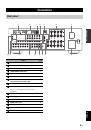
- APPENDIX
- Controls Diagram