Инструкция для Huawei Ascend D2
 1
 2
 3
 4
 5
 6
 7
 8
 9
 10
 11
 12
 13
 14
 15
 16
 17
 18
 19
 20
 21
3
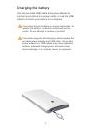
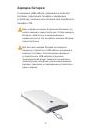
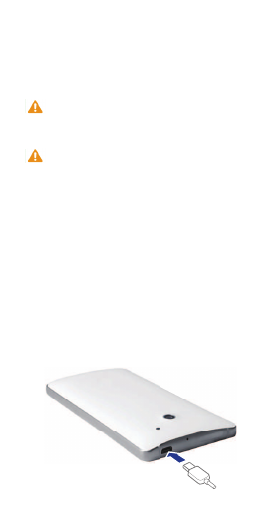
Charging the battery
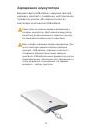
Use the provided USB cable and power adapter to
connect your phone to a power outlet, or use the USB
cable to connect your phone to a computer.
Your phone's built-in battery is not user-removable. To
replace the battery, contact an authorized service
center. Do not attempt to remove it yourself.
Your phone supports fast charging, which requires the
provided power adapter and USB cable. Using other
power adapters or USB cables may cause repeated
restarts, extended charging time, excessive heat,
device damage, or in extreme cases, an explosion.
Оглавление инструкции
- Страница 1 из 22
D2 Quick Start Guide Краткое руководство пользователя Короткий посібник
- Страница 2 из 22
Contents English . . . . . . . . . . . . . . . . . . . . . . . . . . . . . . . . . 1 ................................ 7 . . . . . . . . . . . . . . . . . . . . . . . . . . . . . 13 i
- Страница 3 из 22
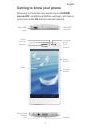
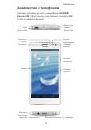
English Getting to know your phone Welcome to the brand new world of your HUAWEI Ascend D2 smartphone! Before we begin, let's take a quick look at the D2 and its external features. Micro-SIM card tray Micro USB port Status indicator Proximity sensor Front camera Earpiece Power button Screen Volume
- Страница 4 из 22
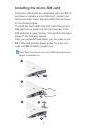
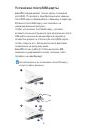
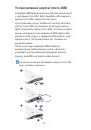
Installing the micro-SIM card Only micro-SIM cards are compatible with your D2. To purchase or replace a micro-SIM card, contact your service provider. Insert the micro-SIM card as shown in the following figure. To install the micro-SIM card, first insert the end of a SIM eject tool or paper clip
- Страница 5 из 22
Charging the battery Use the provided USB cable and power adapter to connect your phone to a power outlet, or use the USB cable to connect your phone to a computer. Your phone's built-in battery is not user-removable. To replace the battery, contact an authorized service center. Do not attempt to
- Страница 6 из 22
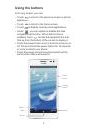
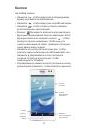
Using the buttons From any screen, you can: • Touch to return to the previous screen or exit an application. • Touch to return to the home screen. • Touch to display recently used applications. • Under , you can enable or disable the hide navigation bar function. When the function is enabled, touch
- Страница 7 из 22
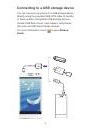
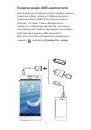
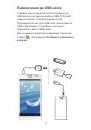
Connecting to a USB storage device You can connect your phone to a USB storage device directly using the provided USB OTG cable to transfer or back up data. Compatible USB storage devices include USB flash drives, card readers, and phones that work as USB mass storage devices. For more information,
- Страница 8 из 22
More information Need more help using D2? Touch on your D2 to open Help Center. Want to browse the user guide? Visit www.huaweidevice.com/worldwide to download the HUAWEI Ascend D2 User Guide. Note This guide is for reference only. The actual product, including but not limited to the color, size,
- Страница 9 из 22
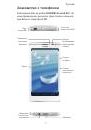
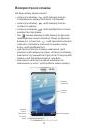
З HUAWEI Ascend D2 ! D2. Порт microUSB Слот для карты microSIM Индикатор состояния Датчик приближения Фронтальная камера Динамик Кнопка питания Экран Кнопка регулировки громкости Микрофон Разъем для наушников Динамик 7
- Страница 10 из 22
У microSIM- D2 microSIM. microSIMmicroSIM- . , . microSIM- , micro- SIMmicroSIM- , , . . D2 ! D2, , . microSIM. 1 2 3 a b 8 ,
- Страница 11 из 22
З USB- , , , , . , . , . . USB. USB, , . 9 ,
- Страница 12 из 22
К : • , • • , , . . . • . , , . , . • , . 10 , . • , . Кнопка питания Кнопка регулировки громкости Назад Скрыть Недавно использованные приложения Рабочий экран 10
- Страница 13 из 22
USBUSBUSB-OTG, . USB, ( ) USB- , . . 11 .
- Страница 14 из 22
D2? D2, . ? www.huaweidevice.com/worldwide, HUAWEI Ascend D2. . ( , . ) , , , , , , , USB. . . , . , . . , . 12
- Страница 15 из 22
З HUAWEI Ascend D2 ! D2 . Відсік для картки Micro-SIM Порт Micro USB Індикатор стану Датчик наближення Передня камера Гарнітура Клавіша живлення Екран Клавіша гучності Мікрофон Роз'єм для гарнітури Гучномовець 13
- Страница 16 из 22
У micro-SIM D2 micro-SIM. Щ micro-SIM, ’ . micro-SIM, . Щ micro-SIM, SIMSIM, . , . D2 .Щ , , D2 . micro-SIM, . 1 2 3 a b 14
- Страница 17 из 22
З USB- , , , ’ USB- . .Щ , . . є USB. USB- . , , , , , — . 15
- Страница 18 из 22
і - : • , • , . . • , . • . , , , , . • , . 10 , . • , . Клавіша живлення Клавіша гучності Клавіша Return Приховати Нещодавні Головний екран 16
- Страница 19 из 22
і і USB- USB- USB OTG, . : - USBUSB, USB- і , і , . .. 17 і '
- Страница 20 из 22
і і і і D2? D2, Ц і . і . , , . , , , є є . , , USB- , . . , ’ . , , . є , . , . . 18
- Страница 21 из 22
Please visit www.huaweidevice.com/worldwide/support/hotline for recently updated hotline and email address in your country or region. Model HUAWEI D2-0082 31010MPK_02
- Страница 22 из 22