Инструкция для LG Optimus L7 II Dual (P715)
Инструкция в формате - PDF
Количество страниц - 233 страницы
Размер - 3.7 МБ
Доступно - Бесплатное скачивание
Доступно - Онлайн чтение
 1
 2
 3
 4
 5
 6
 7
 8
 9
 10
 11
 12
 13
 14
 15
 16
 17
 18
 19
 20
 21
 22
 23
 24
 25
 26
 27
 28
 29
 30
 31
 32
 33
 34
 35
 36
 37
 38
 39
 40
 41
 42
 43
 44
 45
 46
 47
 48
 49
 50
 51
 52
 53
 54
 55
 56
 57
 58
 59
 60
 61
 62
 63
 64
 65
 66
 67
 68
 69
 70
 71
 72
 73
 74
 75
 76
 77
 78
 79
 80
 81
 82
 83
 84
 85
 86
 87
 88
 89
 90
 91
 92
 93
 94
 95
 96
 97
 98
 99
 100
 101
 102
 103
 104
 105
 106
 107
 108
 109
 110
 111
 112
 113
 114
 115
 116
 117
 118
 119
 120
 121
 122
 123
 124
 125
 126
 127
 128
 129
 130
 131
 132
 133
 134
 135
 136
 137
 138
 139
 140
 141
 142
 143
 144
 145
 146
 147
 148
 149
 150
 151
 152
 153
 154
 155
 156
 157
 158
 159
 160
 161
 162
 163
 164
 165
 166
 167
 168
 169
 170
 171
 172
 173
 174
 175
 176
 177
 178
 179
 180
 181
 182
 183
 184
 185
 186
 187
 188
 189
 190
 191
 192
 193
 194
 195
 196
 197
 198
 199
 200
 201
 202
 203
 204
 205
 206
 207
 208
 209
 210
 211
 212
 213
 214
 215
 216
 217
 218
 219
 220
 221
 222
 223
 224
 225
 226
 227
 228
 229
 230
 231
 232
 233
17
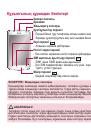
Video camera
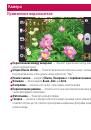
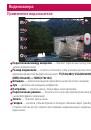
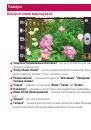
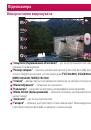
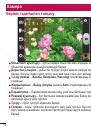
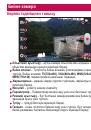
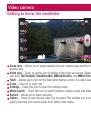
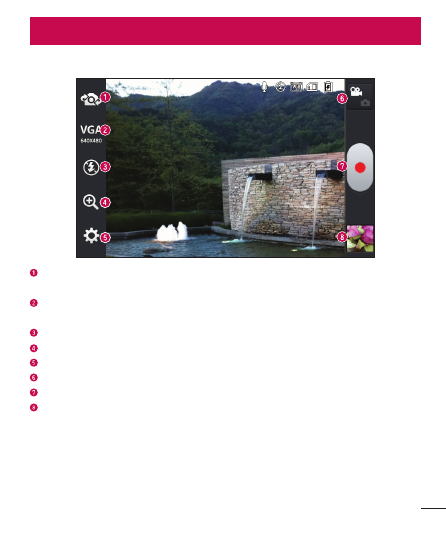
Getting to know the viewfinder
Swap lens
– Allows you to swap between the rear camera lens and the front
camera lens.
Video size
– Touch to set the size (in pixels) of the video you record. Select the video
size from
TV(720x480), VGA(640x480), MMS(320x240),
and
MMS(176x144)
.
Flash
– Allows you to turn on the flash when taking a photo in a dark place.
Zoom
– Zoom in or zoom out.
Settings
– Touch this icon to open the settings menu.
Mode switch
– Touch this icon to switch between Camera mode and Video mode.
Record
– Allows you to start recording.
Gallery
– Touch to view the last video you recorded. This enables you to access your
gallery and view your saved videos from within video mode.
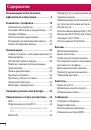
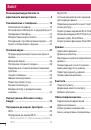
Оглавление инструкции
- Рекомендации по безопасной и эффективной эксплуатации
- Знакомство с телефоном
- Главный экран
- Настройка учетной записи Google
- Подключение к сетям и устройствам
- Вызовы
- Контакты
- Сообщения
- Электронная почта
- Камера
- Видеокамера
- Мультимедиа
- LG SmartWorld
- Функция On-Screen Phone
- Инструменты
- Интернет
- Настройки
- Программное обеспечение ПК (LG PC Suite)
- Обновление ПО телефона
- Сведения о данном руководстве пользователя
- Аксессуары
- Устранение неисправностей
- Рекомендації щодо безпеки та ефективного використання
- Ознайомлення з телефоном
- Головний екран
- Налаштування облікового запису Google
- Під'єднання до мереж і пристроїв
- Дзвінки
- Контакти
- Обмін повідомленнями
- Eлектронна пошта
- Камера
- Відеокамера
- Мультимедія
- LG SmartWorld
- On-Screen Phone
- Утиліти
- Веб
- Налаштування
- Комп'ютерна програма (LG PC Suite)
- Оновлення програмного забезпечення телефону
- Про цей посібник користувача
- Аксесуари
- Усунення несправностей
- Телефонмен танысу
- Негізгі экран
- Google есептік жазбасын орнату
- Желілерге және құрылғыларға қосылу
- Камера
- Бейне камера
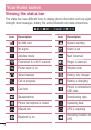
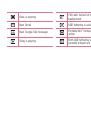
- Getting to know your phone
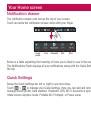
- Your Home screen
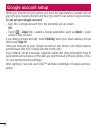
- Google account setup
- Connecting to Networks and Devices
- Camera
- Video camera