Инструкция для Toshiba RAS-13N3KV-E / RAS-13N3AV-E
 1
 2
 3
 4
 5
 6
 7
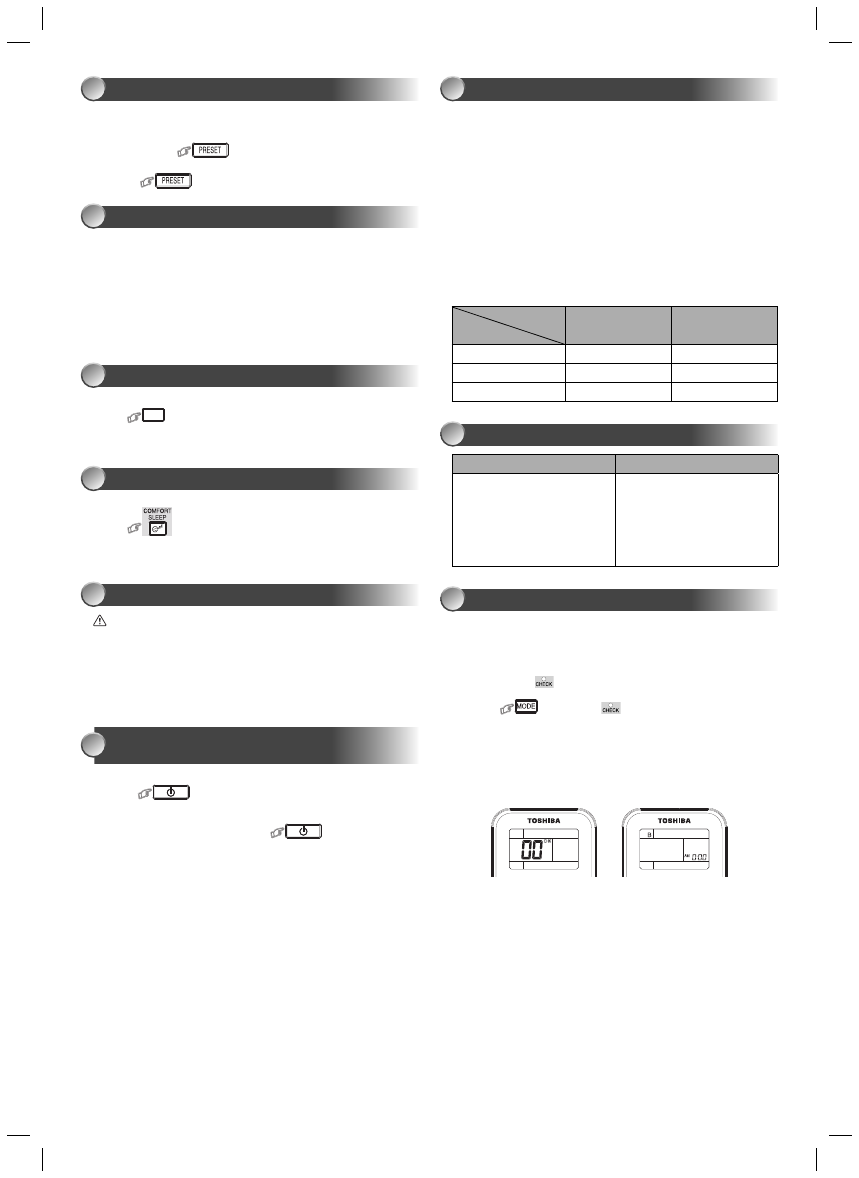
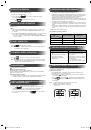
Set your preferred operation for future use. The setting will be memorized by the
unit for future operation (except airfl ow direction).
1. Select your preferred operation.
2.
Press and hold
for 3 seconds to memorize the setting.
The
P
mark displays.
3.
Press
: Operate the preset operation.
To automatically restart the air conditioner after the power failure (Power of the
unit must be on.)
Setting
1. Press and hold the RESET button on the indoor unit for 3 seconds to set
the operation. (3 beep sound and OPERATION lamp blink 5 time/sec for
5 seconds)
2. Press and hold the RESET button on the indoor unit for 3 seconds to cancel
the operation. (3 beep sound but OPERATION lamp does not blink)
• In case of ON timer or OFF timer are set, AUTO RESTART OPERATION
does not activate.
To operate at super low fan speed for quiet operation (except in DRY mode)
Press
QUIET
: Start and stop the operation.
Note:
Under certain conditions, QUIET operation may not provide adequate
cooling due to low sound features.
For comfortable sleep, automatically control air fl ow and automatically turn OFF.
Press
: Select 1, 3, 5 or 9 hrs for OFF timer operation.
Note:
The cooling operation, the set temperature will increase automatically
1 degree/hour for 2 hours (maximum 2 degrees increase). For heating
operation, the set temperature will decrease.
Firstly, turn off the circuit breaker.
Filter Reset (Some models only)
FILTER lamp lights on; the fi lter must be cleaned.
To turn off the lamp, push the RESET button on the indoor unit or the FILTER
button on the remote control.
Indoor Unit and Remote Control
• Clean the indoor unit and the remote control with a wet cloth when needed.
• No benzine, thinner, polishing powder or chemically-treated duster.
1. Three-minute protection feature: To prevent the unit from being activated
for 3 minutes when suddenly restarted or switched to ON.
2. Preheating operation: Warm up the unit for 5 minutes before blowing warm air.
3. Warm air control: When the room temperature reaches the set temperature,
the fan speed is automatically reduced and the outdoor unit will stop.
4. Automatic defrosting: Fans will stop during defrost operation.
5. Heating capacity: Heat is absorbed from outdoor and released into the room.
When the outdoor temperature is too low, use another recommended heating
apparatus in combination with the air conditioner.
6. Consideration for accumulated snow: Select the position for outdoor unit where
it will not be subjected to snow drifts, accumulation of leaves or other seasonal
debris.
7. Some minor cracking sound may occur when unit operating. This is normal
because the cracking sound may be caused by expansion/contraction of
plastic.
Note:
Item 2 to 6 for Heating model
Air conditioner operating conditions
To protect bad smell caused by the humidity in the indoor unit.
1. If the
button is pressed once during “Cool” or “Dry” mode,
the fan will continue to run for other 30 minutes, then it will turn off
automatically. This will reduce the moisture in the indoor unit.
2. To stop the unit immediately, press the
more 2 times within
30 seconds.
Temp.
Operation
Outdoor Temperature
Room
Temperature
Heating
–15°C ~ 24°C
Less than 28°C
Cooling
–10°C ~ 46°C
21°C ~ 32°C
Dry
–10°C ~ 46°C
17°C ~ 32°C
To separate using of remote control for each indoor unit in case of 2 air
conditioners are installed nearly.
Remote Control B Setup.
1. Press RESET button on the indoor unit to turn the air conditioner ON.
2. Point the remote control at the indoor unit.
3. Push and hold
button on the Remote Control by the tip of the pencil.
“00” will be shown on the display.
4. Press
during pushing
. “B” will show on the display and “00”
will disappear and the air conditioner will turn OFF. The Remote Control B
is memorized.
Note:
1. Repeat above step to reset Remote Control to be A.
2. Remote Control A has not “A” display.
3. Default setting of Remote Control from
factory is A.
The unit does not operate.
Cooling or Heating is abnormally low.
• The power main switch is turned
off.
• The circuit breaker is activated to
cut off the power supply.
• Stoppage of electric current.
• ON timer is set.
• The fi lters are blocked with dust.
• The temperature has been set
improperly.
• The windows or doors are opened.
• The air inlet or outlet of the outdoor
unit is blocked.
• The fan speed is too low.
• The operation mode is FAN or DRY.
OPERATION AND PERFORMANCE
19
TROUBLESHOOTING (CHECK POINT)
20
REMOTE CONTROL A-B SELECTION
21
PRESET OPERATION
13
AUTO RESTART OPERATION
14
QUIET OPERATION
15
COMFORT SLEEP OPERATION
16
MAINTENANCE
17
SELF CLEANING OPERATION (COOL AND
DRY OPERATION ONLY)
18
2
1
TSB 1110650192 (01_EN).indd 4
TSB 1110650192 (01_EN).indd 4
08/06/12 2:59 PM
08/06/12 2:59 PM
Оглавление инструкции
- Страница 1 из 8
OWNER’S MANUAL ENGLISH ESPAÑOL FRANÇAIS PORTUGUÊS PУCСКИЙ TÜRKÇE AIR CONDITIONER (SPLIT TYPE) For general public use Indoor unit RAS-13, 18, 22N3KV Series Outdoor unit RAS-13, 18, 22N3AV Series 1110650192 TSB 1110650192 (CVF).indd 1 08/06/12 3:04 PM
- Страница 2 из 8
PRECAUTIONS FOR SAFETY CAUTION DANGER • Do not install, repair, open or remove the cover. It may expose you to dangerous • Check that the circuit breaker is installed correctly. If the circuit breaker is not voltages. Ask the dealership or the specialist to do this. • Turning off the power supply
- Страница 3 из 8
PREPARATION BEFORE USE 2 AUTOMATIC OPERATION 6 Preparing Filters 1. Open the air inlet grille and remove the air filters. 2. Attach the filters. (see detail in the accessory sheet). To automatically select cooling, heating or fan only operation Loading Batteries (when use wireless operation.) 1.
- Страница 4 из 8
13 PRESET OPERATION 19 Set your preferred operation for future use. The setting will be memorized by the unit for future operation (except airflow direction). 1. Select your preferred operation. 2. Press and hold The P mark displays. 3. Press 14 1. Three-minute protection feature: To prevent the
- Страница 5 из 8
MEPЬI БEЗOПACHOCTИ OПACHO ПPEДOCTEPEЖEHИE • He выполняйтe ycтaновкy, peмонт, нe откpывaйтe и нe cнимaйтe кpышкy. Bы можeтe подвepгнyтьcя воздeйcтвию выcокого нaпpяжeния. Oбpaтитecь по этомy вопpоcy к дилepy или cпeциaлиcтy. • Oтключeниe питaния нe пpeдотвpaщaeт опacноcть поpaжeния элeктpичecким
- Страница 6 из 8
2 6 ПOДГOTOBКA К ИCПOЛЬЗOBAHИЮ Подготовкa фильтpов 1. Oткpойтe peшeткy вxодa воздyxa и cнимитe воздyшныe фильтpы. 2. Уcтaновитe фильтpы (подробности см. на дополнительном листе). ABTOMATИЧECКИЙ PEЖИM Для aвтомaтичecкого выбоpa peжимa оxлaждeния, нaгpeвaния или вeнтилиpовaния MODE : Для выбоpa
- Страница 7 из 8
13 PAБOTA B PEЖИME ПPEДBAPИTEЛЬHЫХ УCTAHOBOК Уcтaновитe жeлaeмый peжим, котоpым впоcлeдcтвии вы можeтe воcпользовaтьcя. Hacтpойкa бyдeт cоxpaнeнa в пaмяти ycтpойcтвa для иcпользовaнии пpи поcлeдyющeй paботe (зa иcключeниeм нaпpaвлeния потокa воздyxa). 1. Bыбepитe жeлaeмый peжим. нaжaтой в тeчeниe 3
- Страница 8 из 8